68kMLA Classic Interface
This is a version of the 68kMLA forums for viewing on your favorite old mac. Visitors on modern platforms may prefer the main site.
| Click here to select a new forum. | |
| Macintosh Plus odds and ends | |
Posted by: t2jd1967 on 2023-12-10 02:09:14If the disks have seperate SCSI IDs it will work. I will post a screenshot later when I am back home. | |
Posted by: Snial on 2023-12-10 02:51:26Unfortunately I have lost all my work through the mists of time, although I recently found a few microdrives laying around at my brother's. But sadly the QL itself is long gone. Started out with Programming the Z80 (very good introduction) after cutting my teeth with BASIC. I wrote my own editor on the QL, mimicking the behaviour of POP (or SEU) on a System/36. That one was probably done in C, which became my language of choice after assembly.Assuming these microdrive cartridges contain some data you might want (i.e. aren't blank); then if you send me the microdrives and if you don't mind, I can pop them in my QL and see if they're readable. I won't look at the contents, but then I can zip it all up and you can run a QL emulator to read it properly. If you send me a direct message (envelope, to the right of your username); I'll send you my address. -cheers from Julz | |
Posted by: cheesestraws on 2023-12-10 02:56:21Startup Disk not being able to write something to an actual drive The Startup Disk control panel doesn't write anything to disk at all, AFAIK: it writes a byte to the PRAM telling it what SCSI ID to boot from. So it won't work - or certainly won't work reliably - if you don't have a PRAM battery installed. I don't know of anything that the BlueSCSI does that would prevent that from working, but the BlueSCSI product does have a generally low standard of engineering quality, so I wouldn't be surprised. | |
Posted by: t2jd1967 on 2023-12-10 04:45:51Assuming these microdrive cartridges contain some data you might want (i.e. aren't blank); then if you send me the microdrives and if you don't mind, I can pop them in my QL and see if they're readable. I won't look at the contents, but then I can zip it all up and you can run a QL emulator to read it properly. If you send me a direct message (envelope, to the right of your username); I'll send you my address. Wow, that would be wonderful. I will dig out what I have and am really keen to see what is on them. Will get back to you sometime this week. There is nothing on there that is personal except for my poor coding, so feel free to have a peek. | |
Posted by: t2jd1967 on 2023-12-10 04:51:54The Startup Disk control panel doesn't write anything to disk at all, AFAIK: it writes a byte to the PRAM telling it what SCSI ID to boot from. So it won't work - or certainly won't work reliably - if you don't have a PRAM battery installed. I don't know of anything that the BlueSCSI does that would prevent that from working, but the BlueSCSI product does have a generally low standard of engineering quality, so I wouldn't be surprised. I have the 4.5 Volt battery installed (using an adapter) and the clock is working between powering off and on so I assume that part is working. There may be some BlueSCSI setting that I am ignoring, so will have a look there. | |
Posted by: t2jd1967 on 2023-12-10 04:59:12This means someone probably over tightened it. Do you have a photo of where it goes into the front bezel? Taken with the case off. There should be plastic tube that the screw go into above the CRT.I pulled the case apart before I left home this morning and made the photo. I think it is clear that the grove has eroded to the point that it won't fasten properly anymore. I wonder if applying some glue before screwing it back together next time would rethread it? Using epoxy glue or something like that? Anywhere it is back together now and obviously there is no mechanical load on the case, it all fits rather snugly. 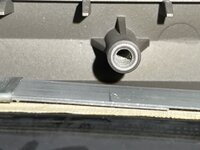 For those of you who may be interested, these is my handiwork on the diode mod. You can see that I have no bench, so working off the floor. 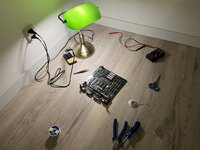 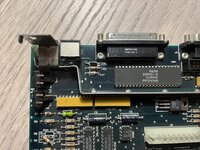 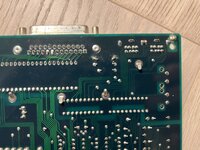 | |
| Posted by: cheesestraws on 2023-12-10 05:24:29 Yup, if the clock is working you should be fine... | |
Posted by: t2jd1967 on 2023-12-10 15:05:30If the disks have seperate SCSI IDs it will work.Tried it on both 7.5.5 and 7.1 and got the same response. System 7.5.5. 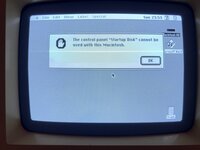 System 7.1. 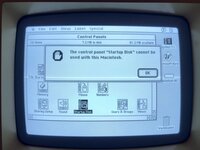 Weird, huh? I must be missing something really simple here. | |
Posted by: Phipli on 2023-12-10 15:11:55Tried it on both 7.5.5 and 7.1 and got the same response.Very strange. That OS was used on a Mac Classic, which is almost identical to an SE. And I've been using Startup Disk on it. That isn't normal behaviour. | |
Posted by: cheesestraws on 2023-12-10 15:21:10which is almost identical to an SE but this is a Plus, not an SE, and it is normal. Here it is on an emulated Plus: 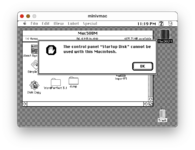 I thought the new pram stuff came in with the Plus, but it might have been the SE. | |
| Posted by: LaPorta on 2023-12-10 15:22:25 Very bizarre, I’ve never seen that, either. System Picker it is then, I believe! | |
Posted by: Phipli on 2023-12-10 15:23:18but this is a Plus, not an SE, and it is normal. Here it is on an emulated Plus:Oops. I did know the SE had the expanded PRAM... But forgot it wasn't an SE. Someone else was talking about SEs 😆 | |
Posted by: t2jd1967 on 2023-12-11 02:19:46Oops. I did know the SE had the expanded PRAM... But forgot it wasn't an SE. Someone else was talking about SEs 😆I found this article through Wikipedia and it states that the Mac Plus will simply boot according to the SCSI IDs with the highest number first. That is also my experience booting off the BlueSCSI SD card. There is probably a trick there with removing "system" from a higher numbered drive, but that seems cumbersome. Use two hard drives, one for each OS - they're certainly cheap enough these days. Use the Startup Disk control panel to choose which system you'll boot from. (Exception: The Mac Plus loads the first system it finds in this order SCSI ID 6, 5, 4, 3, 2, 1, 0.) The Compact Mac Trio: System 6 or System 7?The Compact Mac Trio: System 6 or System 7?, Dan Knight, The Old Gray Mac, 2001.08.01. Weighing the pros and cons of System 6 vs. System 7 on the Mac Plus, SE, and Classic.
| |
Posted by: Phipli on 2023-12-11 02:49:32I found this article through Wikipedia and it states that the Mac Plus will simply boot according to the SCSI IDs with the highest number first. That is also my experience booting off the BlueSCSI SD card. There is probably a trick there with removing "system" from a higher numbered drive, but that seems cumbersome.Yeah, your best bet is to put both System Folders on the same disk (with different names) and use System Picker that LaPorta linked. System Picker is as easy to use as Startup Disk, the reason it isn't a default recommendation is that a small amount of software gets confused if you rename the System Folder, and sometimes having multiple Systems on one partition gets things muddled and a computer won't boot... But that is infrequent. | |
| Posted by: LaPorta on 2023-12-11 05:42:50 This sure is interesting to me, seeing as I don’t think I ever tried to dual-boot a Plus before. Good to know. | |
| < 2 |