68kMLA Classic Interface
This is a version of the 68kMLA forums for viewing on your favorite old mac. Visitors on modern platforms may prefer the main site.
| Click here to select a new forum. | |
| Any suggestions on IDE to SATA adapters for a g4 MDD? | |
Posted by: Irinikus on 2024-06-28 12:05:53Well, I have tried 2 of them, and neither do anything with my 9.2.2 G4 Sawtooth.Have you tried an adapter like the one that I posted above? | |
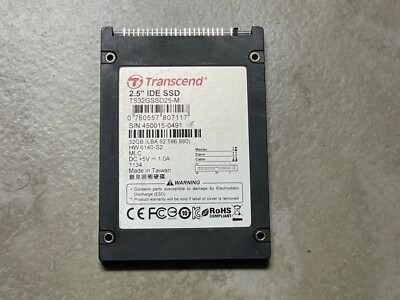
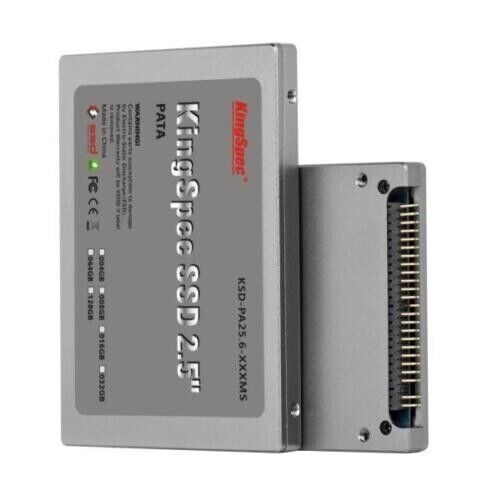
Posted by: MBongo on 2024-06-28 12:20:38Any reason either of these would NOT work? At this point, now I need to think about controllers?Well, 44 pins (of those pictured) vs. the 40 pin connector of your IDE ribbon cable. Which means an adapter is necessary between either of those and your connector. Could you attach a photo of just how you've connected the StarTech (with SSD) actually inside of your Sawtooth? *AND I'll be attempting the StarTech + SSD in a Sawtooth here, in the next few hours. | |
| Posted by: Irinikus on 2024-06-28 12:25:49 You'll need such an adapter to get those drives working: 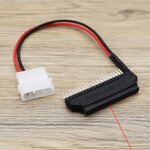 I was originally thinking of using such a setup in my QuickSilver and MDD machines, but now I think that the Startech solution coupled to a standard SSD's a better idea! 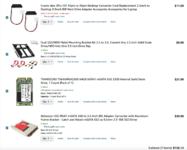 | |
Posted by: nomarkup on 2024-06-28 12:44:16Have you tried an adapter like the one that I posted above?Yes, 2 new startech IDE2SAT2 have been tried, purchased new from Staples. After first one didn't work, I spent an hour with tech support from StarTech. They guessed DOA. So I got the 2nd one. Same behavior. | |
Posted by: nomarkup on 2024-06-28 12:45:27Well, 44 pins (of those pictured) vs. the 40 pin connector of your IDE ribbon cable.any chance you're on 9.2.2 as I am? It has been suggest that 9.2.2 is an issue for this. (Not sure why) | |
Posted by: Irinikus on 2024-06-28 12:50:33Yes, 2 new startech IDE2SAT2 have been tried, purchased new from Staples.Does the system simply not detect the drives or are you not able to partition them? The reason why I ask is because I had to make use of the disk utility on the OSX install CD to get my SSD's partitioned on the SONNET TEMPO SATA PCI card in my G3. They simply did not want to be partitioned by the disk utility in OSX itself. | |
| Posted by: nomarkup on 2024-06-28 12:51:42 The adapter is plugged into the exact same connector on the IDE ribbon cable that was originally on the old HDD. (In this photo it isn't seated only because I had already removed it and didn't want to seat/unseat again.) Because the IDE ribbon has a blocked pin on the female connector, there is only 1 way to connect to either the old HDD or this adapter (which is properly missing a pin on the male end.) | |
| Posted by: nomarkup on 2024-06-28 12:54:28 Plugging in the StarTech w/ the SSD is not recognized at all. (As if it isn't plugged in.) The only thing I do know, 100%, is that the drive is getting power from the adapter because when I substituted an older (2011) SATA HDD, it spun up, but was not recognized in any way on the Mac running off the old 20gb HDD. So, ultimately, all I do know is that the Molex connector is powering the adapter which is powering the end drive (SSD or HDD) | |
| Posted by: Irinikus on 2024-06-28 13:11:29 Here's a video showing one running in such a machine: | |
| Posted by: MBongo on 2024-06-28 15:16:39 Thanks for the pics.😉 Few problems here with the StarTech and an Inland 120 GB SSD and a 480 GB Crucial SSD… other than the customary new-to-me, never-been-booted-here-before machine *glitches. (Can cover all of that here later.) BUT, there does seem to be a video conflict of some sort for me, using the two different SSDs here (with pre-installed OS 9 and OS X partitions). I have to shift-key boot into OS 9 in order to disable extensions and then it boots fine into 9. Otherwise at the last moment of startup the screen goes black. Extensions off = full boot into OS 9. No problems with Tiger. AND using both SSDs individually connected to the StarTech (alone) with it’s jumper set to Master. So, I’ve got some video concerns to chase… and of course, the CD/DVD drive is not functional in this machine. (So, headed downstairs now to dig out the external FireWire CD/ DVD drive - in an attempt to boot from that with an OS 9 installer disc.) Both the Crucial and the Inland SSDs were formatted and partitioned first in a Quicksilver here using Drive Setup 2.1 under OS 9. Then (still in the Quicksilver) Tiger was installed first on the second partition so that I could pre-exclude the first partition from Spotlight’s prying eye. THEN after that, went back and installed OS 9.2 on that first partition. (The 480 GB Crucial SSD was partitioned in several partitions, 120 GB or less, each.) The Inland SSD has only two partitions; one for OS 9 and the other for Tiger. Once the external CD/DVD FireWire drive is in play, I’ll then attempt to boot from that AND install the original drive (again) as Master - and change the StarTech to Slave and give it all a go again. I do wonder if there’s some sort of G4 Firmware updater that needs to be installed in the Sawtooth OR… some ATI video updater as well? *Glitches? Removed, re-seated and then replaced the video card. Replaced the battery and reset PRAM and CUDA. Removed heatsink and applied new paste. Removed RAM and booted with one stick only, before adding all sticks back in. Just now added the original HD to the cable as Master and SSD / StarTech as Slave. Original HD is dead - doesn't even appear as a boot source or under Drive Setup / when machine is booted into OS 9 with extensions off. So next will retrieve that external CD/DVD drive and swap out the original HD with one that's good and then begin again. What did you use to initially format and partition your SSD? | |
| Posted by: nomarkup on 2024-06-28 21:09:48 There is NO question (in my mind) that the G4 in the YouTube video is being connected to the StarTech adapter. It may have a different name over the pond, but it is identical, at least visually. So, I did the reset PRAM procedure this evening. It did result in one difference in behavior. Rather than the computer never getting off a black screen at startup, I got a disk with a question mark. That was ONLY with the adapter/ssd connect with the jumper on MASTER. I could not do anything else at that point (at least nothing I was aware of.) I shut down the G4 and reconnected the old HDD (master) and also connected the adapter/SSD as SLAVE. Computer started normally, but did not see the adapter/SSD. I went to the startup disk in the control panel, and only saw the HDD. The only time I ever saw the SSD there was when the SSD was connected via USB. I had actually set, at some point, the SSD (via USB) as startup disk and after restart, was running the OS via the SSD (USB). There was a question as to how I loaded the OS onto the SSD (via USB). I simply dragged the contents of the HDD onto the SSD. By that I mean I clicked the HDD open, saw all the folders/files, dragged them to the SSD, and waited for them to copy. So, some progress, but I have no idea what any of it means. I do believe, however, that 9.2.2 has NOTHING to do with this issue. I say that because the computer never got to the point of starting up to know what OS was on the drive. For example, when I had the SATA HDD connected to the adapter, while it spooled up, it wasn't operating. (it didn't make the common HDD seek/write sounds. It simply spun the platter.) So I'm not so sure on the OS being the conflict. | |
| Posted by: indibil on 2024-06-28 22:25:24 Cheap and works, JMicron chip, i have some of this: https://es.aliexpress.com/item/2055..._main.114.6d75194d8BXQ0X&gatewayAdapt=glo2esp | |
| Posted by: MBongo on 2024-06-29 00:29:32 Okay. I give up for tonight. Will post notes on the efforts here today and tonight... tomorrow (which I guess will now actually be later today).😉 | |
| Posted by: nathall on 2024-06-29 11:19:09 I guess you posted this in two threads, so I’ll repost my reply from the other thread. I was never able to get these to work in my 6400, FWIW: “I don’t think you’re missing anything. I have three of them (the StarTechs), coupled with various SSDs. They all work in my 6300 (OS 9.1). None work in my 6400, and they all do exactly as you describe. I thought I’d be sneaky and boot the 6400 via a SCSI drive and then hot-plug the StarTech w/drive in while it was at the desktop, and the system freezes instantly. Did it with all three, just to verify. I came to the conclusion the newer Macs have something in firmware or other hardware that is incompatible, but I don’t really know for sure. And like you, I tried all jumper settings.” Be interested to hear if you get it working, and what you did. | |
| Posted by: MBongo on 2024-06-29 22:06:14 SUCCESS! Well sorta anyway. 450 MHz SP Sawtooth running and booting both OS 9.2 and Tiger 10.4.6 from a dual, equally partitioned 120 GB Inland brand SSD, with a StarTech SATA adapter bridge.  Last night and into the early morning hours here, the Sawtooth seemed to almost make it through the complete boot sequence with OS 9.2. Right up to when desktop icons would normally begin to appear… and then the monitor would simply go dark. (With an occasional pair of audible “dings” soon thereafter.) And that was with a Shift-key boot to disable extensions. Tiger always booted fully and without problem. Updated the Sawtooth’s Firmware from 3.2.2f1 to 4.2.8f1 and it still pulled the same stunts under 9.2. Actually a few times, suspected some ATI extension problem. So after chasing and testing various ATI extensions off and on, I gave up early this morning. This afternoon… (in a Quicksilver) reformatted, partitioned and re-installed both OS 9.2 and 10.4.6 on the 120 GB Inland SSD and found a suitable nVidia video card. Re-placed the StarTech + SSD and the nVidia card in the Sawtooth and Option-key booted the thing into the then visible OS 9.2 partition. No problems. Quickly turned off all of the ATI extensions and then selected Tiger for a reboot. Again, no problems. Only when I selected the OS 9.2 partition then for a reboot from within Tiger… ooops. It booted right back into Tiger as if OS 9 didn’t exist at all. The OS 9 partition didn’t even appear as a selection when Option-key booting after that. So then, loaded the OS 9.2 “Universal” installer into the tray and booted that. From there, using the Startup Disk control panel, selected the OS 9.2 partition for reboot and it then rebooted right back into the OS 9.2 partition. AND that is repeatable, as long as using Option-key booting between the two partitions. AND it does exactly the same when using a green “Bribge” (EVB-002-3) SATA adapter. (Both the Bribge and the StarTech jumpers set to Master.) Ahh, the lowly “Bribge”. 😉 (Hats off to @indibil!) Now I haven’t tested it as a Slave with a conventional HD in place as a Master - but if the SSD was entirely devoted to OS 9.2 AND that would work, I could accept that. BUT not going to test that right away. But, may do so before I use Tiger’s Disk Utility to reformat the OS 9.2 partition (with OS 9 drivers checked) and then re-install OS 9.2… as if the different formatting might allow Tiger to actually reboot into a newly reformatted (Extended) partition with OS 9.2… again, freshly re-installed. I do prefer formatting OS 9 partitions with Drive Setup 2.1 as it yields slightly better benchmark results and all ‘round better performance. I’m definitely OS 9 - centric. And this current result is kind of funny… in the sense that Tiger may really prefer OS 9 operating and linked to it, under “Classic” mode? It was killing me last night, as I’ve never had such problems using an adapter and SSD, even in a G3 Blue & White! And I haven’t tested this yet in the other (400 MHz) Sawtooth with its’ current resident Boot ROM of 1.3f1. [There is a 2.4 Firmware Update too.] Suppose I could try the 2.4 AND the 4.2.8f1 updaters? So, it is "tentatively" possible after all? 🙂 | |
| Posted by: Irinikus on 2024-06-30 00:39:40 It's great to see the progress you've made! Thanks for all the valuable info! 🙂 | |
| Posted by: indibil on 2024-06-30 09:29:10 Congratulations. I'm glad it works. Since English is not my native language, I didn't understand the word "bribge" very well. Did I say something crazy? hehehehe In my experience, SSDs usually don't like rebooting on PPC Macs, sometimes they don't want to boot, it's always better to turn off and on again. It has happened to me with some. I invite you to replace Tiger with Sorbet Leopard: https://macintoshgarden.org/apps/sorbet-leopard Although I don't know if it requires a minimum of 500MHz. | |
| Posted by: MBongo on 2024-06-30 14:56:31 Thanks @indibil! Nothing to do with English not being your native language… but perhaps more to do with someone’s native language not being English (or at least their inability to correctly spell “Bridge”). If you look closely at that adapter, Bridge is spelled B-r-i-b-g-e. Funny. AND they do represent a very low-cost 40-pin approach, using the oft-maligned JMicron chip (as opposed to the Marvell chipsets on the more expensive StarTech adapters). They perform very well in machines requiring Master/Slave arrangements - and even in a single drive configuration (set to Master) in some machines requiring Cable Select settings. Like @indibil - I use them in everything from G3 Blue and Whites, up to even MDDs here. And now even in this Sawtooth, the G4 Digital Audios and Quicksilvers. Low cost value AND proven performance. I do plan to return to the formatting question and possible solution for the Sawtooth - and also examine further… the ATI video card & driver questions. As far as Leopard or Sorbet Leopard, specs for the Sawtooth note Tiger 10.4.11 as the maximum allowable OS. I do plan to eventually try Sorbet Leopard on other machines. Just haven’t done so, yet.🤔 And hopefully, mods here will move this entire portion of this thread (beginning with @nomarkup’s #9 post here) as it was effectively hi-jacked from “Suggestions on IDE to SATA adapters for a g4 MDD” to something more like: “What About My Sawtooth?”.😉 | |
| Posted by: cgp on 2024-07-01 18:23:32 Addonics ADSAIDE SATA to IDE/ATAPI Converter https://eshop.macsales.com/item/MISC/ADSAIDE/ (and other places) works really well in my B&W G3 with an OWC SSD. It's identical to the StarTech. | |
| Posted by: thisisamigaspeaking on 2024-08-11 05:19:46 The StarTech adapter works great in my G4 350 AGP (Sawtooth). Tried two different drives. It will only boot (OS 9 at least) off a < 128GB drive, but OS 9.2.2 recognized a 240GB drive as well when it was set to slave. Drives:
| |
| < 2 > |