68kMLA Classic Interface
This is a version of the 68kMLA forums for viewing on your favorite old mac. Visitors on modern platforms may prefer the main site.
| Click here to select a new forum. | |
| NEW iMAC G3 ! | |
| Posted by: BadGoldEagle on 2016-08-17 13:42:41 Great tip! Will do once I get back! You're right, this is the UNDISPUTED BEST web browser for those old macs. | |
| Posted by: just.in.time on 2016-08-19 13:42:24 On the Classilla wagon: Up until a few days ago my only experience with Classilla was on a 180mhz powerbook 2400c. Wasn't incredibly impressed but it functioned. Then, I used it on an 867mhz Quicksilver G4 and WOW!!! The performance was snappy and everything ran and rendered exactly as I expected within reasonable time. Even that Google animation on their main search page was fluid. I was just looking last night on their website to see if they took PayPal donations. Definitely worth $15. Back to the iMac G3, very nice find! When OS 9 was still my daily driver OS (up until 2005 on my PowerBook) I used a version of Netscape 7. I want to say that 7.0.2 was the version I was using. At the time Mozilla had a portal full of legacy downloads, that's where I found it. Honestly though, going to have to second that vote for Classilla. Since that is a slot-loading model, I'm going to take a bet that it is running in excess of 500mhz. If that is the case I'd say there is a good chance of acceptable performance. | |
Posted by: BadGoldEagle on 2016-08-19 13:52:36Since that is a slot-loading model, I'm going to take a bet that it is running in excess of 500mhz. If that is the case I'd say there is a good chance of acceptable performance.Unfortunately it's only a 400 MHz model. But still, Classilla works great. I should try Youtube (if it works at all... Youtube tells me my rMBP running 10.9.5 and Safari 7 is out of date) I'm setting up a Mac SE at the moment, and it's the first time I've used System Picker. Does system picker work on a G3? I'd like to run OSX on this thing. | |
| Posted by: Reasons. on 2016-08-19 14:01:16 System Picker is only really necessary to have multiple installations of Mac OS on the same partition. If you've got separate partitions or are running OS X and Mac OS, it's not necessary. | |
| Posted by: BadGoldEagle on 2016-08-19 14:31:54 I've only got one partition on this iMac, and I'd like to keep it that way. I thought System Picker would only work up to something like 8.1? Does it run at all on OSX? | |
| Posted by: just.in.time on 2016-08-19 15:01:15 The Startup Disk control panel in 9.2 and above already supports having an OS X and OS 9 system folder on the same partition. You can click the arrow next to the disk to select show available systems, select the wanted OS, and click Restart. Assuming you are up to 9.2, no additional software should be necessary to dual boot X and 9 from the same partition. | |
| Posted by: just.in.time on 2016-08-19 15:03:11 I just verified it on my G4 running 9.2.2 and that version of Startup Disk control panel definitely supports it. As for 8.5 - 9.1 I can't say if that feature is present. I know it is not there in 8.1 (also just verified). | |
| Posted by: BadGoldEagle on 2016-08-19 15:04:28 I'm running 9.0.1 I think. Or 9.1 but definitely not 9.2. I need to check this but I don't have the Mac on hand right now. | |
| Posted by: just.in.time on 2016-08-19 15:08:00 Ah, okay. The iMac G3s all support up to 9.2.2. At one point all the updates were available via Apple for free (as long as you were going from 9.x to a newer 9.x version). If they aren't still hosting them, I'm sure the updates can be found at the garden or many other places via Google. | |
| Posted by: just.in.time on 2016-08-19 15:16:42 Here is a screen shot of the 9.2.x Startup Disk control panel. I have my systems on seperate partitions, but basically the drop down arrow would reveal both system folders under the same drive if they were set up that way. Good luck! 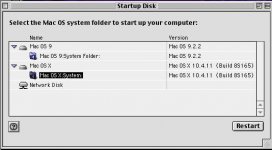 | |
| < 2 |