68kMLA Classic Interface
This is a version of the 68kMLA forums for viewing on your favorite old mac. Visitors on modern platforms may prefer the main site.
| Click here to select a new forum. | |
| My White Whale of 90s Apple Software: Macintosh Print Pack | |
Posted by: joshc on 2023-10-22 20:48:46I tried my best to convert the MacWrite datasheet to PDF and here's what I ended up with.This is great. There is another version of it with a photo / screenshot on the Fall '93 disc, but it has no file type/creator info. Tried changing its type to MacWrite II and MacWrite Pro 1.5 doc types, but no luck opening it. Any ideas? 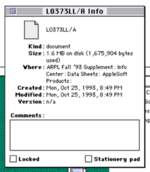 | |
Posted by: joshc on 2023-10-22 20:55:06This is great. There is another version of it with a photo / screenshot on the Fall '93 disc, but it has no file type/creator info. Tried changing its type to MacWrite II and MacWrite Pro 1.5 doc types, but no luck opening it. Any ideas?Also tried original MacWrite format and opened with MacWrite II and it did a conversion but it was all garbled, so I'm obviously still doing this wrong. 🙂 | |
| Posted by: joshc on 2023-10-22 20:56:20 If anyone wants to try and tackle it... | |
Posted by: MrFahrenheit on 2023-10-22 21:13:51This is great. There is another version of it with a photo / screenshot on the Fall '93 disc, but it has no file type/creator info. Tried changing its type to MacWrite II and MacWrite Pro 1.5 doc types, but no luck opening it. Any ideas?What does ResEdit say the file/type creator code is? Usually the programs to load these were in the CDs themselves. | |
Posted by: dougg3 on 2023-10-22 21:41:22If anyone wants to try and tackle it... It's definitely tempting to try! What does ResEdit say the file/type creator code is? Looks like it's ALB4/ALD4. Quick Googling indicates a PageMaker 4 file. | |
| Posted by: dougg3 on 2023-10-22 22:16:05 I can't seem to get the fonts correct when I print to PDF. I'm asking Acrobat to embed the fonts, but there's some kind of mismatch somewhere. It looks fine in PageMaker 4.2 (see the png file), but in the generated PDF the title spacing doesn't look right. Not sure exactly what's going on, but this is my best attempt. I'm sure newspapers and magazines in the '90s had all kinds of fun with font issues like this. | |
Posted by: joshc on 2023-10-22 22:53:50What does ResEdit say the file/type creator code is?Ugh I didn't think to check this... just assumed it had none as it wasn't identfying as anything other than a Document. That's what I get for trying this in the middle of the night. 🤦♂️ Strangely, Apple didn't include PageMaker 4 on the disc. I can't seem to get the fonts correct when I print to PDF. I'm asking Acrobat to embed the fonts, but there's some kind of mismatch somewhere. It looks fine in PageMaker 4.2 (see the png file), but in the generated PDF the title spacing doesn't look right. Not sure exactly what's going on, but this is my best attempt. I'm sure newspapers and magazines in the '90s had all kinds of fun with font issues like this. This is pretty close. Maybe @Ajaxermd can use the image and other information from the datasheet on their recreated box - they might just have to get creative for the front of the box. | |
Posted by: Danamania on 2023-10-22 23:15:31I can't seem to get the fonts correct when I print to PDF. I'm asking Acrobat to embed the fonts, but there's some kind of mismatch somewhere. It looks fine in PageMaker 4.2 (see the png file), but in the generated PDF the title spacing doesn't look right. Not sure exactly what's going on, but this is my best attempt. I'm sure newspapers and magazines in the '90s had all kinds of fun with font issues like this.I went through some of the same issues a few months back converting some of those documents. Those font issues were solved with a print to .eps - embedding worked well there. Nowadays everything is .pdf, but I guess back then support was a bit flakey, and .eps was stronger. perhaps. Edit: may have been export to eps, or save as eps. Too close to my real current-day job to not be pushed out quickly 🙂 | |
Posted by: Danamania on 2023-10-22 23:16:08I went through some of the same issues a few months back converting some of those documents.After that, Preview on Catalina converted the .eps to a visible document I could then save as a .pdf, too. | |
| Posted by: Danamania on 2023-10-22 23:44:55 Converted. I think the helvetica might still be a bit weird, but the rest looks good. I like that there's a weird font spacing issue in the image, too 🙂 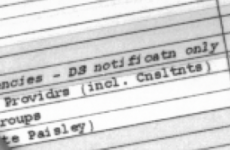 | |
Posted by: joshc on 2023-10-23 00:18:47Converted.This has turned out really nicely 👏 | |
Posted by: Phipli on 2023-10-23 00:39:39Yeah, remember Daystar did an upgrade card with the 68060. It was nearly as fast as the 601.Erm... They cancelled it? Before sale? Is that a reproduction box? Edit - yeah, see your link saying it's a mock-up. Shame. The card wouldn't be much different to the Turbo 040, but the ROM would be awesome to have. ___________ @Bolle | |
| Posted by: joshc on 2023-10-23 02:23:15 Also interesting... Macintosh Print Pack Looks like Apple re-named the PowerPrint software to "Parallel Printer Software" but I can't find anything to suggest it's anything other than PowerPrint. I haven't been able to find the HyperCard guide. The PowerPrint software is here: https://macintoshgarden.org/apps/powerprint-v300 And here's a photo of what the contents of the DOS Companion box were: 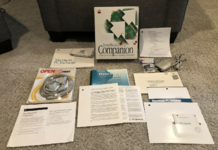 I do keep thinking back to that mention I found that the Print Pack was bundled with some Performas... I wonder if that was separate floppies to the main system restore disc/disks, or bundled with various versions of the Performa system software? I looked on a 6400 disc and couldn't see it there. | |
| Posted by: joshc on 2023-10-23 02:28:52 Checked the Apple Legacy Recovery CD, no sign of it there. Almost like it never existed! | |
| Posted by: joshc on 2023-10-23 03:33:27 @Ajaxermd Some box art for you, you may have already done these but just in case... Sorry, haven't found Print Pack yet, still searching on various CDs. | |
| Posted by: Ajaxermd on 2023-10-23 04:28:29 Thanks, that’s very generous of you to look that up. Based on the structure of the text that looks to be what is on the back of the box. i’d like to get an original of the box, but if I can’t I’ll make a reproduction, now I just need a better image of the front of the box. i’ve been looking for an image of this box for 3 years now. | |
Posted by: Ajaxermd on 2023-10-23 04:32:38@Ajaxermd Some box art for you, you may have already done these but just in case... Sorry, haven't found Print Pack yet, still searching on various CDs.Thanks I’d didn’t have At Ease 3.0, any chance you have an image of the back of the box and the sides? When I recreate them it’s nice to have all the sides. Apple Media Tool is very hard to find, do you own these? | |
| Posted by: joshc on 2023-10-23 04:49:08 No, I don't own them. Those photos were from the Apple Media Image Disc Vol.5. Unfortunately no Print Pack on there. And only the fronts, not the sides or back. If you can't find the sides or back for a particular box, I'd use other box designs as a template and use the information from the data sheet for the text. Here's the back of DOS Companion though I think you've already done this one? 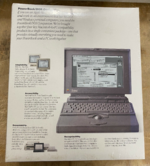 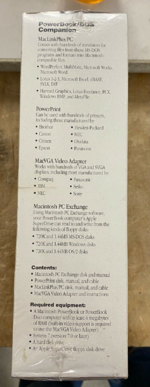 | |
| Posted by: Forrest on 2023-10-23 05:24:49 GDT PrintLink Collection worked great and it supported printers with both serial and parallel interfaces. The manual states it also works on Atari ST computers running Spectre GCR or Magic Sac and Commodore Amiga computers running the Amex emulator. There is also the Eason LQ Printer Software for Macintosh Computers. This included a Mac serial to RS232 serial cable and software. Many Epson LQ printers were supported, but the LQ-500 required a serial interface board. | |
Posted by: Ajaxermd on 2023-10-23 05:45:16No, I don't own them. Those photos were from the Apple Media Image Disc Vol.5. Unfortunately no Print Pack on there. And only the fronts, not the sides or back. If you can't find the sides or back for a particular box, I'd use other box designs as a template and use the information from the data sheet for the text.Thanks I do own that one. | |
| < 2 > |