68kMLA Classic Interface
This is a version of the 68kMLA forums for viewing on your favorite old mac. Visitors on modern platforms may prefer the main site.
| Click here to select a new forum. | |
| Problem with Mercury Electra SSD in beige MiniTower G3? | |
Posted by: macuserman on 2023-08-30 08:13:33Me too 😉Hang in there! It wouldn’t hurt to snag a sata card just for kicks as well they are handy to have around and work in lots of setups. Here’s one on a Power Tower Pro I’m working on. 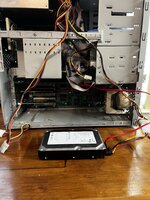 Works flawlessly with the sata spinning disk I have hooked up on os 9. | |
Posted by: Renegade on 2023-08-30 12:00:02Might that have been deep sleep on later G4 models though?I had a 6280M in my B&W G3 back then. | |
Posted by: ktkm on 2023-08-30 13:26:00Hang in there! It wouldn’t hurt to snag a sata card just for kicks as well they are handy to have around and work in lots of setups.Thanks, I will! If everything works out with the 6280M, I might get the strength to pursue another endeavour. Here’s one on a Power Tower Pro I’m working on.Nice! Is that the 750 or 604e? I had a 6280M in my B&W G3 back then.It’s probably unrelated, but I could never get my PB Pismo to wake up from sleep if I had 9.2.X installed. | |
Posted by: croissantking on 2023-08-30 14:26:44This system has truly tested my patients. When I bought it, I thought it was going to be straightforwardI mean, it is pretty straightforward if you use a PATA hard drive… You could have got a large and quiet 7200RPM drive and saved yourself a lot of trouble. | |
Posted by: macuserman on 2023-08-31 05:50:16Nice! Is that the 750 or 604e?It's 604e 225mhz I believe, it's being polished up for fleabay currently, and won't be staying in my collection, but it is a fun machine for sure. | |
| Posted by: Phipli on 2023-08-31 05:55:40 T Yes, but the 8GB rule is just for OS X. Not sure what OS @ktkm has in mind?The 8GB rule is for OS9 as well. Its a ROM Issue. The reason it is less noticeable on an OS 9 disk is because the OS itself is much smaller. You see, the problem isn't that the boot partition needs to be less than 8GB, that is the solution. The problem is if the OS is beyond the first 8GB of the disk. If you have a 32 GB partition, things will often work for a while, until the drive gets full enough that part of the OS gets re-written to a location more than 8GB into the physical media, at that point... things start going weird. By putting an 8GB partition at the beginning of the disk, you artificially constrain the location files can be written for that disk, including the System Folder, to the first 8GB. What you might be thinking of is that the OSX installers were generally smart enough to prevent you from installing onto a partition that could cause issues due to this, but the lack of this feature in the OS9 installer doesn't mean it wasn't still an issue! | |
Posted by: croissantking on 2023-08-31 06:14:10TSo I’ve heard this before, and I’m sure you’re correct, but my own experience with OS 9 has not been like this. I’m convinced I’ve partitioned large disks (e.g. 80GB ones) into several volumes and booted off a partition that starts well past the 8GB mark. I’ll need to double check this now. | |
Posted by: Phipli on 2023-08-31 06:16:14So I’ve heard this before, and I’m sure you’re correct, but my own experience with OS 9 has not been like this. I’m sure I’ve partitioned large disks (e.g. 80GB ones) into several volumes and booted off a partition that starts well past the 8GB mark.On the built in bus? | |
Posted by: croissantking on 2023-08-31 06:17:29On the built in bus?I *think* so. Let me get back to you on this, I’m curious now and I want to verify it. | |
| Posted by: croissantking on 2023-08-31 06:20:15 Have you ever personally experienced the problem yourself on OS9 @Phipli ? | |
Posted by: Phipli on 2023-08-31 06:31:59Have you ever personally experienced the problem yourself on OS9 @Phipli ?I believe so, but I haven't set myself up to face it in a long time, hence asking were you using the internal IDE bus. | |
| Posted by: cgp on 2023-08-31 10:08:39 Firstly, the 8GB IDE/ATA restriction is imposed by the firmware and it applies to booting any OS. Once an OS is running, it's subject to the ATA limitation of 128GB (28-bit addressing of 512byte sectors) so partitions beyond 8GB are accessible. For Beige G3s (desktop and tower), I've tried various IDE adapters: many don't work at all and others are unstable. These machines are picky with DMA modes and such. But I've had great success with Hyperdisk SSDs. They're cheap, have good capacities and are reliable. But IMHO, the best solution for these machines is the SIL3112 PCI card - see https://68kmla.org/bb/index.php?thr...3112-flashing-easier-way-using-flashrom.7013/ and https://tinkerdifferent.com/threads...ci-power-mac-impossibru-updated-3-21-23.1494/ and similar. I've hung OWC Electra drives and standard SATA spinners from these cards - they're fast and not subject to the size problems. You need to flash the SeriTek 1S2 firmware to be able to use MacOS and OSX. You'll probably need to flash @dosdude1's patched SeriTek image that works with any flashrom chips. There's other firmware available solely for OSX. And Linux and NetBSD will boot with any old firmware loaded. | |
Posted by: Phipli on 2023-08-31 12:28:36But IMHO, the best solution for these machines is the SIL3112 PCI cardThey don't play nice with all Beige G3 ROM revisions sadly. | |
Posted by: cgp on 2023-08-31 12:53:53They don't play nice with all Beige G3 ROM revisions sadly.Hhmm .. I have two machines with v3 ROMs that I can vouch for. | |
Posted by: Phipli on 2023-08-31 12:56:58Hhmm .. I have two machines with v3 ROMs that I can vouch for.The Sonnet instructions (that use the SiriTek firmware) warn that there are issues with some G3s and to contact them, sadly not describing the issue. I have a G3 that... Won't boot from a Sil3112 if there isn't an IDE disk installed at the same time | |
Posted by: croissantking on 2023-08-31 16:55:13I believe so, but I haven't set myself up to face it in a long time, hence asking were you using the internal IDE bus.I’ve just installed a 20GB IDE hard drive on the internal IDE bus and partitioned it into two 9546MB volumes as follows: 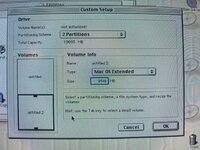 Well, I performed a clean install of Mac OS 9.2.2 onto ‘untitled 2’ and it boots up just fine. 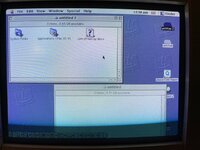 This is why I said I don’t think the 8GB restriction applies to classic Mac OS, just OS X. | |
Posted by: cgp on 2023-08-31 17:01:52Hhmm .. I have two machines with v3 ROMs that I can vouch for.I should have said G3 v2 which is OFW 2.4. The Sonnet instructions (that use the SiriTek firmware) warn that there are issues with some G3s and to contact them, sadly not describing the issue. I have a G3 that... Won't boot from a Sil3112 if there isn't an IDE disk installed at the same timeI can't say I've ever tried without an IDE drive present. These machines are notoriously cranky and a time or two I've had to resort to an OFW init-nvram to straighten things out. [But I do multiboot several other OSes.] | |
Posted by: joevt on 2023-09-01 13:13:55I should have said G3 v2 which is OFW 2.4.What version of OF does G3 v3 have? I thought 2.4 was the latest for Beige G3. I have these (the 1.49/1.53 are ATY,Fcode versions): 077d.40f2 Beige G3 Desktop Open Firmware, 2.0f1 1.49 077d.45f1 Beige G3 Minitower Open Firmware, 2.0f1 1.49, 1.53 077d.45f2 Beige G3 (v3) Open Firmware, 2.4 1.49, 1.53 | |
Posted by: Phipli on 2023-09-01 13:18:08I’ve just installed a 20GB IDE hard drive on the internal IDE bus and partitioned it into two 9546MB volumes as follows:Interesting. Which ROM? | |
Posted by: croissantking on 2023-09-01 14:43:01Interesting. Which ROM?Rev C ROM. | |
| < 2 > |