68kMLA Classic Interface
This is a version of the 68kMLA forums for viewing on your favorite old mac. Visitors on modern platforms may prefer the main site.
| Click here to select a new forum. | |
| Installing/restoring AppleTalk on System 7.0.1 | |
Posted by: xantufrog on 2023-08-19 14:11:34That's what I thought, too - but OP says that MacTCP is using "built-in" and that's apparently working? I dunno, I'm going to defer this one to people who know PiSCSI.Just to clarify - I actually have no problem connecting to the web using either option. I switched to EtherTalk Alternative upon your suggestion - it didn‘t break anything, just didn’t result in AppleTalk shared drive from the Pi showing up | |
Posted by: Phipli on 2023-08-19 14:16:53Just to clarify - I actually have no problem connecting to the web using either option. I switched to EtherTalk Alternative upon your suggestion - it didn‘t break anything, just didn’t result in AppleTalk shared drive from the Pi showing upI feel like there is a chance you're confusing TCP and AppleTalk... | |
Posted by: xantufrog on 2023-08-19 14:23:22I feel like there is a chance you're confusing TCP and AppleTalk...There's a chance I'm confusing a lot of things - this is my first Mac! Let me posy some images to show exactly what my setup is, and this is what I am trying to do here (not TCP, but accessing shared drive using AppleTalk DDP): https://github.com/PiSCSI/piscsi/wiki/AFP-File-Sharing#user-content-Connect_with_DDP_AppleTalk | |
| Posted by: xantufrog on 2023-08-19 14:30:40 ...and here is my setup in images: 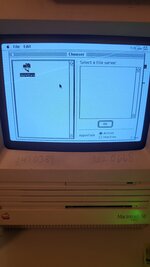 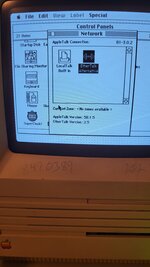 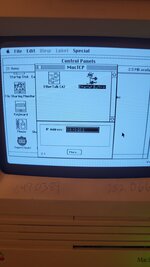 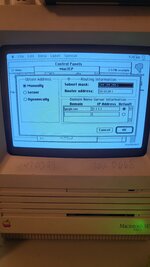 | |
Posted by: Phipli on 2023-08-19 14:33:39There's a chance I'm confusing a lot of things - this is my first Mac!You've mentioned Internet a few times. Its an entirely separate setting. It shows that there is a network interface, but not that appletalk is set up. The MacTCP control panel doesn't matter for appletalk or appleshare. Just rechecking the basics, Is the Pi definitely set up to share? Have you told it to share something? If yes... 1. Start the Pi. Then start the Mac 2. Go to the Chooser, select AppleTalk Active 3. Go to the Network Control Panel, and select "EtherTalk Alternative", close, save whatever 3. Restart the mac (Special Menu -> Restart) 4. Go to the Chooser, click on AppleShare... 5. see if a share appears | |
Posted by: xantufrog on 2023-08-19 14:39:18You've mentioned Internet a few times. Its an entirely separate setting. It shows that there is a network interface, but not that appletalk is set up. The MacTCP control panel doesn't matter for appletalk or appleshare.Yes I know the internet has nothing to do with share, the reason I keep mentioning it is it is proof that I have a network connection with the Pi in the first place (without which i couldn't access anything it is sharing over the network). As in my images above, I have it set up just like you mentioned. But as far as the Pi being set up goes... I don't know. I used its shell script to set up afp exactly like in the link I posted. It did create a share drive on the Pi as well. But I'm not sure why - something isn't configured right! | |
| Posted by: Phipli on 2023-08-19 14:39:23 It only does AppleShare over TCP. It needs OpenTransport and wont work on a 68000 like your SE. Oops, sorry. this wasn't true. | |
| Posted by: Phipli on 2023-08-19 14:40:01 deleted | |
| Posted by: Phipli on 2023-08-19 14:43:37 Has anyone mentioned that you need to restart after changing most AppleTalk settings? | |
Posted by: xantufrog on 2023-08-19 14:47:22Has anyone mentioned that you need to restart after changing most AppleTalk settings?I have restarted each time (although I'm not sure anyone guided me to do so!) | |
Posted by: Phipli on 2023-08-19 14:49:54I have restarted each time (although I'm not sure anyone guided me to do so!)And you've set up a share on the Pi? "Download File to AppleShare" : 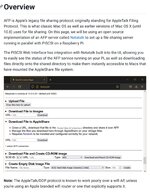 | |
Posted by: xantufrog on 2023-08-19 14:53:56And you've set up a share on the Pi? "Download File to AppleShare" :Well, like I said in my post above I followed this link exactly using the easyinstall.sh instead of manually configuring it: https://github.com/PiSCSI/piscsi/wiki/AFP-File-Sharing#user-content-Connect_with_DDP_AppleTalk It may (seems to?) Not actually work right, so perhaps I should try to manually configure everything instead *edit* although I do note the piscsi control page doesn't look like the rascsci one at all - I don't have an appleshare menu, just an option to download to a share: | |
Posted by: Phipli on 2023-08-19 14:58:50Well, like I said in my post above I followed this link exactly using the easyinstall.sh instead of manually configuring it: https://github.com/PiSCSI/piscsi/wiki/AFP-File-Sharing#user-content-Connect_with_DDP_AppleTalkSo what is it sharing? What | |
Posted by: xantufrog on 2023-08-19 15:05:26So what is it sharing? WhatBy default, it created a folder called "shared_files" and sets that up as the shared folder. Here's its output from when it autoconfigured everything! | |
| Posted by: cheesestraws on 2023-08-19 15:07:54 That looks to me like your settings are sensible. I'd recommend flagging someone down from the PiSCSI folks. | |
Posted by: Phipli on 2023-08-19 15:07:57By default, it created a folder called "shared_files" and sets that up as the shared folder. Here's its output from when it autoconfigured everything!  Your setup requires AppleTalk networking and won't work with AppleTalk over TCP/IP. | |
Posted by: xantufrog on 2023-08-19 15:10:05View attachment 60872Can you say a bit more? I'm not trying to use TCP, I'm trying to use AppleTalk DDP like in the link I posted above. | |
Posted by: Phipli on 2023-08-19 15:12:05Can you say a bit more? I'm not trying to use TCP, I'm trying to use AppleTalk DDP like in the link I posted above.But the log you shared said that there may be an issue and the software needed for DDP might not be installed on the Pi. I can't tell why, its all it says in your photo. | |
Posted by: xantufrog on 2023-08-19 15:19:16But the log you shared said that there may be an issue and the software needed for DDP might not be installed on the Pi. I can't tell why, its all it says in your photo.I see, I took this as a generic warning - I'm using all the recommended hardware with their latest board and software and haven't done any custom configuration of the Pi. I think I need to see what the piscsi folks say. I appreciate all the guidance on this | |
| Posted by: xantufrog on 2023-08-19 15:53:47 Ah, sorry, thats an old image - I reinstalled based on a tip in the wiki and that warning didn't show up the second time (but no connection - that's where we are still at). The piscsi controller page says AppleShare is active. I'll keep you all posted on what the piscsi devs say! | |
| < 2 > |