68kMLA Classic Interface
This is a version of the 68kMLA forums for viewing on your favorite old mac. Visitors on modern platforms may prefer the main site.
| Click here to select a new forum. | |
| Macintosh Portable non-backlit hopeful LCD repair adventure | |
| Posted by: wymtb on 2023-08-11 06:43:40 Are you using the original power supply? Recapped board? Recapped Power Supply if it is the original one? | |
Posted by: Sideburn on 2023-08-23 12:39:14A few years ago I had exactly the same experience. Got a spare screen in perfect conditions, after a few hours of use it started developing dead lines. Out of 3 screens I had, two are now dead, only one is still OK, bar for a few dead pixels...We desperately need a reproduction lcd! | |
Posted by: Sideburn on 2023-08-23 12:39:47Are you using the original power supply? Recapped board? Recapped Power Supply if it is the original one?All original but re-capped / repaired. | |
| Posted by: Joopmac on 2024-01-12 12:32:37 Any new insights on this? It worked perfect yesterday Today the line is or off or on (Black line or “white” line) 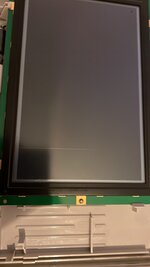 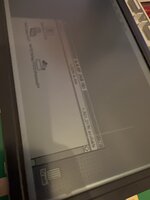 | |
| Posted by: Sideburn on 2024-01-12 15:26:20 Ahhh bummer... That happened to me after replacing / ruining / making worse the original one.. I ended up finding another that is so far all good except one pixel. I wish someone could figure out what exactly is going on here.. I don't think it is the carbon zebra stripe rubber connecting the lcd to the board and I don't think it is the driver chips either since I have tried swapping them out. We really need a new reproduction lcd designed... | |
| Posted by: Joopmac on 2024-01-12 16:08:53 are the backlit M5126 less prone to this? i have two of these and luckily they are fine (knock on wood) i tried fiddling with a screwdriver around the drivers, and i can make the stripe change colour from off- to on.. it's very strange indeed so this is going to be a parts donor 🙁 | |
| Posted by: Sideburn on 2024-01-12 16:43:20 I’d be surprised. | |
Posted by: Sideburn on 2024-01-12 16:45:07are the backlit M5126 less prone to this? i have two of these and luckily they are fine (knock on wood)I tried very hard to fix mine. What I did learn is aligning the glass in the frame is crucial and if not right it can lead you down the path of thinking lines are dead when they are not. But if they are dead then I don’t think there’s anything you can do about it unless we can figure out what really is going on. | |
| Posted by: Joopmac on 2024-01-12 16:53:12 They probably end all up being parts donors to make really nice and tight m5126’s😜 | |
| Posted by: Sideburn on 2024-01-12 18:37:50 That’s probably it! | |
| Posted by: techknight on 2025-12-21 18:23:47 Bumping an old thread but, these are active matrix panels. dead pixels or half-lit lines are the transistor(s) failing in the polysilicon glass itself. The driver ICs will drive the entire column or row, not partials. partials = glass panel failure. This is a pure rabbit out of my ass thinking here, but I am starting to suspect the tunneling on these displays (especially later revisions) are likely from similar reasons, the transistors get electrically leaky and theyll slowly dump DC and cause charge to build up in the liquid crystal itself. This is what the M clock is precisely designed to prevent, but if theres a DC bias riding on it due to leakage, well... there you go. | |
| < 2 |