68kMLA Classic Interface
This is a version of the 68kMLA forums for viewing on your favorite old mac. Visitors on modern platforms may prefer the main site.
| Click here to select a new forum. | |
| DayStar PowerCache 50MHz IIci Performance Results | |
Posted by: ObeyDaleks on 2023-06-19 06:07:31MacBench scores accelerator cards way lower than the others. It seems to be affected by bus speed more. Ahh that's interesting. My results were very similar to your screenshots. So it stands to reason that Macbench will produce similarly low scores in my case as well. I might try it anyway out of curiosity (although swapping cards and extensions is a bit of a pain hehe). So I heard (somewhere) that Macbench is considered a more "complete" benchmark as compared to Speedometer and Norton. But if Macbench indeed favors bus over cache, is it, in all actuality, a misleading benchmark, at least when it comes to accelerators? Onboard cache was touted as a big contributor to the performance gains for accelerators of this era. The idea was that in most applications, the most frequently reused portion of the memory stack was fairly small and therefore would fit into cache. This is actually true even today and it is a known fact that CPUs with large cache will often outperform faster CPUs with smaller amount of cache (AMD Ryzen X3D series being a prime example). So, if Macbench is somehow neglecting to test those scenarios (perhaps by randomizing memory allocations), is it really a good benchmark, at least when it comes to measuring real-world performance? Just a theory. | |
Posted by: Phipli on 2023-06-19 06:18:03So I heard (somewhere) that Macbench is considered a more "complete" benchmark than the other two. But if Macbench indeed favors bus over cache, is it really a misleading benchmark, at least when it comes to accelerators? Onboard cache was touted as a big contributor to the performance gains for accelerators of this era. The idea was that in most applications, the most frequently reused portion of the memory stack was fairly small and therefore would fit into cache. This is actually true even today and it is a known fact that CPUs with large cache will often outperform faster CPUs with smaller amount of cache (AMD Ryzen X3D series being a prime example). So, if Macbench is somehow neglecting to test those scenarios (perhaps by randomizing memory allocations), it's not really a good test, at least when it comes to measuring real-world performance. Just a theory.It depends what you want from your benchmark. I think MacBench's objective was to produce results more representitive of productivity software performance etc. So, most of the time it is more interesting. The reason I'm not mad on it is... I'm an engineer. I do maths projects and stuff like that on my old macs and while MacBench is a black box of mystery, I understand what the Norton System Info benchmark is doing. MacBench is trying to estimate performance you'll get in normal use, while other benchmarks are more of a... pure test of the attributes of the computer. But I don't understand why MacBench "Processor" scores are different, surely these benchmark style decisions should only impart the later simulated productivity scores? I don't understand why it scores differently, so shouldn't criticise without understanding. Given I've used Norton System Info for about 30 years I'm very used to its quirks and so am happy continuing to use it. If the cats leave the screen, graphics are good 🙂 Which is the final point - I want cat pictures in my benchmarks. Without them I feel sad. | |
Posted by: Hunter259 on 2023-06-20 17:42:23I'm running 2.2. I am thinking of making a ram disk to force into bank b just for giggles but running in a ram disk shouldn't make any difference unless macbench did a really poor job of pre caching the test data.Welp did that and ran system 7.1 in a ram disk using RamDisk+ with no change in results. Really zips around system 7 tho 😝 | |
Posted by: Fizzbinn on 2023-06-20 19:01:18Which is the final point - I want cat pictures in my benchmarks. Without them I feel sad.LOL! I definitely agree. How cool would it be to find out the names of those cats, how a Norton programmer got their fluffy kitties pictures in there... | |
| Posted by: pfuentes69 on 2023-08-09 07:59:57 Would bring any benefit combining the Daystar PowerCache with a IIci Cache Card? I got both in a bundle (still not received and tested) and I wonder if the standalone cache card is really used as the PowerCache is expected also to bring cache. Txs | |
Posted by: Phipli on 2023-08-09 08:16:03Would bring any benefit combining the Daystar PowerCache with a IIci Cache Card?They use the same slot, you can't fit both at the same time. The PowerCache has its own cache anyway. | |
Posted by: pfuentes69 on 2023-08-09 08:28:45They use the same slot, you can't fit both at the same time. The PowerCache has its own cache anyway.Right... silly me! Anyway... if I manage to get an adapter I'm checking about putting the Daystar in the SE/30... | |
| Posted by: JC8080 on 2023-08-11 16:37:13 What is the difference between the universal and P33? I have a 40mhz board that says P33, and a 50mhz board that just says "Powercache". I always assumed they were essentially the same, but people in this thread are talking about them being different. 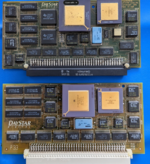 | |
| Posted by: ObeyDaleks on 2023-08-11 16:39:37 Pretty sure the P33 is universal. Look on the other side. It should say universal in the corner. I believe these are just different revisions of the same board. | |
Posted by: David Cook on 2023-08-11 16:49:02assumed they were essentially the same | |
| Posted by: David Cook on 2023-08-11 18:10:11 My understanding is that Figure 21 (P33 board) is desirable over Figure 20 (original board?), in that the P33 works in a wider variety of computers (with an adapter) and that the CPU/FPU are socketed to permit upgrading to higher speeds. The Figure 22 (P34) works in a variety of computers but is not socketed. | |
Posted by: JC8080 on 2023-08-12 08:55:57My understanding is that Figure 21 (P33 board) is desirable over Figure 20 (original board?), in that the P33 works in a wider variety of computers (with an adapter) and that the CPU/FPU are socketed to permit upgrading to higher speeds. The Figure 22 (P34) works in a variety of computers but is not socketed.Very cool, thanks for the info. I didn't know that any PowerCache cards were compatible with the SE/Classic. I don't think I've ever seen an adapter card for either of those. I assume the SE/30 adapter won't fit an SE. | |
Posted by: JC8080 on 2023-08-12 08:58:54Pretty sure the P33 is universal. Look on the other side. It should say universal in the corner. I believe these are just different revisions of the same board.I checked, you are correct the P33 says universal on the back, my other card does not. | |
| Posted by: pfuentes69 on 2023-08-12 09:09:08 Cool, so the one I got is the P33 and it will work in the SE/30 if I manage to get the adapter | |
| Posted by: jessenator on 2023-08-12 09:28:02 Bears repeating: if you use Bolle's SE/30 adapter, all versions of the PowerCache should work. The TwinSpark adapters will only accept Universal. | |
Posted by: pfuentes69 on 2023-08-12 09:49:03Bears repeating: if you use Bolle's SE/30 adapter, all versions of the PowerCache should work. The TwinSpark adapters will only accept Universal.Yep… I’m trying to contact him… | |
| < 2 |