68kMLA Classic Interface
This is a version of the 68kMLA forums for viewing on your favorite old mac. Visitors on modern platforms may prefer the main site.
| Click here to select a new forum. | |
| Power Mac 7500 | |
Posted by: ExplorerZ on 2023-04-13 16:56:31Leave it for now. Sadly your board doesn't have eject leavers. Mine do.Got them out. | |
| Posted by: Phipli on 2023-04-13 16:57:53 This is a very heavily upgraded machine. You want to look after it. Be careful with the cards and RAM. Don't touch the edge contacts and put them down on cardboard or paper, not plastic or synthetic cloth. | |
| Posted by: ExplorerZ on 2023-04-13 16:58:18 Different type of ram. 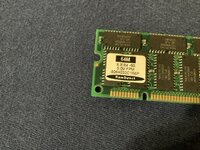 | |
Posted by: ExplorerZ on 2023-04-13 16:59:00This is a very heavily upgraded machine. You want to look after it. Be careful with the cards and RAM. Don't touch the edge contacts and put them down on cardboard or paper, not plastic or synthetic cloth.Oops | |
Posted by: Phipli on 2023-04-13 16:59:05Got them out.Those two you have shown are already more RAM than most people have. 128MB (two 64MB SIMMs) would be expensive to buy on eBay. Look after them. | |
| Posted by: ExplorerZ on 2023-04-13 17:05:15 Had to press it a few times to get the power supply working. Hard drives turned on faster. No chime. | |
Posted by: Phipli on 2023-04-13 17:07:55Had to press it a few times to get the power supply working. Hard drives turned on faster. No chime.Can you remove the hard disk pci card? | |
| Posted by: Phipli on 2023-04-13 17:08:26 You want the bare minimum. | |
Posted by: Phipli on 2023-04-13 17:14:16This is my first time dealing with a Power Mac. Power supply has issues half of the time. It only turns on when this is unplugged. Tried removing cards. No change. Ordering a compatible monitor to test the display. (No chime) Guessing it needs to be recapped.View attachment 55202🤣 🤣 🤣 🤣 🤣 🤣 🤣 🤣 Hey, BTW, the speaker isn't plugged in. | |
Posted by: Phipli on 2023-04-13 17:16:08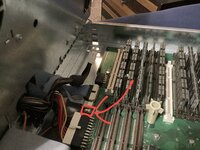 Find the wire that plugs in there. | |
Posted by: ExplorerZ on 2023-04-13 17:25:36View attachment 55244 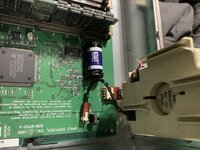 Isn’t this the speaker? Isn’t this the speaker? | |
Posted by: ExplorerZ on 2023-04-13 17:27:23View attachment 55244cannot find it. | |
Posted by: Phipli on 2023-04-13 17:29:34View attachment 55245Isn’t this the speaker?Ah, there are two options. The same board was used in Tower cases too. One connector is for the tower speaker, the other for yours. | |
| Posted by: Phipli on 2023-04-13 17:32:17 I need to sleep. I'll check if not having VRAM is your problem tomorrow. | |
Posted by: ExplorerZ on 2023-04-13 17:32:28Can you remove the hard disk pci card?Done. No change | |
Posted by: ExplorerZ on 2023-04-13 17:33:00I need to sleep. I'll check if not having VRAM is your problem tomorrow.Thank you! | |
| Posted by: Phipli on 2023-04-14 06:36:54 Right. I fetched my 8600 out of storage, it is basically the same logic board as your 7500, close enough to not matter. 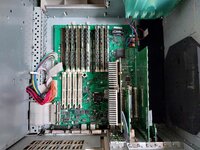 My 8600 boots happily using the ixMicro PCI video card I have installed with no VRAM installed on the logic board, so that is not your problem. 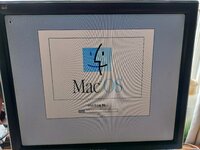 So, you should have your computer set up as follows.
Test the computer. Does it chime? If not, remove the CPU card and carefully, using rubbing alcohol on a q-tip or paper towel, scrub the gold contacts. Do not touch them with your fingers. Do not wear high-static clothes. Do not take off a staticy pullover just before handling the computer. Put the CPU back in the computer. They take quite a bit of effort to push in all the way, do not leave it slightly out. Triple check. I killed a 500MHz G4 Sonnet once because it wasn't quite fully seated. Make sure it is properly in place. Square and all the way down. I can not over emphasise this enough. You're sure? Well check it again. Try the computer. Does it chime through the external speaker that you remembered to power on? If not, remove the PCI video card. Again, try the computer (with no video card). Does it chime? My 8600 will chime with no VRAM on the logic board, and no PCI video card. Although it isn't very useful like this 😉 After these tests, let us know how everything is. | |
Posted by: macuserman on 2023-04-14 06:41:40If not, remove the CPU card and carefully, using rubbing alcohol on a q-tip or paper towel, scrub the gold contacts.I've also found carefully scrubbing the contacts with an eraser really helps although contact cleaner works better than any of it, I had a couple cards I cleaned by eraser, and alcohol and nada, got some contact cleaner and instantly in business. I've quite a few of these machines and I agree that your issues is either the CPU or your memory. I'd pick one memory stick to try and give it the same treatment you give the CPU if just cleaning the CPU does not work. If that doesn't work, swap your memory with another stick keeping everything else the same and give that second memory stick a good clean on the contacts before trying it. | |
Posted by: macuserman on 2023-04-14 06:43:41I've also found carefully scrubbing the contacts with an eraser really helps although contact cleaner works better than any of it, I had a couple cards I cleaned by eraser, and alcohol and nada, got some contact cleaner and instantly in business. I've quite a few of these machines and I agree that your issues is either the CPU or your memory. I'd pick one memory stick to try and give it the same treatment you give the CPU if just cleaning the CPU does not work. If that doesn't work, swap your memory with another stick keeping everything else the same and give that second memory stick a good clean on the contacts before trying it.And if none of that works, then buy a can of contact cleaner and spray the inside of the PCI slot where the video card is, the cpu slot, and the memory slot, then let it dry for a good long time overnight is overkill but a safe time frame if you do it just before bed then try it all again. | |
Posted by: ExplorerZ on 2023-04-14 14:28:01Right. I fetched my 8600 out of storage, it is basically the same logic board as your 7500, close enough to not matter.Did all your steps. When taking out the cpu card to clean It i found that it wasn’t in all the way. Reseated it and cleaned the cards memory and the cpu. Nothing different happened. | |
| < 2 > |