68kMLA Classic Interface
This is a version of the 68kMLA forums for viewing on your favorite old mac. Visitors on modern platforms may prefer the main site.
| Click here to select a new forum. | |
| Lindy mouse | |
| Posted by: Phipli on 2023-03-27 13:06:37 Just a thought... is the button broken? | |
Posted by: reddrag0n on 2023-03-27 16:58:32Just a thought... is the button broken?i thought that too, but the button clicks and i reflowed every solder joint on the little pcb, so i don't think so | |
Posted by: reddrag0n on 2023-03-27 17:02:16Anyway, the fact that the handler ID is 0x04 means you're using a system new enough....i checked parser with the original apple desktop mouse, aka the teardrop one and it shows as 6*02 | |
Posted by: reddrag0n on 2023-03-27 19:40:39I'm not familiar with the program, but try setting it to listen, then clicking the right button. See if data received says anything.nothing happens, no output at all I find it easiest to open up “ADB Record” from the Window menu. When I move around my Pippin controller (which acts as a 2-button mouse by default) I see something along the lines of:this is all i get, no other window or info 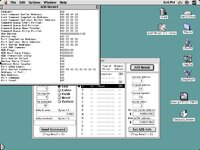 | |
| Posted by: sfiera on 2023-03-27 22:12:44 Data Buffer Contents of $03 FE is consistent with left-dragging down and to the left, I think. If the mouse is perfectly still, I’d expect $00 80 for left-click, $80 00 for right-click, and $00 00 for both. | |
| Posted by: reddrag0n on 2023-03-27 22:35:56 hopefully this video loads, but when i move click or do anything, nothing moves 68k forums won't let me load the vid, so it's hosted on my own server for people to see | |
| Posted by: sfiera on 2023-03-28 03:59:29 Oh, weird. When I have the window open it's constantly updating. | |
| Posted by: reddrag0n on 2023-03-28 08:24:51 is there a different version i need? i know sometimes when i close the app i get an error code 1 | |
| Posted by: reddrag0n on 2023-04-18 09:21:46 just picked up an alps adjustable adb mouse NIB with software. installed the software and plugged in the mouse. i get every click option available but still no right click with any software, even using themouse2b nothing is registered. was the 68k series challenged or could my install of 8.1 be faulty? | |
| Posted by: olePigeon on 2023-04-18 12:14:47 @reddrag0n That ALPS mouse is designed for System 6. So, yeah, I'd try a different operating system. Maybe your 8.1 is borked. Maybe try 7.6 or 7.1. | |
| Posted by: reddrag0n on 2025-01-30 23:38:21 So i figured i would post an update to this thread, i found out how to get the control click to work on 68K macos 8. It's called the mouse2b control panel and a "very" special ADB mouse. That sucker set me back $150 but it's worth it. mouse in question is a NeXT ADB mouse. it arrived this morning and i finally got home to try it out. yes, control click works properly with the control panel installed. when i have a little more time, i will upload screenshots and pics | |
Posted by: reddrag0n on 2025-02-01 02:44:08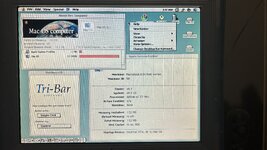 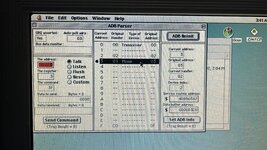  | |
| Posted by: Tashtari on 2025-02-01 05:27:32 Interesting, this same setup only works with the NeXT mouse, not with any other two-button mice you tried? | |
| Posted by: stynx on 2025-02-02 05:29:14 I have a similar 2 button mouse from "macally" and it cam with the driver "Point Device v3.0" It looks identical to the Lindy mouse except that it has a different logo. The mouse in the "Macintosh Repository"-link looks a bit different. MacALLY ADB 2-Button mouse driver - Macintosh RepositorySoftware that allows the use of the second mouse button on MacALLY ADB mouse devices
www.macintoshrepository.org
You can define the 2nd button freely to any key combination. -Jonas | |
| Posted by: lolo799 on 2025-02-02 09:12:01 Interesting thread, I've been searching for a 2 buttons mouse for some time and some really are one button mouse with 2 buttons. For example this one I got not long ago, the Sanwa Supply small confort mouse MA-402MACMD 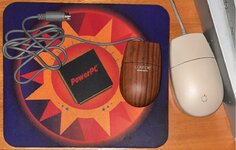 The product webpage show this 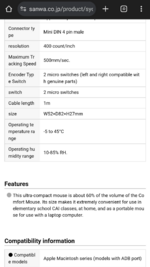 If I look at another model from the same brand and its specs, you'll see the difference in the compatibility info at the bottom. 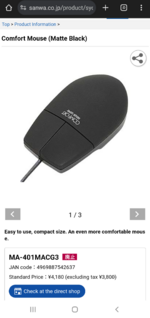 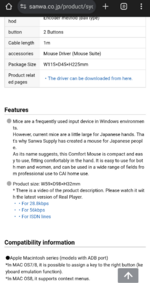 The control panel looks like this: 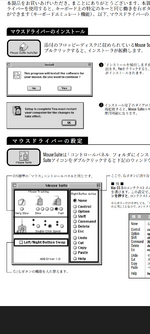 It's downloadable at 「Mouse Commander」(Ver1.1)のソフト(ドライバー)ダウンロード | サンワサプライ株式会社サンワサプライのソフト(ドライバー)ダウンロードのページ。mc11.sit.hqx
 www.sanwa.co.jp
| |
| Posted by: stynx on 2025-02-03 07:12:59 Also interesting: La gestion du second bouton de la souris ADB de Macally | Le journal du lapin www.journaldulapin.com
2bt mouse manual: Macally Two Button Mouse Manual Point Device 1.0: Macally Two Button Mouse Driver - v1.0 (68K) Point Device 3.0 should be a FAT and work on 68k (i am pretty sure that my father used v3.0 on his 475) Point Device 3.1: Macally Two Button Mouse Driver - v3.1 (PPC only) Point Device 3.5: Macally Two Button Mouse Driver - v3.5 (PPC only) Point Device 3.6 (final): Two Button Mouse Driver v3.6 (PPC only) Mouse Sprokets (old): Two Button Mouse InputSprocket - v1.0d1 Mouse Sprokets up to 8.6.1: InputSprocket for Macally Two Button Mouse Mouse Sprokets for OS9: InputSprocket for Two Button Mouse v1.7b5 | |
| Posted by: reddrag0n on 2025-02-19 13:23:17 i'll look into all those here in a bit. i wouldn't mind seeing if the lindy mouse i have works again. i like the shape of it better than the next mouse but i knew steve allowed proper ctrl click with those | |
| Posted by: reddrag0n on 2025-02-19 14:43:45 ok, was able to get the downloads that you mentioned, so now i will try to get this mouse to work. will keep you updated | |
| Posted by: reddrag0n on 2025-02-19 16:07:42 ok, so my lindy mouse is acting stupid, i can move side to side and down no issues, i can't move up without trying to mash the mouse into the mousepad and constantly trying to scroll upwards, so trying all this on my alps 3 button mouse and the next mouse **doing all these tests on a Performa 637CD with 132 MB ram and a 68040 33 Mhz on MacOS 8.1** **disabled mouse2b control panel in order to check each of these out** - installed mouse commander and got a crash: bus error on startup... - installed macally mouse installer 1.0.3 and installer corrupt. not installed properly and won't see the mice even though it says that the mouse will work like a normal 1 button mouse *also glitched out my computer, had to boot into safe mode to remove those files* - installed macally point device 3.0 *says can't find macally mouse so reattaching lindy mouse for testing* *software see's the lindy mouse but now mouse doesn't move at all* ok, so after bending the sensor for vertical movement, the lindy mouse reacts properly. side to side and up and down, and right click works | |
| Posted by: stynx on 2025-02-20 04:23:38 @reddrag0n Quite the journey you had there. | |
| < 2 > |