68kMLA Classic Interface
This is a version of the 68kMLA forums for viewing on your favorite old mac. Visitors on modern platforms may prefer the main site.
| Click here to select a new forum. | |
| PowerBook Ethernet PCMICA setup | |
| Posted by: MacUp72 on 2023-09-14 03:36:32 hm, when I try to get the EtherLink III card to work I cant boot anymore..as written in the description I did a backup of the system folder, removed the stock Apple Ethernet extension (there were no other) but nothing, I dont even get that 'system error, please reboot'.. edit: ok, some progress..installed also the FarallonSkyline driver, now the 1400c is booting again..a new 'alternative Ethernet ' is now available in AppleTalk and TCP/IP | |
| Posted by: Snial on 2023-09-14 05:35:01 Do we have a list of PowerBook 1400 (or just PowerBook) compatible PCMCIA ethernet cards? | |
| Posted by: 3lectr1cPPC on 2023-09-14 06:10:52 I’d happily put such a list up on website if someone were to make one. Would certainly be useful. For now, I’ve been using this Etherlink card successfully on my 1400 for some time, although the custom driver is a bit unstable. | |
| Posted by: MacUp72 on 2023-09-14 06:40:50 afaik there are but a few, Farallon, Asante and these EtherLink III ones (with special driver) | |
| Posted by: 3lectr1cPPC on 2023-09-14 06:41:40 I have a… farallon I think? I know whatever it is is Mac compatible anyway. I just haven’t taken the time to track down the proper driver for it though. | |
| Posted by: MacUp72 on 2023-09-14 07:12:00 hm, still doesnt work, it detected the Etherlink card, I set up ethernet sharing on the other powerbook 12" via Ethernet cable( works all the time with other powerbooks)..but in TCP/IP of the 1400c it generates some 169. 254.. garbage not proper IPs. I also made the extra detour of installing a WiFi card which worked on my old AP Express ( without password), just to get the actual IP of the 1400..well, thats just a little progress. | |
| Posted by: 3lectr1cPPC on 2023-09-14 07:15:33 I think there may be some variants of the EtherLink card that may not work with the driver - check the floodgap page again and read through it. | |
| Posted by: MacUp72 on 2023-09-14 07:56:36 just like yours, it shows up as 3Com 589 EN Card on desktop, I wonder what your TCP/IP looks like when its connected to your other powerbook.. 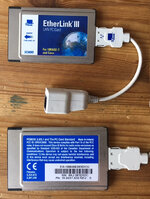 | |
| Posted by: 3lectr1cPPC on 2023-09-14 07:57:15 I could try internet sharing off my G4 tonight - I usually use a windows 10 computer. | |
Posted by: LCARS on 2023-09-18 13:17:58It works!Has anyone been able to find more information about the getting the weather on System 7? I've searched the forum there but can't find more about it. That would be very cool. | |
| Posted by: 3lectr1cPPC on 2023-09-18 13:19:11 I think it’s a web page there somewhere? Don’t know, I’ll have a look. | |
| Posted by: LCARS on 2023-09-19 06:51:22 @3lectr1cPPC It was featured on this morning's start page. Yesterday I couldn't find it in the Forums and refreshing it didn't bring it back up. Here's the link: S7T Weather By the way, I'm glad you were able to get your 1400 online. I had to go through a few motions as well to get mine to recognize the connection. | |
| Posted by: 3lectr1cPPC on 2023-09-19 07:49:00 Yes, I found this too. Forgot to post though. Using these on the internet honestly makes me feel bad for those who had to back in the day. Even over what would be considered a fast connection at the time feels glacial, and I've had a bunch of freezes and other problems. Might be more of a Mac OS thing though. It works though! | |
Posted by: LCARS on 2023-09-19 10:01:52Using these on the internet honestly makes me feel bad for those who had to back in the day.As a kid we used a Performa 550 online well into 1997 and it was excruciatingly slow compared to a Toshiba with IE that I used at school. OS9 felt like it helped speed things up along with the G3 chip. Its remarkable how quickly the software/hardware landscape changed from say 1992 to 1999. I haven't had a freeze yet but its come close to it. I'm running 7.6.1 but I also haven't pushed beyond FrogFind and MacintoshRepository. | |
| Posted by: MacUp72 on 2023-10-11 01:02:27 finally.. ethernet works, I thoroughly scrubbed and cleaned the connectors of the 3Com 589 card and also of the Apple USB-to-Ethernet adapter with IP.. also installed the FarallonSkyline with the etherlink extension. It now correctly assigns its IP adress. 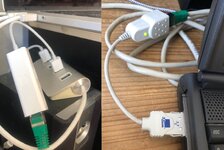 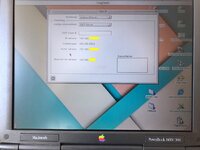 | |
| Posted by: LCARS on 2023-10-12 18:19:20 Hooray! Good work. That's a nice prize after all that work. | |
| Posted by: MacUp72 on 2023-10-12 22:55:48 yes, it was a weird trip, wouldnt figure out why it couldnt even have an IP.. even when I got one via WIFI card and then use that IP to fill in at TCP/IP manually as this always worked. I wish I'd have that rare ethernet extension card for the 1400 | |
| < 2 |