68kMLA Classic Interface
This is a version of the 68kMLA forums for viewing on your favorite old mac. Visitors on modern platforms may prefer the main site.
| Click here to select a new forum. | |
| cd player question | |
Posted by: reddrag0n on 2023-03-02 07:35:36That LCD monitor stand has some serious NeXT Cube vibes going on.nah, just some cheap 1024x768 vga monitor picked up from a thrift store | |
| Posted by: reddrag0n on 2023-03-02 07:39:17 the monitor i want will cost me almost $600, original apple lcd with the adb and video input model M4551 | |
| Posted by: mikes-macs on 2023-03-02 07:43:07 I ripped a Led Zeppelin CD recently using my Mac SE/30. I used Sound App. Very nice program for its time. I forgot to change the settings from 44.100 kHz to 20.050 kHz. The resulting file (1 song) was 87 MBs. The Mac Se/30 played it but only output at the lower sample rate. | |
| Posted by: MrFahrenheit on 2023-03-02 07:51:21 For audio CD extraction, I can’t recommend enough Astarte CD-Copy. Download the appropriate version to match your Mac OS version and the drive you’re using. It was the definitive program to use back in the day, and shipped with my Yamaha CDR back in the early 90s. | |
| Posted by: mikes-macs on 2023-03-02 07:55:07 Thanks! I have 3 of those Yamaha CDR Drives. I’ll give Astarte a try. | |
Posted by: MrFahrenheit on 2023-03-02 07:57:53Thanks! I have 3 of those Yamaha CDR Drives. I’ll give Astarte a try. It can be used with an Apple SCSI cdrom to extract a perfect copy of any CD, too. I use it to make exact perfect images of CDs where other software and procedures fail to make a 100% copy. A/UX install Cd for example. It has a few volumes, one of which is hidden and normal CD extractions of that CD miss some of the hidden structures and volumes. | |
| Posted by: reddrag0n on 2023-03-15 16:15:38 well, to continue with this thread, i got a plaintalk mic in the mail (yes it's the clear one with the long mono plug) but when i record sounds from the mic and play them back, there is no sound. the mic icon shows it's recording something, but nothing is being played back 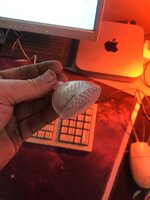 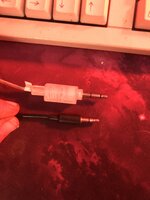 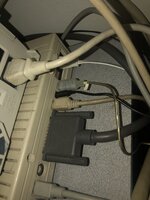 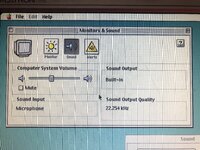 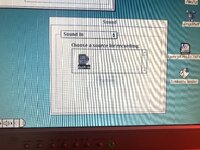 View attachment IMG_8317.mov | |
Posted by: Phipli on 2023-03-15 16:26:09well, to continue with this thread, i got a plaintalk mic in the mail (yes it's the clear one with the long mono plug) but when i record sounds from the mic and play them back, there is no sound. the mic icon shows it's recording something, but nothing is being played backWhat are you recording it with, software wise? | |
| Posted by: reddrag0n on 2023-03-15 16:35:51 the built in sound app, in the apple extras folder | |
| Posted by: reddrag0n on 2023-03-15 16:37:19 i have played with these options before with other macs, so maybe there is a software piece or a step i'm missing | |
| Posted by: reddrag0n on 2023-03-15 16:44:28 View attachment IMG_8319.mov | |
Posted by: Phipli on 2023-03-15 16:48:39View attachment 53677Daft question, is the sound turned up? Does it quack if you click quack? | |
Posted by: reddrag0n on 2023-03-15 16:49:34Daft question, is the sound turned up? Does it quack if you click quack?yes it does, and i found out that if i save the file using simplesound in the applications folder, it works | |
Posted by: Phipli on 2023-03-15 16:49:56the built in sound appThat's a control panel, not an application. It's just the sound settings manager. But it should still work. Is "Simple Sound" in the Apple Menu? | |
Posted by: Phipli on 2023-03-15 16:50:31using simplesound in the applications folder,Ah, you found it. | |
| Posted by: reddrag0n on 2023-03-15 16:52:30 View attachment IMG_8320.mov | |
| Posted by: reddrag0n on 2023-03-15 16:55:20 *EDIT* and now it's working in monitors & sounds app in the control panels folder and the other sound app programs in the mac | |
| < 2 |