68kMLA Classic Interface
This is a version of the 68kMLA forums for viewing on your favorite old mac. Visitors on modern platforms may prefer the main site.
| Click here to select a new forum. | |
| SE/30 no fun with new purchase | |
| Posted by: CharlieFrown on 2016-08-12 09:35:15 ok here's an update, I bought CRT on eBay, supposedly taken from Mac Classic, but the yoke cable was plug and play. After transplantation, keeping my fingers crossed I turned it on, ping, happy mac, no arches of electricity...that's good. It boots just ok, but the screen seems distorted, havent tried any adjmustment, windows are visible when dimmed. DO you think I got broken CRT or just another thing? Brightness is really nice, no visible burn ins. 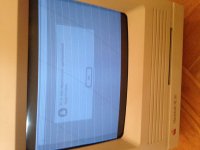 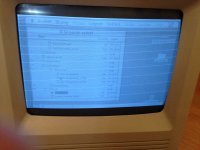 | |
| Posted by: BadGoldEagle on 2016-08-12 10:30:45 After any CRT/ Analog Board Transplant, you NEED to perform adjustments. Don't worry your CRT is fine. What you need to do: 1/ Turn down Cut-Off ! Seems like your previous CRT was kinda weak (logical). This one isn't and it requires less than your old dead one. 2/ Reduce Width. The display should measure 7.11 inches wide. You can do these adjustments with the computer on, but you need a plastic or insulated screwdriver. I used kebab skewers on my Classic II. | |
| Posted by: aplmak on 2016-08-12 10:33:10 There are adjustment's you have to make on the analog board... You need the plastic adjustment tools or use something non conductive.. You can use a small screwdriver if you are experienced but it's not recommended.. It's on the side facing outward and should have a plastic white shield over it.. There is small holes where the adjustments need to be made.. Just be careful.. if there is no plastic shield and if your not comfortable I would have that experienced tech you know do it.. Kebab Skewers is an awesome idea!!! | |
| Posted by: Ferrix97 on 2016-08-12 10:33:57 There is a transistor on the "video board", (the one that connects to the back of the CRT), you should replace it, should be a 2N3906 by memory. I also had a gassed CRT and after replacing it it did, the same thing, replacing that transistor fixed the problem | |
| Posted by: CharlieFrown on 2016-08-12 10:46:35 Thank you so much Ferrox, will do it! | |
| Posted by: techknight on 2016-08-12 16:02:48 if you powered it up with the dead/gassed CRT it will kill that transistor. | |
| Posted by: just.in.time on 2016-08-12 23:49:26 Interesting. I saw an effect similar to that on a color classic I have been working on. Turns out there is a knob I could adjust with a flat head screwdriver when I had the case removed. I believe it was the red/green/blue background controls. Obviously a B&W display won't have those 3, but maybe something similar? Someone was kind enough to link me apple's color classic service source document, it was listed in the adjustments section. Ignore this post, didn't see there was a page 2 to this thread. I recommend following the other advice already given. | |
| Posted by: techknight on 2016-08-14 07:24:09 As I and everyone else has mentioned the summery is basically these 2 things: 1 your transistor is bad. 2. the G2 voltage is too high so the CRT isnt reaching cutoff. I refer to it as the G2 voltage because its a service term, but most people refer to it as "Screen". | |
| Posted by: CharlieFrown on 2016-09-04 07:00:39 here's an update: after swapping transistor mentioned above things got uglier. Now I get the same horizontal stripes pattern, but there's no video generated by Mac behind those stripes. Fiddling with cut off did not help. After turning it on it starts to boot ( I can hear hard drive spinning and reading), but there's nothing on screen apart from this pattern. I must admit that during discharging process I accidentaly disintegrated the metal clip from the suction cup (yoke) with my grounded screwdriver. Fortunately there was some visible wire sticking up, managed to put metal clip back into the cup in the manner the wire and old solder were aligned, solder it together. Do you think it might be a cause? Another thing is I might have put too little solder on video board. What would you suggest trying first? | |
| Posted by: techknight on 2016-09-04 08:32:36 or you used the wrong transistor, or inserted it wrong. | |
| Posted by: CharlieFrown on 2016-09-04 10:16:51 thx techknight, you're right, I used 2N3906 instead of 2N3904. | |
| Posted by: techknight on 2016-09-04 18:12:18 yeap, BIG difference! I mean BIIIIG difference! | |
| Posted by: CharlieFrown on 2016-09-20 04:37:19 ok replacing the correct transistor didnt help, so I am continuing to determine the cause of failure. There's raster, but no video generated by Mac on screen. I assume that it has nothing to do with suction cup connection I had to fix, since the monitor in luminated. Before replacing R20, R21 as mentioned on some site, was thinking about R6 on video board, because there's this dark residue near this resistor R6. | |
| Posted by: CharlieFrown on 2016-09-20 11:13:57 here's what I found, there's a crack in resistor. 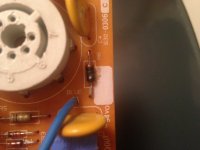 | |
| Posted by: techknight on 2016-09-20 11:59:28 possibly caused by the wrong transistor being in there. change it. | |
| Posted by: CharlieFrown on 2016-10-28 09:51:19 replaced cracked resistor and 2N3904 in video board, but black screen occurred. After logic board recap and replacing UE8 (was in bad visible condition) all I get is this - horizontal stripes - no bong, - fans working - hdd is audible - same pattern appears immediately on screen after pushing reset button what should I do? I suppose the analog board and video board are not the issue in this case, unlike motherboard. Should I replace UF8 / UG8 ( 74HC393 )? Ferrix once concluded bad UF8/UG8 might prevent SE/30 from booting. Also does washing motherboard make sense? It was only cleaned with IPA. Forgot to mention it still has (probably) bad Bourns filter, even when the desktop was visible it couldnt properly read any floppy disk even with external 100 % working floppy drive. 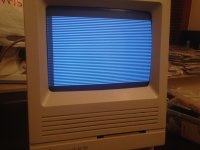 | |
| Posted by: CharlieFrown on 2016-10-28 11:59:38 ok here's an update, after cleaning it again with IPA, reflowing some solder in caps C6 and C7, reseating memory and ROMs I have some progress: - loud BONG! - no stripes - boots the OS I can fiddle with icons and run apps, but everything is hardly visible. Is my video board bad (the one that goes to the CRT neck) or maybe suction cup (anode) ? As mentioned before because had to solder those metal thing back to the suction cup...  | |
| Posted by: CharlieFrown on 2016-11-17 09:10:17 another one saved from dumpster! Replacing video board did the trick. I suspect the old one is gonna work after continuity fix. 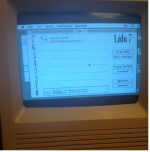 | |
| Posted by: SlateBlue on 2016-11-24 17:50:14 Nice! Looks like the the display still needs some adjustment. | |
| < 2 |