68kMLA Classic Interface
This is a version of the 68kMLA forums for viewing on your favorite old mac. Visitors on modern platforms may prefer the main site.
| Click here to select a new forum. | |
| A/UX 3.1.1 Post Install Scripts | |
Posted by: MrFahrenheit on 2022-12-17 16:36:23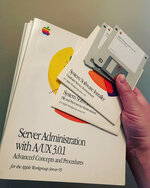 | |
| Posted by: james_w on 2022-12-19 07:08:00 @MrFahrenheit I have a WGS 95 being delivered this Friday. The person who I've bought it off is ex-Apple and the WGS 95 was used inside Apple. It's got some assets stickers on it which is fun. Unfortunately upgraded to a WGS 9150, so I'll probably swap out the board for a 950 board. But no special cache/scsi PDS card 🙁 Lastly, no software at all or any other artefacts from their time at Apple. So I'm a bit jealous of what you have there in your hand! | |
Posted by: MrFahrenheit on 2022-12-19 08:55:12@MrFahrenheit I have a WGS 95 being delivered this Friday. The person who I've bought it off is ex-Apple and the WGS 95 was used inside Apple. It's got some assets stickers on it which is fun. Unfortunately upgraded to a WGS 9150, so I'll probably swap out the board for a 950 board. But no special cache/scsi PDS card 🙁 I guess we are both a bit jealous of each others’s assets! Lol. That AppleShare Pro you have… very rare and desirable. Edit: Wait a minute... I'm pretty sure you have the A/UX 3.0.1 install media for the WGS95 machine. When I watched your stream with Mac84, you opened the box for me, and I was sure it had A/UX media inside the AppleShare Pro box... | |
| Posted by: nottomhanks on 2023-01-09 20:53:06 This is super interesting!! Would this work on a 68030 Mac (like an accelerated SE/30)? Or would that just be painful? | |
Posted by: uyjulian on 2023-05-16 01:38:02Here is an alternative method if you don't want to use filesystem sharing methods... More tidbits... If you use e.g. /dev/dsk/c1d0s31 (SCSI ID is 1, slice is 31) then the offset will start at 0 instead of 0x19800 bytes. This means you can simply remove "offset" or "seek" options, reducing the complexity. The tar data appears to be there immediately in the image and seems to work. But I'm not too sure about how caching is done and if it is safe to use the tar data or write new tar data there. tar has 100 character limit, and can't save symbolic links or device nodes properly. cpio has 128 character limit. Use the "pax" tool, which doesn't have these limits. pax -w -p | dd bs=512 /dev/dsk/c1d0s31 You can use this as a primitive "file sharing" method. | |
Posted by: uyjulian on 2023-05-16 10:07:45More tidbits...Some mistakes in the command: file operand was missing and using rdsk is faster. pax -w -p /path/to/directory | dd bs=16384 /dev/rdsk/c1d0s31 | |
Posted by: uyjulian on 2023-05-26 22:37:09Some mistakes in the command: file operand was missing and using rdsk is faster.Whoops, another mistake: forgot of= pax -w -p /path/to/directory | dd bs=16384 of=/dev/rdsk/c1d0s31 | |
| Posted by: emendelson on 2023-08-08 08:47:37 This is all just superb. Thank you a thousand times. One small detail for the wiki. I couldn't get optsw to mount because the wiki's instructions under step 5 doesn't have the full string that you have above: mount -v /dev/dsk/c4d0s4 /mnt/optsw | |
| Posted by: dr.zeissler on 2023-08-08 10:42:29 Installing and setting up AUX will be something I would like to do to. LC475 does not work on this even with a full 040, but I have a Quadra610 (not used yet) and a Quadra700 which I am currently setting up via bluescsi because the internal SCSI HDD had some serious issues. My Q700 has a nubus 386 OrangePC and a PPC601 card. Currently I have setup 7.1.2 with the possibility to use the PPC card and I am currently setting up the PC-Section. AFAIK I can install AUX after macos7. my first hdd on Bluescsi is 500MB with 125MB System7, 125MB System8 (not installed jet) 256 Slice3 AUX (not installed). Which AUX should I use and will there be problems if I activate the PPC card in that machine? Doc | |
Posted by: zigzagjoe on 2023-08-08 11:46:02Installing and setting up AUX will be something I would like to do to. LC475 does not work on this even with a full 040, but I have a Quadra610 (not used yet) and a Quadra700 which I am currently setting up via bluescsi because the internal SCSI HDD had some serious issues. My Q700 has a nubus 386 OrangePC and a PPC601 card. Currently I have setup 7.1.2 with the possibility to use the PPC card and I am currently setting up the PC-Section. AFAIK I can install AUX after macos7. my first hdd on Bluescsi is 500MB with 125MB System7, 125MB System8 (not installed jet) 256 Slice3 AUX (not installed).This website has a lot of useful info: https://www.aux-penelope.com/hardware.htm I think you want A/UX 3.x. The PPC card will not work, A/UX is very picky about hardware and only works with a very small subset of accelerators that are transparent to the OS. At this time I only know it to be confirmed working with DiiMOCache for SE/30, and possibly the Interware booster. | |
| Posted by: dr.zeissler on 2023-08-08 14:28:06 OK, thx, If I remember that correctly AUX boot's System7 so no use of PPC card with System7 anymore when installing AUX? | |
Posted by: zigzagjoe on 2023-08-08 14:50:15OK, thx, If I remember that correctly AUX boot's System7 so no use of PPC card with System7 anymore when installing AUX?Right. You need to boot in 68k mode to the macpartition to boot into A/UX, ditto need to be in 68K mode to boot off the floppy to begin the A/UX install process. | |
| < 2 |