68kMLA Classic Interface
This is a version of the 68kMLA forums for viewing on your favorite old mac. Visitors on modern platforms may prefer the main site.
| Click here to select a new forum. | |
| Easter Egg Image Centris/Quadra 610/650 | |
Posted by: tecneeq on 2022-10-27 01:08:11264MB 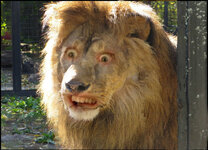 Awesome! Pulling different keyboards from storage later, if that doesn't help i'm giving up. | |
| Posted by: benibb on 2022-10-27 08:45:46 @cheesestraws ahh i see.. if youre in deep shit you need to do error handling... makes sense 😆.. i'll see if i can rephrase the syscall thing @tecneeq one could try to see if the keymap memory region is properly populated when pressing esc + l + f + w. This can be done by entering the debugger and entering "DM 174 " (with space at the end) and then press "esc + l + f + w + enter".. this is bit a hacky method, but it works on my IIci.. DM 174 dumps the keymap memory location and if you put a space after it, everything you enter then is ignored by the debugger.. thus "esc + l + f + w + enter" does not interfere with any debugger command or so... but I have the feeling that the keymap works fine and the error lies somewhere else, i guess it wouldn't crash if the keymap was wrong maybe you could also hit the debugger switch when the system hangs and then see where the program counter points to by entering "PC" or dumping all registers with "TD" | |
Posted by: cheesestraws on 2022-10-27 08:54:16ahh i see.. if youre in deep shit you need to do error handling... makes sense 😆.. that's it 😀 it's when things have gone wrong enough that you might not be able to display a normal dialog box... | |
| Posted by: volvo242gt on 2022-10-27 10:17:05 Ok, so just tried it with my 650. Keystroke doesn't work. But, the debugger command works fine...with one caveat. If you click on the image after it pops up, the machine locks up solid. Won't even respond to the programmer's switch buttons. Nor does the command-control-power keystroke. So, have to manually reach behind and hit the power switch to shut it down. | |
| Posted by: Phipli on 2022-10-27 10:46:54 So, just with regards to it not working for everyone. I think I remember that there are two ROM versions fitted to the 650. To be clear, I have a *Centris* 650, that shipped at 25MHz, so it is an earlier 650. Might everyone else have the updated ROM? | |
| Posted by: slomacuser on 2022-10-27 11:00:11 It works with mine Q650 - 136 RAM and Alps keyboard 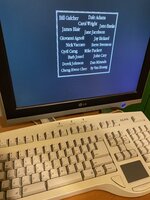 | |
Posted by: benibb on 2022-10-27 12:27:01I think I remember that there are two ROM versions fitted to the 650.The checksum is stored at the first 4 bytes of the ROM. "DM 40800000" in the debugger would show it. | |
| Posted by: volvo242gt on 2022-10-27 19:17:50 Mine is also a stock C650 that shipped with a 25MHz '040 chip. I did upgrade it with a 33MHz chip, but the computer still reports itself as being stock, since I haven't changed the resistors on the underside. | |
| Posted by: tecneeq on 2022-10-28 14:59:57 Have to pull out my Quadra 650 again tomorrow to verify the checksum. | |
| Posted by: Dandu on 2025-07-03 09:58:28 Hi. I have tried the tools with the ROM of a DuoDock to find the Easter Egg, and there is a problem with the file. It's weird : it works with another ROM dump, but with this file, i have an error. I can add the FF at the end, but the image is not complete. Can you help me ? | |
Posted by: joevt on 2025-07-03 15:29:56Hi. I have tried the tools with the ROM of a DuoDock to find the Easter Egg, and there is a problem with the file.What is "the tools"? That ROM appears to be a NuBus Slot ROM for a "Macintosh DuoDock II". It is 128K in size but only the first 64K is valid. I can parse the ROM if I copy the FHeaderRec from the DuoDock ROM (the last 32 bytes of the ROM). However, some parts may be missing. The last slot resource has address E634C. It has length 00ABA6 which extends beyond the 64K of valid data. Also, note that QuickDraw pictures are not viewable in modern macOS. You should use QuickTime or something to save it as a png file. I looked at the picture in SheepShaver SimpleText. The picture has a few lines worth of invalid bytes at the end. Where did the picture come from? It does not appear to be from the DuoDock II ROM. | |
| Posted by: joevt on 2025-07-03 15:54:50 The tools refers to the tools from #16 #======================================================================= # Get macintosh-rom-easteregg-hunt cd "/Volumes/Work/Programming" mkdir "macintosh-rom-easteregg-hunt" cd "/Volumes/Work/Programming/macintosh-rom-easteregg-hunt" git clone https://github.com/nerdprojects/macintosh-rom-easteregg-hunt.git nerdprojects-macintosh-rom-easteregg-hunt #Cloning into 'nerdprojects-macintosh-rom-easteregg-hunt'... cd "/Volumes/Work/Programming/macintosh-rom-easteregg-hunt/nerdprojects-macintosh-rom-easteregg-hunt" #======================================================================= # Test it thefile="/Volumes/Storage/Downloads/DuoDock II ROM/DuoDock II.ROM" ./extract_PICT1.py "$thefile" ./extract_PICT2.py "$thefile" ./extract_bitfield.py "$thefile" found PICT2 header at offset 0x6598 with PICT size 0xd252 end byte not matching 0xff writing file to ./output_bitfield/DuoDock II.ROM_INVALID_0x6598.pict #======================================================================= extract_bitfield.py finds the picture in the incomplete sResource that I mentioned previously. | |
| Posted by: Arbee on 2025-07-03 19:58:03 The second half of that DuoDock II ROM likely has additional useful data, so it'd be nice to get a complete dump. Regarding the original point of this thread, ESC+L+F+W works great in MAME. 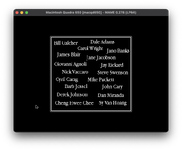 Edit to add: ESC+S+E+T works for me on the Quadra 900 but not the 700. 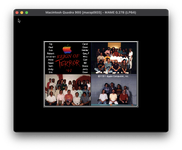 | |
Posted by: Dandu on 2025-07-04 00:26:23What is "the tools"?I have used this tools : https://github.com/nerdprojects/macintosh-rom-easteregg-hunt And yes, it's a Duo Dock II ROM. The picture is an Easter Egg from this dock (https://www.journaldulapin.com/2019/02/20/easter-egg-duo/) For the image, i use an old Mac to convert the picture, but this one is invalid. I have made the same things with the Mini Dock, and it worked. The tools refers to the tools from #16 Exactly. The second half of that DuoDock II ROM likely has additional useful data, so it'd be nice to get a complete dump. For the dump, i have launched SlotRom (https://www.gryphel.com/c/minivmac/extras/slotrom/). Have you another software to dump the ROM from the Duo Dock II ? | |
Posted by: joevt on 2025-07-04 14:22:10For the dump, i have launched SlotRom (https://www.gryphel.com/c/minivmac/extras/slotrom/).You can try one of the utilities at https://github.com/joevt/SlotsDump Either SlotsGrab or SlotsDump. | |
| Posted by: Dandu on 2025-07-04 15:14:25 The two files are 0 bytes, is this normal ? | |
Posted by: adespoton on 2025-07-04 16:03:22The two files are 0 bytes, is this normal ?No, that means something went wrong. I believe you're looking for two 64k files. | |
| Posted by: Dandu on 2025-07-04 16:22:46 Not in the dump, in the release file from the GitHub (https://github.com/joevt/SlotsDump/releases) | |
Posted by: joevt on 2025-07-05 00:38:31Not in the dump, in the release file from the GitHub (https://github.com/joevt/SlotsDump/releases)The zip command in macOS doesn't include resource forks. I made a new release v1.2 using the compress command from the Finder's file menu. | |
Posted by: Dandu on 2025-07-05 00:42:38The zip command in macOS doesn't include resource forks. I made a new release v1.2 using the compress command from the Finder's file menu.Thank you ! | |
| < 2 > |