68kMLA Classic Interface
This is a version of the 68kMLA forums for viewing on your favorite old mac. Visitors on modern platforms may prefer the main site.
| Click here to select a new forum. | |
| Black screen on Macintosh plus | |
| Posted by: MattBranth on 2022-10-23 10:23:20 According to this page http://myoldmac.net/FAQ/SADerror-earlymac.htm It's a memory problem on the G10 ship location... | |
| Posted by: cheesestraws on 2022-10-23 10:49:58 The Plus has SIMMs for RAM. One of your SIMMs is dud or not seated properly. The chip locations do not apply to the Plus. | |
| Posted by: MattBranth on 2022-10-23 10:50:26 very interesting: I have two motherboards and no matter which motherboard I use I get the error message 02 2000 or 02 0080 depending on which RAM set I use. | |
| Posted by: MattBranth on 2022-10-23 10:52:28 Maybe I can mix the RAM sets? | |
| Posted by: MattBranth on 2022-10-23 11:10:55 Hum, I mixed the SIMMs now, the error code is 02 0040. I think the location code has a meaning 🤔 | |
| Posted by: joshc on 2022-10-23 20:18:39 You could have multiple bad SIMMs. The SIMMs used in the Plus are not hard to get and not expensive either, so it may be worth buying a new set to test with. Also, the SIMM sockets themselves can be weak - make sure there is a tight connection and using contact cleaner can help as well. | |
| Posted by: MattBranth on 2022-10-24 03:42:32 By testing several combinations of bars the mac finally started! It is extremely slow though! The question is: how to use another disk than the system disk? I would like to test this floppy disk for example: 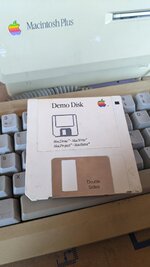 | |
Posted by: joshc on 2022-10-24 03:47:54It is extremely slow though!That's normal when booting from a floppy. You would need to boot from a SCSI drive for better speed. The question is: how to use another disk than the system disk? Once you have booted from a system disk, eject it and insert the Demo Disk. | |
| Posted by: MattBranth on 2022-10-24 03:48:47 How to eject the disk? | |
| Posted by: MattBranth on 2022-10-24 03:53:15 Mac Draw and Mac Write are not part of the system floppy ? I have to get a dedicated disk for each software ? Other question: How to save text or picture files with one only floppy drive? | |
Posted by: joshc on 2022-10-24 03:57:52How to eject the disk?Drag the floppy icon to the Trash icon. Mac Draw and Mac Write are not part of the system floppy ?Depends on the disk you are using. I assume your system disk doesn't have them. That demo disk doesn't look like it includes a bootable System. Other question: How to save text or picture files with one only floppy drive?You swap disks or get an external 800K floppy drive. It's very time consuming and tiring, and very slow, as the Mac will require several disks swaps each time you save or read a file. I'd strongly suggest looking into getting an external SCSI drive (maybe an SD card based one) to use with your Plus. One example is SCSI2SD or ZuluSCSI. See here https://store.rabbitholecomputing.com/product-p/scsi2sd-v5.5-usps-int-1st.htm | |
Posted by: cheesestraws on 2022-10-24 04:03:07It is extremely slow though! You're booting from a floppy. You're not going to get much speed out of it. You really want either two floppy drives or a floppy drive and a hard drive. How to eject the disk? Click on the disk icon, use the Eject menu item. It will leave a ghost of the old disk on the desktop. Put in the new disk, it'll complain and make you swap disks a lot. This is how you usually work with stuff on the Mac, you select stuff and select menu items. I suggest you get into the habit of exploring the menus. Mac Draw and Mac Write are not part of the system floppy ? Depends which system floppy and who made it. You can have both the system and MacWrite on the same disk, or not. There's no magic here, it's all just files. I have to get a dedicated disk for each software ? The System is just files. Applications are just files. You can put any combination of stuff you like on a disk up to the size of the disk. | |
Posted by: bibilit on 2022-10-24 05:36:24That's normal when booting from a floppy. You would need to boot from a SCSI drive for better speed. IIRC, you can crank your memory size to 4 Mb, then create a Ram disk with the appropriate tool, copy in the new ram disc the tools required and then don't use any longer the floppy. | |
Posted by: MattBranth on 2022-10-24 05:57:17I'd strongly suggest looking into getting an external SCSI drive (maybe an SD card based one) to use with your Plus. One example is SCSI2SD or ZuluSCSI. See here https://store.rabbitholecomputing.com/product-p/scsi2sd-v5.5-usps-int-1st.htmIt looks cool, no need to boot on the floppy disk with this device? You can easily find the software to install on it, like the system for example? | |
Posted by: joshc on 2022-10-24 05:57:56It looks cool, no need to boot on the floppy disk with this device?Yes. It requires some set up but it's not that hard. | |
| Posted by: MattBranth on 2022-10-24 06:02:18 Do you know an european reseller for one of those: SCSI2SD or ZuluSCSI ? | |
Posted by: joshc on 2022-10-24 06:57:09Do you know an european reseller for one of those: SCSI2SD or ZuluSCSI ? ZuluSCSI Mini RP2040 SD Adapter, Amiga Kit Amiga Store - the world's largest Amiga Store - we ship worldwideAmigaKit Amiga Shop - we ship worldwide. Manufacturer and distributor of Commodore Amiga computer adapters, A500 RAM expansions, A1200 turbo cards and A600 memory upgrades. A1200 Dust covers and mouse mats. Joysticks and games.
 amigakit.amiga.store
| |
| Posted by: MattBranth on 2022-10-24 12:49:56 Tks! And what about the floppy Emu ? Floppy Emu Disk Emulator for Apple II, Macintosh, and Lisa | Big Mess o' Wires | |
Posted by: joshc on 2022-10-24 17:05:52Tks! And what about the floppy Emu ?They are useful. But it’s still slow, fine to use as a second floppy drive but personally I think you’d be better off with the ZuluSCSI. The FloppyEmu has HD20 emulation mode which you can boot from and use as a ‘hard disk’ but that is still slow. | |
Posted by: MattBranth on 2022-10-24 23:43:58They are useful. But it’s still slow, fine to use as a second floppy drive but personally I think you’d be better off with the ZuluSCSI. The FloppyEmu has HD20 emulation mode which you can boot from and use as a ‘hard disk’ but that is still slow.Thks! I have several questions : - Is a mac plus able to power the ZuluSCSI Mini V1.0 ? I understood it need to be powered via USB with the particulary mac plus ? - Where on the Internet I can find disk images of systems and softwares to copy on this ZuluSCSI ? - Is a standard nowadays PC running windows OK to transfert files on the ZuluSCSI SD card? | |
| < 2 > |