68kMLA Classic Interface
This is a version of the 68kMLA forums for viewing on your favorite old mac. Visitors on modern platforms may prefer the main site.
| Click here to select a new forum. | |
| Best cable for discharging Mac Plus CRT | |
| Posted by: 68kPlus on 2022-08-30 01:30:56 Ah right, I must have misunderstood your other message. I wonder why it happened to their 128K then? | |
| Posted by: 68kPlus on 2022-08-30 01:34:06 Also if anyone has instructions on making a discharge tool with resistors, please let me know! Thanks | |
Posted by: AwkwardPotato on 2022-08-30 01:55:37I always used a plain cable without resistor, but it seems that this can (not so rarely) cause damages. Do you think it would be better if I waited a while until I discharged it to reduce the discharge amount?Decades' worth of Apple service info, forum postings, etc. all strongly advise that the CRT be discharged to the ground lug on the mounting ear, else the rest of the system gets damaged. Person with the dead 128k doesn't specify how he did it, entirely possible the damage is down to user error. I'd implore you all not to overthink discharging the CRT in the Compacts, it isn't a particularly nuanced procedure and not necessarily the death trap some people make it out to be. Chances are you'd be putting yourself more at risk by experimenting with series resistor values (the resistors used in such discharge tools are often specialized for this task). Get a clip lead of reasonable enough quality, make sure it's clamped solidly to the screwdriver/ground lug, and put one hand behind your back, if you feel like it. If you have one of the later flybacks and the machine's sat for a while, you likely won't hear a pop, even without the resistor. | |
Posted by: 68kPlus on 2022-08-30 02:02:11Decades' worth of Apple service info, forum postings, etc. all strongly advise that the CRT be discharged to the ground lug on the mounting ear, else the rest of the system gets damaged. Person with the dead 128k doesn't specify how he did it, entirely possible the damage is down to user error.This is the message I really needed. Thank you very much for all the help everyone! I'll go ahead and buy the parts and do the repair. I'll update you guys when it's done. Thanks! | |
Posted by: pfuentes69 on 2022-08-30 02:15:09I'd implore you all not to overthink discharging the CRT in the CompactsYours seems a fair and informed advice, but it's not easy not overthinking when you hear about risks of damaging your beloved old Mac... 🙂 | |
Posted by: 68kPlus on 2022-08-30 02:18:39but it's not easy not overthinking when you hear about risks of damaging your beloved old Mac...I can agree with this. It seems like the 128k people connected their ground wire to their chassis and not the ground lug (I asked one of them, they confirmed this). Looks like discharging normally is the best way to go. | |
Posted by: Pushpull76 on 2022-09-01 00:17:27Decades' worth of Apple service info, forum postings, etc. all strongly advise that the CRT be discharged to the ground lug on the mounting ear, else the rest of the system gets damaged. Person with the dead 128k doesn't specify how he did it, entirely possible the damage is down to user error.I usually discharge flybacks to the ground of my home electrical system. First, I've never felt secure to discharge them on the metal chassis; second, a lot of old tv's from the fifties/sixties were built in wood/plastic, no metal frames..... | |
| Posted by: Iesca on 2022-09-01 01:03:50 Recently acquired this, discharge info straight from the horse's mouth: 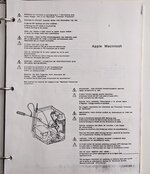 They mention a "discharge tool" but also say it's optional. The procedure demonstrated in the diagram depicts a simple allegator clip + screwdriver setup using the ground lug. | |
| Posted by: Phipli on 2022-09-01 01:11:01 You don't need a particularly heavy cable - the thing that causes problems at high current is the temperature things get to, discharging a cap is short duration. Cable current ratings are for continuous operation. You could always put a resistor inline to reduce the current. Something low value because you want it to still be fairly quick. | |
| Posted by: joshc on 2022-09-01 02:36:54 There's next to no chance of finding an official Apple discharge tool these days (did they even have an Apple part number on them?), they were only provided to service providers and I've never seen one for sale. This is what they looked like, probably not much different than other 'official' CRT discharge tools: 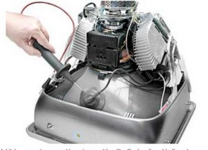 Basically a large probe with a built-in insulated cable with a clip on the end, so not really any different to what you can make yourself with a screwdriver and a crocodile clip. But anyway, discharging to the ground lug NOT the chassis is the key part to follow there. | |
Posted by: 68kPlus on 2022-09-01 02:38:21But anyway, discharging to the ground lug NOT the chassis is the key part to follow there.That is exactly what this person did: 
128K analog trouble after bad dischargeI discharged a 128K Mac without a bleeder resistor and manage to damage it. At first I got a chime but no raster at all. Per Macintosh Repair & Upgrade Secrets, I replaced the LAG chip on the logic board and got raster lines but a dark screen. I then replaced U2 on the analog board, but the...
 tinkerdifferent.com
They wrecked their 128K analogue board :/ | |
| < 2 |