68kMLA Classic Interface
This is a version of the 68kMLA forums for viewing on your favorite old mac. Visitors on modern platforms may prefer the main site.
| Click here to select a new forum. | |
| Macintosh Plus AppleTalk Questions | |
Posted by: TomCruise1 on 2022-08-11 01:53:28You need AppleTalk in all connected computers.Also one more thing, I connected the micro SD to my computer and opened the hard disk image in mini Vmac. Now I was able to finally download the 1.4.5 file and run it on the miniVmac and installed it to the hard drive. So, it said succesful install and to reset the machine to use new software, but the chooser is still empty. Wat else am i missing? | |
| Posted by: cheesestraws on 2022-08-11 01:55:31 My post got lost at the end of the previous page, please read it 😛 | |
Posted by: Phipli on 2022-08-11 01:59:23Ah, sorry, my bad. I was on autopilot setting up networking. I rarely link applications and usually fileshare. | |
| Posted by: cheesestraws on 2022-08-11 02:05:17 Yeah, same. And the whole thing being called SomethingTalk or AppleSomething does make it very easy to get bits of it confused with other bits | |
Posted by: TomCruise1 on 2022-08-11 02:14:11You do need appleshare on both computers, but you don't need two hard disks, it will fit on a floppy disk.There is a bit of confusion going on in this thread, between AppleTalk and AppleShare. They are different things. Hi, yes thank you for making that more clear, I think my wording was poor. I just want to play Maze Wars. So your saying that if I just connect two mac pluses to one another via the printer port, that AppleTalk, should automatically appear and I don't need anything else? | |
Posted by: Phipli on 2022-08-11 02:17:18Quick question, so apple share is on the one diskYou just want to do what cheesestraws said. | |
Posted by: cheesestraws on 2022-08-11 02:23:27AppleTalk, should automatically appear and I don't need anything else? Yes. AppleTalk isn't in the list on the left of the chooser though, it's down in the bottom right of the window (circled in red): 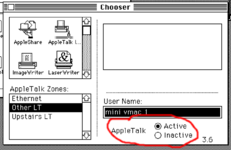 | |
Posted by: TomCruise1 on 2022-08-11 02:38:36Yes.Thank you, I was able to connect two players in maze wars within 10 seconds, I thought AppleTalk required some sort of special set up, omg.... Anyways, is there a list on this forum of 2 player or more multiplayer games for the mac plus? I think I saw star trek was one and grid or bus something... but are there are killer apps? Also, I was able to get the Appleshare to display on the two separate macs but I don't think it was working anyway lol. | |
| Posted by: cheesestraws on 2022-08-11 03:07:16 Glad it's working! Yeah, AppleTalk is really easy from a setup point of view. The engineers who built it did really well there. I'm not sure about 2 player games: you might be better off creating a separate thread to ask about that in the software forum or something. I don't play many games, I just muck about with networks 🙂 | |
| < 2 |