68kMLA Classic Interface
This is a version of the 68kMLA forums for viewing on your favorite old mac. Visitors on modern platforms may prefer the main site.
| Click here to select a new forum. | |
| PowerBook 520c PSU to repair or not? | |
Posted by: croissantking on 2022-07-20 19:53:12The pin is a hook, so that will be a little difficult, but it will come up!@Iesca I just realised tonight that I’d cut this hook off at some point whilst I had my PSU disassembled. I thought someone had forgotten to snip it off, so let’s tidy this up. Oops. | |
| Posted by: Iesca on 2022-07-20 21:19:23 I remember opening mine up to recap as well and, at least in mine, the hook seemed deliberate. As for the recapping not fixing, that unfortunately was my experience as well, even putting new caps on the vertical daughter board. I ended up just getting another one on ebay (for a reasonable price, I might add), but I really ought to take another look at it, as these things aren't getting any younger. | |
| Posted by: croissantking on 2022-07-21 03:02:28 Looking at the way the PSU is designed, it seems it’s split into two halves on the low voltage side. The two sides are mirror images of each other and I’m going to guess that one side is for the battery (VBATT) and the other for the laptop (VMAIN). Since I get good voltage off the battery side I’m going to assume this is not a high voltage issue, but rather one confined to the VMAIN side. So that kind of narrows it down to one quarter of the PSU: 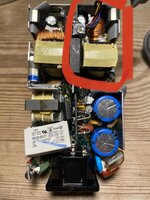 I deduce that this side is VMAIN, because the other side gets warm while I run it off VBATT. I’ve had an issue with a MOSFET already, and I see there is another one in that corner, so I may start there. I may try swapping components over from one side to the other one by one. It will be a labour of love. If anyone has any better ideas based on experience please let me know. Are there any good forums dedicated to PSU repair? | |
| Posted by: croissantking on 2022-07-21 17:15:51 Well, some good news. I’ve been running the 520c on full brightness for a couple of hours, doing quite a lot of intensive stuff, and it hasn’t shut down once. I think the old caps were failing. I think I can now just use the PSU as it is (with the wires swapped over and no battery charging capability) - I’ve heard that rebuilding batteries for the 500 series is difficult anyway. Need to get some more RAM now as I only have 8MB. | |
Posted by: Iesca on 2022-07-21 17:33:35Need to get some more RAM now as I only have 8MB.Good luck with that... I'm lucky that mine has I believe it's 24MB; would love a 32MB card but people charge crazy money for them, and unfortunately the connectors used are unobtainium according to SiliconInsider, so he (nor anyone) is able to make new cards like with the PB100s. | |
Posted by: croissantking on 2022-07-21 17:36:08Good luck with that... I'm lucky that mine has I believe it's 24MB; would love a 32MB card but people charge crazy money for them, and unfortunately the connectors used are unobtainium according to SiliconInsider, so he (nor anyone) is able to make new cards like with the PB100s.Yeah, I’ll try to buy some more ‘not tested’ 500 series machines on eBay for cheap and see if they come with a larger RAM card. | |
Posted by: croissantking on 2022-07-21 17:41:36Good luck with that... I'm lucky that mine has I believe it's 24MB; would love a 32MB card but people charge crazy money for them, and unfortunately the connectors used are unobtainium according to SiliconInsider, so he (nor anyone) is able to make new cards like with the PB100s.Also… if I were you, I’d try to solder in some compatible chips from a RAM card of a similar era. I’m assuming you have some empty pads? | |
Posted by: Iesca on 2022-07-22 00:15:50Also… if I were you, I’d try to solder in some compatible chips from a RAM card of a similar era. I’m assuming you have some empty pads?Yes indeed. It's something I've considered. | |
Posted by: iomac on 2022-07-23 14:59:09Did you also check if the 3.15A fuse is blown, as mine initially was?Fuse looks good. Continuity across and 120V measured on both sides when powered. More digging required as everything on the high-voltage side seems groovy. | |
Posted by: 3lectr1cPPC on 2022-07-25 16:47:11Need to get some more RAM now as I only have 8MB.Here's a max card on Yahoo Japan with a buyout price under $50! I'd buy it but I can't justify it as my 540c already has 20MB, which is honestly plenty for my needs. | |
Posted by: croissantking on 2022-07-26 02:16:01Here's a max card on Yahoo Japan with a buyout price under $50! I'd buy it but I can't justify it as my 540c already has 20MB, which is honestly plenty for my needs.Ha! It’s already sold. I wonder how much the shipping would be, but it’s moot now. I’ve bought a parts machine on eBay which comes with a 33MHz CPU (I have the 25) and an Apple 8MB RAM card. 12MB RAM will be a lot better than 8, but still not enough. | |
| Posted by: 3lectr1cPPC on 2022-07-26 08:09:08 Hah, no kidding! Maybe someone else here saw before you and sniped it! 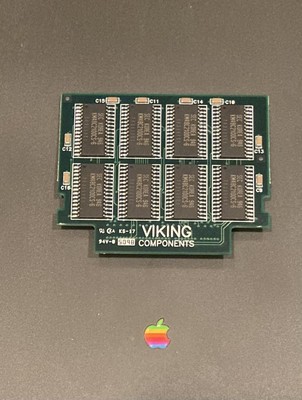
Vintage Apple Powerbook 500 520 540 550 Memory 32 Megabyte Upgrade | eBayIt is compatible with PowerBook 500 series computers - PB 520’s, 540’s & 550's. Pulled from a working system. Upgrade your PowerBook.
www.ebay.com
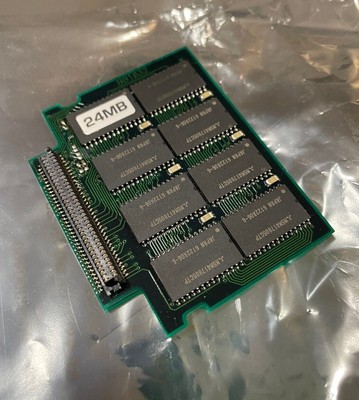
Vintage Apple Mac Powerbook 500 520 540 Memory 24mb Upgrade | eBayFind many great new & used options and get the best deals for Vintage Apple Mac Powerbook 500 520 540 Memory 24mb Upgrade at the best online prices at eBay! Free shipping for many products!
www.ebay.com
| |
Posted by: croissantking on 2022-07-26 08:44:28Hah, no kidding! Maybe someone else here saw before you and sniped it!Gosh, I still think I’d be pretty happy with a 24mb upgrade though…lol | |
Posted by: croissantking on 2022-07-27 08:32:37This one is only 24MB (still plenty for a 5xx), but it’s cheaper.I’ve studied the photo in that auction and compared it to my 4MB module, and ascertained that the PCB is identical. So I’ve gone ahead and ordered this module off eBay for next to nothing: 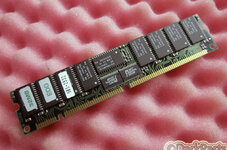 and will proceed to harvest the chips. Edit: ugh… just realised this is probably 3.3V RAM. 😔 | |
Posted by: croissantking on 2022-08-10 05:52:17Edit: ugh… just realised this is probably 3.3V RAM. 😔I returned this one and found the 5V EDO sticks that I successfully borrowed the chips from, as I mentioned in the other thread. Kind of a shame as this one had thin package chips that would be more authentic (and allow for a bit more clearance between the modem card below and the metal shield above). Kudos to @3lectr1cPPC because your link to that eBay 24MB module was the reason I realised that my 4MB card's PCB was actually designed for up to 32MB capacities. It has solder pads which act as jumpers depending on which density of chips you are using -- and I was able to change them based on the seller's photo. I have an Apple supplied 8MB RAM expansion card but I figure that it wouldn't take higher capacity chips, because it doesn't have the jumpers which you can change. Next upgrades are BlueSCSI and a 540c LCD. | |
| Posted by: flyingforstatus on 2022-09-27 00:38:21 Although it seems like this thread changed from PSU repair to custom RAM upgrades 🙂 I just wanted to chime in and say that while I do have one working PSU (at least for now) for each of the 5xx PowerBooks in my collection, I strongly recommend cutting the cord off of an irreparable PSU and soldering it to a Microsoft Surface USB-C charging cable from Amazon to use as your “daily driver” power cord. It delivers 15V/3A to VMAIN. I forgot where I read about this, probably on here lol, but I made a few of these for actually using the PowerBook 5xx and it’s a ton more convenient than lugging the M1893 around… 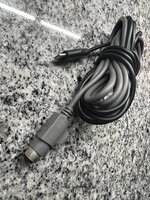 | |
Posted by: croissantking on 2022-09-27 04:53:54Although it seems like this thread changed from PSU repair to custom RAM upgrades 🙂 I just wanted to chime in and say that while I do have one working PSU (at least for now) for each of the 5xx PowerBooks in my collection, I strongly recommend cutting the cord off of an irreparable PSU and soldering it to a Microsoft Surface USB-C charging cable from Amazon to use as your “daily driver” power cord. It delivers 15V/3A to VMAIN.This looks interesting. Can you share some more info/photos about how you did this? | |
Posted by: croissantking on 2022-09-27 09:25:57I returned this one and found the 5V EDO sticks that I successfully borrowed the chips from, as I mentioned in the other thread. Kind of a shame as this one had thin package chips that would be more authentic (and allow for a bit more clearance between the modem card below and the metal shield above).I got my BlueSCSI board in the PB now. It’s way more practical than the old hard drive and quicker, but it feels a bit ‘odd’. Like, the experience of using the computer is somehow not totally authentic anymore. | |
Posted by: flyingforstatus on 2022-09-27 19:48:57This looks interesting. Can you share some more info/photos about how you did this?Sure. As you may know, many manufacturers are building USB-C charging cables with PD chips in the USB-C connector end. Adafruit sells such cables with a DC barrel connector on the other end and on Amazon, you can get a USB-C charging cable for the Surface pro that outputs 15V at 3A through a proprietary Surface connector on the other end. 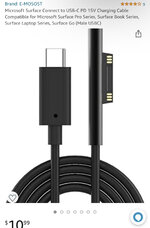 I bought one of these cables from Amazon (not this exact one) for around $10 and cut off the end that plugs into a Surface tablet and tossed it and then soldered the VMAIN and ground wires from a dead M1893 cable to the remaining USB-C end. Then I used heatshrink tubing to seal it up. I simply used a multimeter to identify which wire was which and a pinout I found online of the 5xx series PowerBook power connector to figure out which wires to solder together. 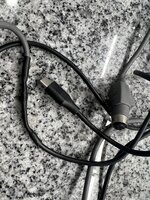 It’s really super easy because the intelligence is in the USB-C connector end. As I understand it, the PD chip there basically tells the power supply you plug it into to send the appropriate voltage at the expected amperage. Obviously you also need a USB-C power brick (45W min) but I have those all over the house and in my travel bag and new ones are getting cheaper and smaller by the day. 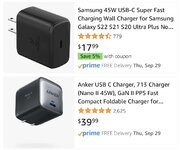 It’s really a quick and mindless way to get reliable power for these old PowerBooks when and where you need it. I’ve thought about using the same idea to replace many other old bricks I have throughout my old computer collection. Sorry I don’t have a more thorough “howto”. Good luck. | |
Posted by: Corgi on 2022-09-27 21:40:50I got my BlueSCSI board in the PB now. It’s way more practical than the old hard drive and quicker, but it feels a bit ‘odd’. Like, the experience of using the computer is somehow not totally authentic anymore.If it helps, it can definitely be an authentic experience if you don't mind feeling like you're a few years in the future. I know many who were using MO or even removable drives back in the day for primary storage and had a lot of good performance. Consider these two ads from early '97, courtesy MacWarehouse. We have a MO drive with a 13ms seek time and 6Mbps transfer, which is inching towards the BlueSCSI's performance of 2-3ms seek and 9Mbps transfer. We also have a removable drive cartridge system (like SyQuest) that actually blows the BlueSCSI's transfer rate out of the water, pushing the limits of the SCSI HBAs in the 68k Macs, while having a nicer 9ms seek time (though still 3x slower than worst case of the BlueSCSI). Sorry for the thread hijack, but I always feel a little sad when I see people lamenting high performance, modern disk solutions in classic Macs. You're still using the original bus to drive them (usually), so the hardware was always capable of it! It's just that now, technology finally caught up to use it to its actual potential. 🙂 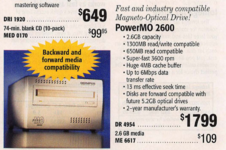 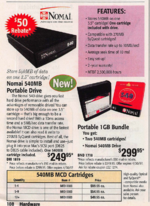 | |
| < 2 |