68kMLA Classic Interface
This is a version of the 68kMLA forums for viewing on your favorite old mac. Visitors on modern platforms may prefer the main site.
| Click here to select a new forum. | |
| HFS Workbench for MacOS X | |
Posted by: timtiger on 2022-04-26 23:55:51export to a .sitThat’s another long story 🙂 As sit is a proprietary file format it is not quite easy to read and create such files. Tough I‘m testing an open source library to get that feature integrated. In the meantime I’ll integrate an „export as hfs volume“ feature for folders. | |
Posted by: mg.man on 2022-04-27 00:15:40The most wanted feature, I‘ll prioritize it.Cool! One additional vote for "floppy" support. I've seen many requests from ppl just getting into vintage Mac'ing who've acquired a pre-CD Mac with a duff hard drive. Bootable "Disk Tools" (and OS install) disk images are readily available, but with no way to create the (standard HFS) diskettes on a modern Mac (with USB floppy), it can be a real chicken/egg struggle getting the vintage Mac going again. I'd therefore vote for "floppy" first, then Zip, MO, etc... Just my 2c. Thanks for your efforts so far!! | |
| Posted by: LaPorta on 2022-04-27 06:29:48 I suppose I meant a way to turn these other disk images into DC 4.2 images. I suppose one could open them with your utility, copy the files, then somehow make a DC 4.2 image somewhere else...but turning those raw disk images into DC 4.2 would be extremely useful for me. Anyone else? | |
| Posted by: MrFahrenheit on 2022-04-27 06:41:31 If you’re working on something that you want to encode/decode files, cross platform, that is 68k Mac compatible, check out Mar. Its an open source, 68k Mac-compatible version of tar, and it works better and faster than StuffIt, plus the files can be transferred to and from a non-HFS volume without losing bits. I’ll try to find the URL again. | |
| Posted by: macuserman on 2022-04-27 07:02:02 This is amazing! Add one more vote from me for supporting physical media esp floppies. With a tool like this I might actually get around to uploading all the drivers I have off floppy onto the interwebs for people. | |
Posted by: MrFahrenheit on 2022-04-27 07:09:36If you’re working on something that you want to encode/decode files, cross platform, that is 68k Mac compatible, check out Mar. Its an open source, 68k Mac-compatible version of tar, and it works better and faster than StuffIt, plus the files can be transferred to and from a non-HFS volume without losing bits.I found the page for Mar if you want to check it out: | |
Posted by: timtiger on 2022-04-27 07:35:05I found the page for MarAh great - very helpful 🙂 Thanks turning those raw disk images into DC 4.2I‘ll take a look at the format specs and let you know. Is it to be able to mount that images using DC? | |
| Posted by: mdeverhart on 2022-04-27 07:43:15 Earlier you mentioned having a feature to remove DC42 headers and using the resulting raw file; I think that LaPorta is asking for the reverse feature - adding DC42 headers back on to raw files. I’d also propose having a feature that can add the proper Type/Creator codes to DC42 images. The resource fork often gets lost when these images are transferred around, and DC42 won’t open a file without a resource fork and proper Type/Creator code. It’s not hard to fix in ResEdit - but it is an annoyingly manual step. | |
Posted by: cheesestraws on 2022-04-27 07:43:44I‘ll take a look at the format specs and let you know dc4.2 is pretty easy. You may find libdc42 useful, perhaps: https://github.com/rayarachelian/lisaem/tree/master/src/lib/libdc42 | |
Posted by: timtiger on 2022-04-27 08:29:48LaPorta is asking for the reverse featureYeah got it 🙂 libdc42Thanks cheesestraws! | |
| Posted by: kitsunesoba on 2022-04-27 13:15:10 This is awesome. Fun to see the latest and greatest (Swift+SwiftUI) meshing with the classic. | |
| Posted by: LaPorta on 2022-04-27 15:55:36 Well, I think I am somewhat unique in the community. I have old Macs, new Macs, and nothing else. I don’t really use emulators. So, I either use the DC4.2 images to mount on real Macs, or make actual floppies from them. I can’t do either of the above with the .dsk raw images, and I also can’t mount them on my Macs. So, effectively there’s a lot of software I can’t access after I download it. That would not be the case with this cool tool you are developing! | |
Posted by: volvo242gt on 2022-04-27 17:51:56Well, I think I am somewhat unique in the community. I have old Macs, new Macs, and nothing else. I don’t really use emulators. So, I either use the DC4.2 images to mount on real Macs, or make actual floppies from them. I can’t do either of the above with the .dsk raw images, and I also can’t mount them on my Macs. So, effectively there’s a lot of software I can’t access after I download it. That would not be the case with this cool tool you are developing!Not that unique, since I'm also in the same boat. Been transferring files either via CD or via an external hard drive between my MBP and my G3 to access files downloaded from the internet. Anyway, to the OP, another person interested in doing beta testing, if needed. | |
Posted by: timtiger on 2022-04-27 23:02:10DC4.2 imagesI got one step further to handle dc 4.2 images in a better way by embedding libdc42 recommended by cheesestraws. Using this lib will make it possible to generate them. The lib is up and running! And no LaPorta, you are not unique 🙂 I am also Mac focused, which are all having access to my network: The 68k machines, the G‘s and the newer ones. I am using AFP Shares, Zip-Drives, physical Floppies, FloppyEmu, SCSI2SD and a RaSCSI. And Basilisk and vMac as well - but it is not streamlined, not elegant and not intuitive. There are so many corrupted disk images out there. Soooo many missing meta infos and res forks. Others are named in a confusing way. And a lot of sit files are created using modern versions - not the ones I am using on the 68k boxes. You have to try out a lot, use ResEdit, move files from machine to machine to machine. I hope to provide a convenient way to interact with and feed the old macs to get more people using them. Not only for playing one or two games. That is what I am doing: Working on my (favorite) IIci; using it for tasks that it can do. | |
| Posted by: mg.man on 2022-04-27 23:26:40 I have been mulling over setting up some kind of networking environment for my old Macs, but, as you say, from what I've been able to work out, it certainly won't be streamlined, elegant OR intuitive! Here's what I'm resorting to atm... 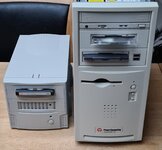 😑 Can't wait for this to make beta! If you want a pre-beta tester, just let me know! | |
Posted by: MrFahrenheit on 2022-04-28 16:45:16Well, I think I am somewhat unique in the community. I have old Macs, new Macs, and nothing else. I don’t really use emulators. So, I either use the DC4.2 images to mount on real Macs, or make actual floppies from them. I can’t do either of the above with the .dsk raw images, and I also can’t mount them on my Macs. So, effectively there’s a lot of software I can’t access after I download it. That would not be the case with this cool tool you are developing! I also do not play around with emulators of any kind. That includes SCSI disk emulators like SCSI2SD and BlueSCSI. I use really hardware, and real drives and disks. For getting software onto those old Macs, I use a G5 with USB Zip, firewire magneto optical, and SCSI Jaz 1GB. Most times I download the file on my Windows 10 desktop, and then transfer the file over to the G5 to extract and copy onto a sneakernet disk. | |
| Posted by: timtiger on 2022-04-29 06:59:45 UPDATE: Based on your feedback I've started adding some new features that show more details about the images: block size and driver information. When testing several images (including a Zip drive), I get strange values for the number and size of blocks that I can't explain. Also interesting: For the attribute "driver operating system type" in block 0, '8224' is displayed again and again ('1' corresponds to 'MacOS' according to the specs)? Do you have any idea? | |
| Posted by: cluster_fsck on 2022-05-25 13:36:11 Damn, this is phenomenal. I was literally just thinking about writing something simiar. Let me know if I can help in any way! | |
| Posted by: Insanely Digital on 2024-05-26 06:19:26 Is this software available yet? I'm trying to archive old SCSI HDs using a Microtec USB XPressSCSI converter. Have MacFuse installed. The system can see the HD, mount it but NOT present it in the finder. Grrr... | |
| < 2 |