68kMLA Classic Interface
This is a version of the 68kMLA forums for viewing on your favorite old mac. Visitors on modern platforms may prefer the main site.
| Click here to select a new forum. | |
| 800k floppy read-write with Greaseweazel + FluxEngine = Success! | |
| Posted by: cheesestraws on 2021-07-23 11:45:05 And here we go, looking pleasantly industrial and chunky. Thanks again! 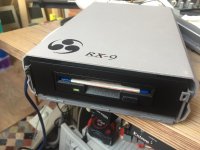 | |
Posted by: Andrew on 2021-07-28 01:20:01And here we go, looking pleasantly industrial and chunky. Thanks again!Great job! this is my setup (modified enclosure from thingiverse to fit the stm32 board). By the way, have you had any success with the latest version of fluxengine? I am unable to write discs. I have let the developer know, however since no one else has mentioned something, I am wondering if it is a problem on my side. | |
Posted by: cheesestraws on 2021-07-28 01:32:34By the way, have you had any success with the latest version of fluxengine? I can't actually get the latest fluxengine client to talk to the greaseweazle at all... (what a sentence!). For the moment I've just been using the greaseweazle client to generate SCP images then converting those with the fluxengine client, until I have time either to dig into it or pester a developer 🙂 . I don't think it's just you. | |
| Posted by: Andrew on 2021-07-28 01:55:20 Do you get an error message? In the latest fluxengine version you have to specify the greaseweazle com port i.e. --usb.greaseweazle=com3 In case you previously used ZaDig to replace your USB driver, you have to use it again to revert to the original greaseweazle driver (usbser) | |
| Posted by: cheesestraws on 2021-07-28 02:01:11 Nope, no error message. I'm on a modern Mac, so driver issues aren't so much of a problem. And no error message, it just sits there forever waiting for something to happen. | |
| Posted by: Andrew on 2021-07-28 02:35:54 You are right. I tried it on Mac and have the same behaviour. On a windows vm it goes further. | |
| Posted by: cheesestraws on 2021-07-28 02:56:40 Glad it isn't just me, then! 🙂 I had to jump through some hoops to get it to compile so I wondered if I broke something | |
| Posted by: Drexel Macintosh on 2021-09-15 12:21:27 Hey all, Can someone explain where to start to make this work? I have a Greaseweazle and a good floppy drive but I need help with the software. | |
| Posted by: cheesestraws on 2021-09-15 13:27:58 Are you trying to write or read? | |
Posted by: Drexel Macintosh on 2021-09-15 13:31:46Can someone explain where to start to make this work? I have a Greasewe Are you trying to write or read?Hey! Just read the 800/400k disks for use in vMac eventually. I’ve been able to use Greaseweazle to pull the flux as .SCP images but now I don’t know where to go next. | |
Posted by: cheesestraws on 2021-09-15 13:36:55Just read the 800/400k disks for use in vMac eventually Ahh, ok. The easiest way I've found to do this is actually to use the fluxengine software, which can generate a DiskCopy image from your SCP images. You can then use the DiskCopy images in Mini vMac. The command to do this is: prydwen:gw cheesey$ fluxengine read macintosh -s <your-scp-file> -o <outputfilename>.diskcopy The .diskcopy extension on the output file is compulsory; that's how fluxengine knows what format output file to work. You may, or may not, have luck driving your greaseweazle directly with the fluxengine software, in which case you can do this in one stage instead of two. Personally, I've never got this to work, though, so I can't tell you how to do it. | |
Posted by: Drexel Macintosh on 2021-09-15 13:55:07Ahh, ok. The easiest way I've found to do this is actually to use the fluxengine software, which can generate a DiskCopy image from your SCP images. You can then use the DiskCopy images in Mini vMac. The command to do this is: Using the code provided in Kyroflux Command: C:\...\Desktop\kryoflux_3.00_windows\dtc\DTC.exe prydwen:gw cheesey$ fluxengine read macintosh -s C:\Mac2.scp -o Mac2.diskcopys It threw back a Syntax error: prydwen:gw Should I be using Fluxengine and not the Kyroflux engine from the Github? (I downloaded the repository but cannot find the application to load in Command Prompt). | |
| Posted by: cheesestraws on 2021-09-15 13:58:51 Sorry, that was my prompt, I left it in by mistake. The command is fluxengine read macintosh -s <your-scp-file> -o <outputfilename>.diskcopy But you need to install the fluxengine software, and also bear in mind that I'm running OS X not Windows, so you may have to adapt things a bit. | |
Posted by: Andrew on 2021-09-16 05:22:46Hey all,Hi there, if your hardware is ready, you are 90% there. Just download the latest version of fluxengine, and use the following command on windows: fluxengine read mac800 -o dump.diskcopy --usb.greaseweazle=com3 and change com3 with the com port assigned to your device by windows. I have spoken to the developer and can confirm that the bugs in the latest version have been fixed. | |
Posted by: cheesestraws on 2021-09-16 05:31:24Hi there, Oh, nice, does this mean it works with the new greaseweazle boards? That will save time | |
Posted by: Andrew on 2021-09-16 07:22:37Oh, nice, does this mean it works with the new greaseweazle boards? That will save timeprobably yes although I have personally only tried with the greaseweazle "direct connection" board with latest firmware | |
Posted by: Drexel Macintosh on 2021-09-16 18:23:48Sorry, that was my prompt, I left it in by mistake. The command isFluxengine installed! (Thanks for the help so far!) probably yes although I have personally only tried with the greaseweazle "direct connection" board with latest firmwarethis worked! The Greaseweazle was able to read the disks via flux engine without issue. | |
Posted by: okto on 2026-03-20 19:13:13Hello all,...soooo are you going to tell us how you did it? | |
| < 2 |