68kMLA Classic Interface
This is a version of the 68kMLA forums for viewing on your favorite old mac. Visitors on modern platforms may prefer the main site.
| Click here to select a new forum. | |
| Macintosh Classic stuck on screensaver and won't boot into OS | |
| Posted by: dylan4397 on 2020-10-27 14:48:14 Yeah, I'll need to get around to the capacitors. When I re read that I realize I made it seem like the capacitors are good, although I knew that I had to change them 😉 . | |
| Posted by: bibilit on 2020-10-27 15:04:19 Pyro, probably someone moved it to another location. So finding and moving temporary Pyro should work for you. | |
| Posted by: dylan4397 on 2020-10-27 15:37:06 When boot into ROM I can't access anything in the system folder. I am assuming that is where pyro is, as it doesn't seem to be anywhere else that I looked. | |
Posted by: MrFahrenheit on 2020-10-27 20:29:58When boot into ROM I can't access anything in the system folder. I am assuming that is where pyro is, as it doesn't seem to be anywhere else that I looked.The boot ROM is a read-only system disk. That's not where Pyro will be. Pyro will be inside the System Folder on the Hard Drive. When booted using the boot ROM, open the Hard Drive by double clicking. Locate the System Folder, and look inside. You cannot double-click system files, they aren't programs. Only programs, documents, folders, and disks can be double-clicked. A system file is none of these. Depending upon the version of Macintosh System Software that is installed on the hard drive, Pyro may be in a different place. It may exist inside the main System Folder itself, or it may be elsewhere. To disable it, once you locate it, drag it out of where it is onto your Hard Drive icon on the desktop. That will move it there. Restart. If you want to start your Mac from the hard drive, and you don't have install disks, you can copy the system folder from the ROM boot disk onto your hard drive to boot from there. When first booted from the ROM disk you can simply double-click on the hard disk, locate the System Folder, double-click the System Folder, and drag the Finder out of that System Folder onto the Hard drive icon. This will move it outside of the System Folder, and disable it. Close the window of the System Folder. Click on the name System Folder and rename it to have OLD after or before it. Next, drag the System Folder from the ROM boot disk to your Hard drive icon, and this will copy the boot files from the ROM disk onto your Hard drive. Restart, it should boot from the hard drive. The System Software on the ROM boot disk is minimal, and only for getting the essentials working on the Mac. It's a short-term solution. | |
| Posted by: dylan4397 on 2020-10-27 21:22:03 Ok, I had some major breakthroughs! And some bad things happen 🙁 . I discovered that the system folder was hiding in the bottom of the HD folder, and moved the Pyro stuff out. But before that, I made a really dumb decision. I decided that I would try and install a system 6 boot disk over the current system. I believe that I chose the Macintosh SE install when I had booted from the install floppy. Now, I get an ID- 12 error when I boot up. I read that it means that I don't have MacsBug installed. Is there an easy way to remove the install? I tried booting back into it, and discovered that I cannot use the uninstall option that it has built in. I will continue working tomorrow, as it is getting late and I am tired of messing with the computer for the day! Thanks, Dylan | |
| Posted by: techknight on 2020-10-28 04:49:36 Unless you want to save the programs off of the hard drive for preservation purposes, I would just simply select the hard drive on the desktop, and do Special, Erase Disk. and just reformat the hard drive. blank it out. Then perform a fresh system install. But you will lose everything on the hard drive (if you havent already) | |
Posted by: cheesestraws on 2020-10-28 04:51:25Unless you want to save the programs off of the hard drive for preservation purposes, I would just simply select the hard drive on the desktop, and do Special, Erase Disk. and just reformat the hard drive. blank it out.Agreed. Honestly, given the state of the software on here, wiping the drive and starting again is probably the best option. | |
Posted by: techknight on 2020-10-28 04:53:10Agreed. Honestly, given the state of the software on here, wiping the drive and starting again is probably the best option. What strikes me is the Screensaver is registered to a school. So this machine may have been "purposely" locked down. Something similar to what At Ease used to do. | |
Posted by: cheesestraws on 2020-10-28 04:54:55So this machine may have been "purposely" locked down. Something similar to what At Ease used to do. Yup, that's what I was thinking, too. It all looks very deliberate, and ... probably not worth unpicking. | |
| Posted by: dylan4397 on 2020-10-28 06:09:53 Yeah, that's what I was thinking that I was going to end up doing. Yesterday a spent a few hours and 19 floppy disks copying everything that I wanted from the hard disk. Today, I'll probably do like you guys said and reformat the disk. Thanks for the help! | |
| Posted by: dylan4397 on 2020-10-28 11:36:43 How would you go about erasing the hard disk? When I have it selected and go to Special > Erase Disk it tells me that I have selected the startup disk, and it cannot be erased. Thanks, Dylan 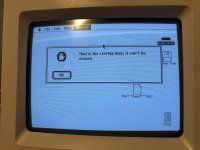 | |
| Posted by: dylan4397 on 2020-10-28 13:50:21 I have now gotten the hard drive erased. I used the Apple HD SC Setup on the System 6 install disk I made. However I cannot get system 6 to install, as like I said before the only install options are for the Macintosh ii, Macintosh Plus, or Macintosh SE. I tried the Plus and SE installs and they didn't work. Now the next thing I need to do is use a system 7.1 install that is meant for the Classic. | |
| Posted by: dylan4397 on 2020-10-28 14:06:12 Well apparently System 7.1 won't work. a few weeks ago, I took the Mac off of my shelf and decided to boot it up. It wouldn't boot and it gave an error, so I removed the RAM expansion and it worked fine. I am a little confused in how the RAM went bad, as it booted fine (by fine I mean got stuck at the screensaver). But oh, well time to try another operating system! 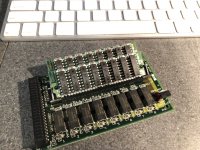 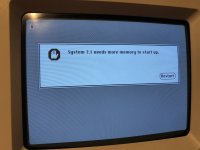 | |
| Posted by: sstaylor on 2020-10-28 14:20:22 The simms on that memory card look like 256K simms, which I don't think will work. You're going to want a pair of 1mb simms on that card. You can try removing the 256k simms and reinstalling the card, which will give you 2mb to play with which is the minimum for system 7. | |
| Posted by: dylan4397 on 2020-10-28 14:53:11 When I had the machine apart I did try without the simms and set the jumper to simm not installed, and it didn't work like that either. Now the issue that I a having is not being able to use the system 6.0.8 installer due to a lack of ram. | |
| Posted by: dylan4397 on 2020-10-28 15:24:46 Now, I think I actually got the machine working! I copied the system folder from the 6.0.8 disk that I made. I don't know if this will work in the long term, but please let me know if it isn't do-able or if I did something majorly wrong. Now to copy the contents of 19 floppies back to the hard disk! (I lost the pyro software when I formatted the drive, but I'm good with that 😉 ). This whole thing also helped me realize how modern Mac OS 9 feels compared to system 6! I needed to use my iMac G3 running Mac OS 9 in order to format the disks from FAT 16 to the Macintosh format, because Mac OS Mojave on my MacBook didn't really like floppy disks. Thanks for everyones help! Dylan  | |
| Posted by: karrots on 2020-10-28 17:42:59 You can just trash the existing system folder and reinstall. | |
| Posted by: dylan4397 on 2020-10-28 19:10:50 Yeah I did remove the system folder, as I formatted the hard disk. I couldn’t do the actual install because there wasn’t enough ram. | |
Posted by: MrFahrenheit on 2020-10-28 23:03:46Yeah I did remove the system folder, as I formatted the hard disk. I couldn’t do the actual install because there wasn’t enough ram.I don’t think System 6.0.8 should use that much ram by default. Check the control panel and make sure that RAM cache is set to off. | |
| < 2 |