68kMLA Classic Interface
This is a version of the 68kMLA forums for viewing on your favorite old mac. Visitors on modern platforms may prefer the main site.
| Click here to select a new forum. | |
| Help with SE/30 | |
| Posted by: blindowl on 2020-05-20 12:50:22 Ok, so found an error. Pin 12 on UJ3 shorts to pin 10 and 13. And pin 4 has no contact with the board. Have no idea if this error has been there all the time, or if I've caused it with my messy cleaning and re-soldering... But UJ2 and UJ3 were the most damaged components on the board. Maybe I should try to remove UJ3 and clean it up. I'm just worried my clumsy hands will mess things up more. I'll sleep on it. | |
| Posted by: blindowl on 2020-05-20 23:50:26 Step 1 done... 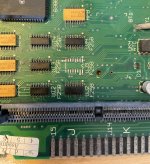 | |
| Posted by: dochilli on 2020-05-21 01:52:22 I had a SE/30 with a simasi mac and had to change UJ3 and UJ4. Afterwards it worked. Looks like your LB had some corrosion in this region. I would change UJ4 too. | |
Posted by: blindowl on 2020-05-21 02:29:44I had a SE/30 with a simasi mac and had to change UJ3 and UJ4. Afterwards it worked. Looks like your LB had some corrosion in this region. I would change UJ4 too.How did you know that you had to change those two chips? Were they visible damaged, or did you measure somehow? With shaky hands I managed to replace UJ3... It's not pretty, but I now have continuity on pin 4 again, and pin 12 is not shorted to pin 11 and 13. Unfortunately the replaced chip didn't solve anything... 🙁 I could try to change UJ4 too. And UJ2, it's also in bad shape. But I do have continuity on all UI/UJ. I don't have a scope (nor the knowledge) to measure them further... | |
| Posted by: dochilli on 2020-05-21 06:04:03 The chips had a lot of corrosion and I decided to replace them and had luck. | |
| Posted by: techknight on 2020-05-21 06:28:29 the 74F253 is known to go bad in the SE/30 anyways. Even without visible corrosion. Any time I run into intermittent RAM Issues on an SE/30, I dont waste my time. I shotgun all 6 of them. | |
Posted by: blindowl on 2020-05-21 06:42:34the 74F253 is known to go bad in the SE/30 anyways. Even without visible corrosion. Any time I run into intermittent RAM Issues on an SE/30, I dont waste my time. I shotgun all 6 of them.Oh, I didn't know that. I went ahead and changed UJ4 and UJ2 too, but I left the UI chips because they didn't look to bad. I guess I should've change them all when I was on to it... I also understand now that it was a mistake to take the replacements from my other (damaged) LB without knowing their status. They just looked to be in good condition... 🙁 The LB is in another bath right now, it was so full of flux residue and other gunk, it needed a good rinse. We'll see how it works when it's dry again, but my hopes are not so high (anymore). | |
| Posted by: blindowl on 2020-05-22 01:31:53 We have major a breakthrough! So I replaced UJ2, UJ3, UJ4, let the board soak in vinegar for a couple of hours, rinsed it in soapy water and then let it dry over the evening and night. When I just powered it on there was a normal chime (not as loud as the chimes of death I had a week ago), but still the same horizontal bars. I restarted it a few times and sound was gone again, and horizontal bars every time. Then I remembered that I forgot to put the video ROM back after cleaning... Now: 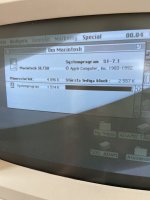 So the two obvious issues right now: - sound. Only twice have I heard the startup chime, otherwise sound is dead. Also on the headphone jack. - the display has issues. It's very dark, and I don't know if you can see it on the picture, but there's some lighter "shadowing" to the right of black pixels. Any advice where to start troubleshoot these issues? I can try to adjust the brightness trim pot on the analog board, I just need to get a proper tool first. I guess the analog board needs a re-cap too... I'm not just that comfortable yet with CRT discharging and handling the high voltage side of things. | |
| Posted by: dochilli on 2020-05-22 01:45:43 Recap the analog board and the PU. The discharging is not very difficult. Often it is not necessary, but I do it every time, when I work at the CRT. This video shows how to do it.: | |
Posted by: blindowl on 2020-05-22 04:23:00Recap the analog board and the PU. The discharging is not very difficult. Often it is not necessary, but I do it every time, when I work at the CRT. This video shows how to do it.:I guess going over the analog board and PSU is inevitable. Another issue now is that the floppy doesn't work anymore. It worked when I got the Mac, and it mounted the first floppy I inserted today, but started to behave weird when it was ejected. Now it can't read any disks. I just replaced the floppy drive with one from a Classic (unknown condition), but it acts exactly the same with the replacement drive. But at least I just got to practice to discharge the CRT... Edit: Actually it reads and formats some disks just fine. So need to give that some more time... | |
| Posted by: dochilli on 2020-05-22 06:06:17 The floppy drive needs some cleaning and new grease. Sometimes the ejection gear is defect. | |
Posted by: blindowl on 2020-05-22 06:55:20The floppy drive needs some cleaning and new grease. Sometimes the ejection gear is defect.I think the drive somehow corrupted all the disks I inserted. The replacement drive works fine now, but I had to re-format the disks. Other disks that I never tried in the faulty drive works fine. But the drives definitely needs a good clean anyway, so I'll bookmark the video, thanks! | |
| Posted by: blindowl on 2020-05-22 07:01:21 I think I'll try and move the HDD/floppy/logic board to my other SE/30. I think/hope the screen/analog board/PSU are in better condition on that one. That way the analog board re-cap can be a future project. 🙂 Just need to clean up some rust first... | |
| Posted by: dochilli on 2020-05-22 07:35:52 Do not wait to long with the recap because the caps are most often leaking. | |
| Posted by: blindowl on 2020-05-23 01:31:11 I went ahead and swapped the logic board, floppy and HDD over to my other SE/30, and now the display is very bright and nice. I also did some extra scrubbing with IPA and a cotton swab around the sound components, and sound is also back. So until the next thing breaks, I almost consider this Mac finished. One new issue though... It won't accept RAM SIMMs on Bank B. As soon as I populate Bank B, chimes of death at startup. I've tried several SIMM combinations (all 1 MB SIMMs), always the same issue. Four of them are confirmed to work in my Classic, but they won't work in the SE/30. Should I continue look for bad traces, or can it be a specific component that is known to fail, causing this issue? Then some future things I need to fix: - re-cap the AB - adjust the CRT yoke, the display is somewhat tilted | |
| < 2 |