68kMLA Classic Interface
This is a version of the 68kMLA forums for viewing on your favorite old mac. Visitors on modern platforms may prefer the main site.
| Click here to select a new forum. | |
| Houdini II DOS compatibility card 486-66 with SB16 - software, hardware considerations on 68K | |
| Posted by: NJRoadfan on 2020-06-12 02:01:40 The CPU is oriented correctly in the socket. | |
| Posted by: BadGoldEagle on 2020-06-12 03:14:58 Thanks NJ! I'll report back once I get the Quadra up and running... but am I really the only one with this issue? | |
Posted by: Byrd on 2020-06-12 10:38:57I had my Houdini II installed in a Q950 (before the thing blew up) and although the card was recognized by 8.1 (I remember checking with a program called Slots that it was correctly identified), the control panel simply would not start (if I double clicked it, it would simply reset the Mac desktop... I tried 1.02, 1.6.4 and 2.1.7 with no avail. I did not check the CPU at the time (maybe it was also running too hot?). Could it be an OS incompatibility?Same issues here with 1.6.4 and Mac OS 8.0, 8.1 - the control panel fails to load. Ended up chucking 7.6.1 on mine and leaving it, however deleting the preferences file might help. | |
| Posted by: jeremywork on 2020-06-12 14:26:11 Not quite Houdini, but this looks to be Apple's prototype to the Houdini cards- the 386-based "Royal Scam Board" (©1993 Apple Computer Inc.) might be my new favorite internal codename. https://www.journaldulapin.com/2017/05/06/prototype-carte-dos/ Given this setup, it makes perfect sense that the Houdini cards work well in 68k machines. I wonder what that 'Pretzel Logic Connector' is... | |
| Posted by: NJRoadfan on 2020-06-15 11:41:04 The Pretzel Logic chip on the DOS card is the interface glue between the card and 040PDS slot. Its likely they put it on a separate plug in card (using a surplus Microchannel slot!) for prototyping purposes. The Pretzel Logic handles all disk I/O, keyboard/mouse, and optionally RAM if not using the onboard SIMM slot. | |
| Posted by: dr.zeissler on 2022-04-22 08:30:58 I have two 486/66 cards. One has a Jumper and works just great in all of my PM6100. I have another 486/66 card that has no jumper and only works on my quadra700, on all PM6100 I do not get a bootscreen. The 1.64 software (regardless if the main OS is 7.5.3 7.6.1 8.x) always stays a "PC is booting" what is wrong here? I chanegd the PDS Adapter but that did not help. Are there some 486 cards that are not compatible with the PM6100? Thx! | |
Posted by: jeremywork on 2022-04-22 12:17:58I have two 486/66 cards. One has a Jumper and works just great in all of my PM6100.I don't recall seeing a jumper on the ones I've seen/bought. Where is it located? To ensure you haven't got a Houdini I with a 66 CPU/Vibra module swapped on, check for the presence of U9 just between the CPU and PDS connector. The only Houdini I I've seen has solder pads there, but no chip. I would expect the Houdini I may not work in 6100 machines, though I haven't tested this personally. | |
| Posted by: dr.zeissler on 2022-04-22 15:04:34 Jumper is beside the CPU. That is my working card. The other one has no jumper and does not work on any PM6100. I will take a picture of the card with no jumper that does not work in my PM6100 machines. | |
| Posted by: jeremywork on 2022-04-22 15:22:21 Interesting, upon review I retract my statement. The card I have with Reply Corp branding does have that jumper present, and the two pins closest to the rear of the case where the port is are bridged. Most of the Houdini IIs I have pictures of only have solder pads for the jumper, no pins. The Houdini I picture I have doesn't even have solder pads. FWIW, I haven't tested the Reply card yet. I've meant to replace a bypass cap that went up in smoke in a previous life. The card came with a Cyrix DX2/66 but no Vibra module (could've just been kept by the previous seller.) | |
| Posted by: CTB on 2022-04-23 00:32:14 I have a Reply card but haven’t attempted to install it yet. I am still having problems getting my Apple DOs cards to work. What is the Vibra module? | |
| Posted by: dr.zeissler on 2022-04-23 03:16:25 The soundblaster-addon board that came with houdini II. | |
| Posted by: jeremywork on 2022-04-23 03:53:16 Yep, other side looks like this 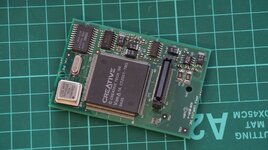 https://modelrail.otenko.com/author/admin/page/4 (this site has some cool info, including details on bodging MIDI support onto these cards.) | |
| Posted by: dr.zeissler on 2022-04-23 04:13:52 Interesting. As I said, works just fine in Q700 but not in PM6100. | |
| Posted by: jeremywork on 2022-04-23 04:24:06 Very curious. The jumper situation looks identical to the one I have which came in a 6100 with the DOS badge on the case, so probably not an issue in itself. What info does TattleTech report about the two cards? It seems interesting that it knows there’s a DOS card present, but thinks it’s not the correct version. | |
| Posted by: dr.zeissler on 2022-04-23 05:29:39 Only 1.0x for 610, PM6100 always 1.64 and that is installed and reports that error. I'll have a look at tattletech. | |
| Posted by: mg.man on 2022-04-23 07:51:40 I don't have one of these cards yet (have bought a couple on eBay, which are waiting for me to get over to the US and collect), so I'm limited to researching... I've found this which may assist : ...and via a little archive.org digging, this: ...which looks like the referenced "2.0" version of PC Setup. | |
| Posted by: dr.zeissler on 2022-04-23 08:24:33 Both cards are 100% identical as shown in tattletech! I had to make a clean install because on that SCSI2SD card was a former and older PC-Setup Installation. Now I did a clean install and...it does not work! So what can be the problem. - The PDS-Adapter ? - The cable? | |
| Posted by: dr.zeissler on 2022-04-23 09:38:22 Man! it was the cable! It's working now! | |
Posted by: jeremywork on 2022-04-23 12:36:39Man! it was the cable! It's working now!Crazy! Had you used the same cable as worked on the other one? Do they both have the same part number stamped in the rubber mold? | |
| Posted by: dr.zeissler on 2022-04-24 04:09:05 Sometimes it works, sometimes not. I have to check further... | |
| Posted by: MrFahrenheit on 2022-04-24 09:44:26 I’m intrigued by what you find out because I have the exact same issue with several of my DOS compatibility cards. | |
| < 2 > |