68kMLA Classic Interface
This is a version of the 68kMLA forums for viewing on your favorite old mac. Visitors on modern platforms may prefer the main site.
| Click here to select a new forum. | |
| Mac Plus, ZIP, "other computer", ZIP, file transfer | |
| Posted by: SBL on 2020-04-06 19:58:30 Yes it does. When I go into the Plus Chooser, I do not see the powerbook. AppleTalk is checked, and in the left window are 2 printers (ImageWriter and Personal Laser Writer). But not a symbol for AppleShare, or, the powerbook. Not sure what I am supposed to see. I do have AppleShare in the system folder, though. Is that where it is supposed to be? | |
| Posted by: cheesestraws on 2020-04-07 02:50:17 It sounds like AppleShare on the Plus is missing some bits and/or not starting. You should see an AppleShare icon in the left hand pane of the Chooser regardless of whether there is anything on the network to talk to or not. I think on System 6 you also need a couple of other files (AppleShare Prep and Responder?) to make it go (my memory is rusty, I don't regularly use System 6). | |
| Posted by: LaPorta on 2020-04-07 04:44:51 Cheese straws is right. I’ll walk through the needed files with you a bit later on today. | |
| Posted by: SBL on 2020-04-07 05:01:28 Thank you very much. When this is all over, I will write a “how to” . I was pretty certain that there were a few missing pieces. steve | |
| Posted by: cheesestraws on 2020-04-07 05:08:59 It should look something like this: note the AppleShare icon in the top left of the Chooser, which will be there whether or not there's a network plugged in. 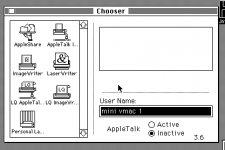 | |
| Posted by: SBL on 2020-04-07 06:11:35 Thank you. I thought I was going crazy. I clearly do not have that. Only 2 printers. I could reinstall 6.0.8, or try to start up from disks just to see. Or wait to see what files I am missing. I do see AppleShare in my systems folder but it is not making it into the Chooser. | |
| Posted by: LaPorta on 2020-04-07 07:42:57 Did you fresh install this system, or it came from elsewhere? I’m doing errands, but promise I can help later on via my own 6.0.8 installation to get this going for you. | |
| Posted by: LaPorta on 2020-04-07 11:26:23 Both AppleShare and AppleShare Prep need to be in the System Folder. You can see them on my SE here: 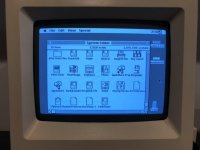 If you don’t have the Prep file for some reason, I’m sure it is located on the disks you received. If not, we can get it to you. | |
| Posted by: SBL on 2020-04-07 12:33:50 I guess I don't know how to do a clean install. I put a dummy text file in my system folder, and then a re-install of 6.0.8 using the original disks. When done, that file was still present, and although I did add a few printers to see if it was taking them, the system files had the same dates. And, it acts the same. Is there a preferred method? | |
| Posted by: SBL on 2020-04-07 12:36:25 No, AppleShare Prep is not in the System Folder. Can that be emailed? | |
| Posted by: LaPorta on 2020-04-07 15:22:18 I will send it, no problem. Send me a PM and we will work this out. | |
Posted by: cheesestraws on 2020-04-07 15:26:01No, AppleShare Prep is not in the System Folder. Can that be emailed?You'll want a matching pair; AFAIK, you have to use the same version of Prep as AppleShare. | |
| Posted by: LaPorta on 2020-04-07 15:48:29 Yep, you are right...and I’ll be sending the pair! | |
| Posted by: SBL on 2020-04-07 16:32:27 PM sent. Thanks. | |
Posted by: Dog Cow on 2020-04-07 17:35:21No, AppleShare Prep is not in the System Folder. Can that be emailed?Don't worry about that file. It's expendable. It contains your AppleShare username, volumes to automatically mount, and some other settings. If it doesn't exist, AppleShare and Chooser will recreate it. | |
| Posted by: SBL on 2020-04-07 18:22:51 I have seen references to that. I still do not understand why I have it in the System Folder but the Chooser never seems to see it. That is the question of the hour/day/week! steve | |
| Posted by: SBL on 2020-04-07 18:58:51 While thinking about this, I tried the following: I did a Custom install from the 4 disk set, and installed Responder and AppleShare. Then, when I brought up the Chooser, AppleShare was there. Clicked it, and the G3 showed up, I selected "guest", and there was my G3 shared folder. And I could transfer files. So, for some reason even with the suggested Easy install (default) those 2 files did not write to my HDD. So, I guess that is problem solved. Does this make sense? steve | |
| Posted by: LaPorta on 2020-04-07 20:50:47 Good deal! | |
| Posted by: cheesestraws on 2020-04-08 02:11:07 Success! And I stand corrected on what AppleShare Prep does - thanks @Dog Cow! System 6 is not my natural milieu and that file isn't a thing under System 7 so I've never been quite sure what it actually does 🙂 | |
| Posted by: SBL on 2020-04-10 19:24:05 Alright I have made a lot of progress. First, PowerBook to Mac Plus transfers seem fine. I can send text files and such, but there may be a problem with more complex file (programs see below). The other thing I did is successfully modify Apache on my modern Mac so that I can exchange files between it and the powerbook. Here is how to do that: https://coolestguidesontheplanet.com/get-apache-mysql-php-and-phpmyadmin-working-on-macos-sierra/ If you do this PM me, as there are a few modifications that are needed. So, what are the problems. a) Often with IE 5.0, or Classilla, I cannot get to websites to get classic software to transfer to the Plus because the browser and site do not share an encryption algorithm. That is OK, as some I can get to. The problem is that most come through as .hqx files. I have tried to extract them, but never have been successful. This is using programs such as stuffit from that same era on the PowerBook. They usually come out as several .dsk files. I have even sent the compressed file to the Plus and tried to see if I could extract it there, but I do not have anything to extract it with. b) I have a similar experience when I use my modern Mac. The decompressed files are .dsk files and will not run on the PowerBook, or, the Plus. It does not matter whether I decompress them on the modern Mac or the PowerBook. There must be something fundamentally incorrect in what I am doing. So how do people get these classic programs to decompress and work? steve | |
| < 2 |