68kMLA Classic Interface
This is a version of the 68kMLA forums for viewing on your favorite old mac. Visitors on modern platforms may prefer the main site.
| Click here to select a new forum. | |
| Audio Waveform Visualizer for Mac 512k to SE/30? | |
| Posted by: JDW on 2020-03-28 22:00:43 Well, I converted my WAV to an 8-bit AIFF, then encoded it as MacBINARY and used ImportFl within Mini vMac to import it to my System 7.5.5 *.dsk. I then decoded it with Stuffit Expander 5.5, then launched Player Pro 4.5, and I was able to import the AIFF into the Instruments List. When I double-click it there, I get the correct waveform. Two problems though: 1. When I click the play button, there is no sound or indication it is playing. 2. I still don't see how to get animate waveform "visualization" to work. Here's a screenshot: 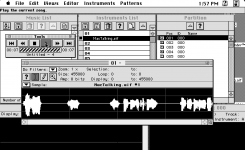 Here's one interesting thing though. If I click the Instruments menu and choose "Save As..." I can save m AIFF file as a SND file, and when I go back to the Desktop and double-click that SND file, it plays perfectly! So it's not an issue of Player Pro not understanding how to interpret my AIFF. I just don't know how to use the software. :-( I also tried importing the SND file into the Instruments List, but that doesn't play either (in Player Pro). Hmmm... | |
| Posted by: Kaa on 2020-03-28 23:45:17 Right, you have now created the instrument and you need to create a track to play that instrument. The visualization you are looking for shows up somewhere when you play your track. I would suggest looking on you tube for tutorials on using a Tracker. You might also be able to import a .mod file and play that to get more acquainted with Trackers. I'm not surprised about 8 bit audio as this is what the input and output limitations of the early Macs were. Good luck! 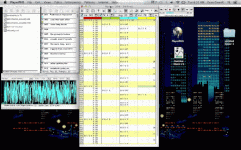 | |
| Posted by: Byrd on 2020-03-29 00:02:25 It's the "oscilloscope" that will display your waveform in a single line; I don't have time to check but there are other options too. As Kaa mentioned load up some .MOD files to see the software functionality; some great examples are here: https://modarchive.org/index.php?request=view_top_favourites | |
| Posted by: JDW on 2020-03-29 00:34:57 I figured it out without YouTube's help, but by accident. After the AIFF is loaded into the Instruments List, you must then open the Oscilloscope window and then click on the Piano. I clicked on "g" which makes my audio sound normal. And to my delight, the waveform animates as the audio is played. It doesn't work in B&W color mode though, but I think I can deal with that. I appreciate all the help! SOLVED! | |
| Posted by: PB170 on 2020-04-17 13:04:58 Late to the party here, but there's an app called WaveWindow by Rustle Laidman that will display the waveform of any audio received through the computer's microphone port (surprisingly, I see now the software is still available for current macs! https://apps.apple.com/us/app/wavewindow/id526600082?mt=12). The update frequency is very good in a small window on my PowerBook 170 (68030 @ 25 MHz), and decent in a larger window. If you have the equipment to feed a line level signal into the microphone port, you can have it display the audio played. Here's a short video of what it looks like on my PowerBook. View attachment WaveWindow.m4v | |
| < 2 |