68kMLA Classic Interface
This is a version of the 68kMLA forums for viewing on your favorite old mac. Visitors on modern platforms may prefer the main site.
| Click here to select a new forum. | |
| Netatalk SD Card Image? | |
Posted by: pcamen on 2020-03-16 13:25:41Ok, so I mapped a shared folder in the Virtual Box settings. Where are the drives accessed via the command line? There's no "volumes" folder like in OS X.I've never done that in VB but I did find this tutorial that seems like it is on target: https://averagelinuxuser.com/virtualbox-shared-folder/ | |
| Posted by: LaPorta on 2020-03-16 14:01:17 So far, it appears I have no permission to edit any of the files that you worked on...how did you do that? | |
| Posted by: pcamen on 2020-03-16 14:48:07 Try opening them in the editor with the "sudo " prefix. If I don't do that it is a read only file. Like sudo vi /etc/network/interfaces | |
| Posted by: LaPorta on 2020-03-16 14:49:39 Got it, thanks. I am one of those guys who grew up on Macs (and still uses them exclusively), so command line is like the first day in Spanish class for me. | |
| Posted by: pcamen on 2020-03-16 14:56:01 Yea, I understand. I was lucky to get familiar with Unix in college and never quite stopped using it. I know just enough to be dangerous. | |
| Posted by: LaPorta on 2020-03-16 15:07:05 I'm trying to read a vi tutorial....I'm liable to burst an aneurysm with this stuff. This is where I wish I could just open said file with TextEdit on the Mac, and then save it back! | |
| Posted by: pcamen on 2020-03-16 15:25:21 VI (vim) has two modes, command and insert. In command mode, move the cursor left right with j and k, up down with h and l. Then delete characters with x, and then type i to get into insert mode, and enter what you want, then ESC to go back to command mode. Then :w to save and :q to quit. That should get you through it. If you get stuck and want to quit without saving :q! will get you out. | |
Posted by: cheesestraws on 2020-03-16 15:31:56I'm trying to read a vi tutorial....I'm liable to burst an aneurysm with this stuffUnless you particularly want to learn vi as a general skill, try using nano instead of vi. It has useful features like 'showing you what the keypresses do before you do them' and 'not being modal'. Personally, I love vi, but it can be an acquired taste 🙂 | |
| Posted by: pcamen on 2020-03-16 15:50:04 When I was in college it was a battle between the VI crows and the Emacs crows. Once you learn the key strokes for one or the other, it stays with you. I won't use an editor now that doesn't support the VI command set as I am so used to it and am very productive without ever having to take my hands off the keyboard. | |
| Posted by: LaPorta on 2020-03-16 17:34:22 I’ll start a new thread on this, no need for me to hijack this one any further. | |
| Posted by: LaPorta on 2020-03-16 17:46:05 New thread: | |
| Posted by: mactjaap on 2020-03-17 15:14:42 If you want you can also download a ready to run VM for Virtual Box on: https://macip.net out of the box old fashion AppleShare. Bonus: you can access internet with your old Mac | |
| Posted by: pcamen on 2020-04-01 12:57:02 So, I have yet to experience the a2server showing up in the chooser as an Appletalk server for any Mac. Under OS 9, I can use the network browser to mount an Appleshare server via an IP address. Under OS 8, there is an option in the chooser for this as well, but it was not able to mount the share for some reason. But under OS 7, I have not found this option. Does anyone know what this might be about? Shouldn't the a2server advertise itself as an Appletalk server so that Macs can readily browse to it? I should say, so far I am just trying this on Macs that are connected via Ethernet. I have: A Mac Mini G4 running 9.2.2 that can connect via IP from its native Ethernet jack. A G3 Lombard via its native Ethernet jack. I believe this one connects fine like the Mini. A PB 540c that I can't connect with the server as there is no way to select a share via IP. It is connected to the network via the AAUI port Ethernet and an AAUI adapter. Fetch on this machine can see my FTP server, so I know the network is functioning. | |
| Posted by: pcamen on 2020-04-01 14:07:49 Progress. If I select Appletalk under the control panels on system 8, I found that I had to choose the Ethernet network, which was part of the solution for setting things right.  And it found the a2server zone. Then in the chooser it could see the Appletalk server. 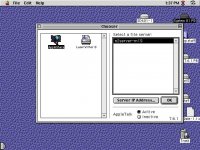 However, it could not mount it. 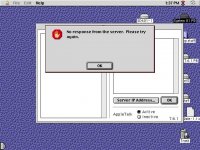 On the Lombard, a similar procedure. 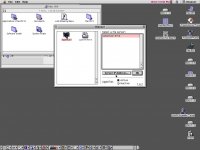 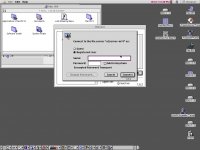 But as you can see, the Lombard with 9.2.2 asked for the credentials, whereas the PB 540c under 8.1 did not. I suspect that is the reason it is giving me the no response error. Or could it be something else? | |
| Posted by: LaPorta on 2020-04-01 14:28:29 I had this error as well. I never tracked down what the problem was, only that re-installing it and using it with little to no modification made it work. system 6, 7, 8, 9 And OS X can all connect for me. Have you changed any settings? | |
Posted by: pcamen on 2020-04-01 14:40:09Have you changed any settings?Well, yes, to get the Mac share running, but that is all. Did you modify yours to create a Mac share? | |
| Posted by: LaPorta on 2020-04-01 14:54:37 No I just used it as-is, just renamed the server. | |
Posted by: cheesestraws on 2020-04-01 15:23:42However, it could not mount it.FWIW, I got this error when connecting to an AFP server that was trying to prefer IP, but IP wasn't enabled. Check that TCP/IP is enabled and using the same port as AppleTalk? | |
Posted by: pcamen on 2020-04-01 16:28:37FWIW, I got this error when connecting to an AFP server that was trying to prefer IP, but IP wasn't enabled. Check that TCP/IP is enabled and using the same port as AppleTalk?Well, this is an a2server, so as a server it only has TCP/IP. And I've connected to it via TCP/IP from my G4 Mini just fine; it does prompt me for the user and password like on the Lombard when I selected it via the Appletalk browser. | |
| Posted by: LaPorta on 2020-04-01 17:12:33 Basically I just left it stock as-is. The share works perfectly fine. Even System 6 will read/write to it correctly (even though it won’t correctly display space used/space remaining since it is over 2 GB in size). | |
| < 2 > |