68kMLA Classic Interface
This is a version of the 68kMLA forums for viewing on your favorite old mac. Visitors on modern platforms may prefer the main site.
| Click here to select a new forum. | |
| MacBottom breakthrough | |
| Posted by: techknight on 2014-10-07 19:55:07 My other option is if Mac128K is still around, and has his mac bottom, Dump his disk as well... | |
| Posted by: Elfen on 2014-10-07 20:18:58 "'I see' said the blind man to his deaf wife..." Thanks Uniserver! | |
| Posted by: olePigeon on 2014-10-08 08:13:01 Techknight, can you make a disk image of the drive, then run Disk First Aid? | |
| Posted by: techknight on 2014-10-08 09:08:00 All I have is what I posted. | |
| Posted by: Gorgonops on 2014-10-08 12:01:12 Wow. I forgot just how flaky my current BasiliskII setup is... There's definitely something screwed up with that disk image. Maybe it's just me, but I'm finding that every application that's on that disk appears to have some corruption in its resource forks. (Every application has a generic "pencil on paper" icon, and if you try to open anything you either get a "The application program "X" could not be opened, because an error of type -39 occurred" message, or a nonsensical message saying "There is not enough memory to open "X" (zero K needed, zero K available). To make more memory available, try quitting "".". Interestingly some of the documents seem to retain at least part of their resource fork, because if you double-click on them they'll try opening the associated (broken) application. This is definitely a job for someone with some deep arcane knowledge of MacOS filesystems. | |
| Posted by: techknight on 2014-10-08 15:23:36 Yea, my guess resource/data fork links or trees arnt right. Not sure. Funny thing is, diskfit works. Lol. Neat little app. | |
| Posted by: Paralel on 2014-10-10 07:00:04 Now I wonder what a "Purple 20" is... | |
| Posted by: jimjimx on 2018-01-28 19:32:52 Good news! I think I may have found some drivers / utilities! Go to http://vintageapplemac.com/154-classic-mac-survival-kit And download: http://vintageapplemac.com/files/misc/ClassicMacSurvivalKit.sit Under Hardware, you will find: MacBottom 800K.img.sit MacBottom MFS.image.sit I was able to convert the 800k file, but not the MFS file. …And I haven’t tested or used either one, yet. If you still have your drive, let me know what your experience is. It'll be a week and a half, before I get everything together, to give it a try.. If I get there first, I'll let you know. Good luck! --jim | |
| Posted by: just.in.time on 2018-01-28 20:15:11 I just read this whole thread. @techknight I hope you can get it working with the drivers @jimjimx found! 🙂 | |
| Posted by: Dog Cow on 2018-01-29 11:37:15 Here are links to the two individual MacBottom disk images: http://dserver.macgui.com/ MacBottom%20MFS.img http://dserver.macgui.com/ MacBottom%20800K.img | |
| Posted by: techknight on 2018-01-29 14:42:55 Wow too bad it came a year too late. I got rid of it after I knew I would never get it running again. And yet, here we are... THIS is what turns me into a hoarder and not want to throw anything out! GRRRRR. I did keep the MFM drive though just in case a HyperDrive unit fails as it fits. | |
Posted by: jimjimx on 2018-01-29 18:26:33Wow too bad it came a year too late.That's too bad. I know how ya feel.. I guess it'll be there for the next person looking for it. I'll still report whatever happens, when I get my MacBottom serial drive & 512kE together... | |
| Posted by: jimjimx on 2018-01-30 09:00:08 I opened the MFS in an emulator, and saw this. It's only 361k I wonder what "Electric Start" means..... 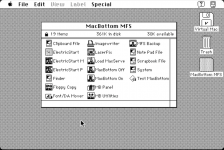 | |
| Posted by: Dog Cow on 2018-01-30 09:59:23 As a side note, have you guys compiled and installed the MFS Lives! filesystem extension for Mac OS X? I have it running. It's very useful; you can just double-click MFS disk images and they'll mount read-only. | |
| < 2 |