68kMLA Classic Interface
This is a version of the 68kMLA forums for viewing on your favorite old mac. Visitors on modern platforms may prefer the main site.
| Click here to select a new forum. | |
| Craigslist Mac SE, Mac SE, and Mac Plus | |
| Posted by: superjer2000 on 2019-06-16 22:23:00 @PotatoFi Did you have any issues with the RF paint on the inside of the case of the Plus or SE from retrobriting? I did a IIsi using full submersion and it ate a lot of the RF paint on the top cover. The paint on the compact Macs seems more resilient but I haven't tried it yet. | |
Posted by: PotatoFi on 2019-06-17 07:12:46@PotatoFi Did you have any issues with the RF paint on the inside of the case of the Plus or SE from retrobriting? I did a IIsi using full submersion and it ate a lot of the RF paint on the top cover. The paint on the compact Macs seems more resilient but I haven't tried it yet.No issues with the RF paint whatsoever! I've done retrobrite on 5 of these compacts now. No problems with that. | |
| Posted by: Huxley on 2019-06-25 08:38:38 Man, your work here is really top-notch. I've recently been restoring a fairly-rough Mac Plus myself, and your work here has really inspired me to take my game to a higher level. Fantastic work. | |
| Posted by: Johnnya101 on 2019-06-25 08:49:06 If your first SE video still shimmers, could be that PSU. That happened on mine, they are all starting to go [the caps]. | |
| Posted by: PotatoFi on 2019-11-09 19:39:37 I finished up a couple of things on the first Macintosh SE today. In an attempt to fix the shimmering video issue, I recapped the analog board, but NOT the power supply. Why not recap the power supply, you ask? Well, this particular machine is flying down to Vegas with me on Sunday (tomorrow) to hand to a friend, and I couldn't tear into the power supply in time. Still, I figured that an analog board recap would be a good idea, so I got it done. No fix, no surprise. As mentioned before, the squirrel cage fan is VERY noise, so I wanted to provide my friend with a "way out" if he chooses: a 3D printed part that a 50x20mm fan could be attached to, which I'll include with the machine. 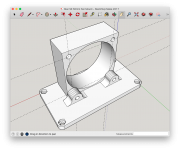 Finally, I decided to try to do something about the CRT, which is rotated by a few degrees (somewhere between 5 and 15). I found these instructions on how to do it: Following those, here's what I did:
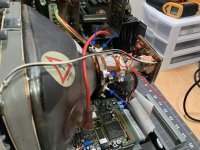 Note, that even though I executed this process and touched things while the CRT was on, I did not die! I am still alive! I think I'll go through and do this on basically all of my machines - they all need adjustment. Which leads to a question: why do these machines need adjustment? I think this is the most plausible explanation I've ever heard. | |
| < 2 |