68kMLA Classic Interface
This is a version of the 68kMLA forums for viewing on your favorite old mac. Visitors on modern platforms may prefer the main site.
| Click here to select a new forum. | |
| John's SE #1 Rebuild | |
| Posted by: Johnnya101 on 2019-02-04 11:10:24 Yes, they were always working fine, but Apple seems to have labeled all of the AB cardboard wrong maybe? They have the plus going one way, and minus the other, but when turning the screen the minus way it expands the screen instead of shrinking. It's opposite for some weird reason. Potato, I think you just have to rotate the yoke, and can even do it while running, but DONT TRY THAT without a confirmation. | |
| Posted by: SE30_Neal on 2019-02-04 11:17:15 I’m to scared to touch the screen side of things, same as you Potato | |
| Posted by: LaPorta on 2019-02-04 11:19:04 You can do as John said. There is a retaining screw that tightens a collar that keeps the yoke from rotating. With that screw loose, you can rotate it freely. You can also adjust pinching with the deflection magnets in the back. Here is a good thread on it: There are also some good articles on adjusting arcade machine monitors, which are the same thing...except compact macs are easier since they have B&W screens. I believe adjustment procedures exist in Pina's guides as well. | |
| Posted by: Johnnya101 on 2019-02-04 11:24:36 Think Ill leave SE #1 as is, because rotating it so the video is off the burn in will look odd. | |
| Posted by: K Trueno on 2019-04-17 11:08:17 Bumping an old thread, but, have a machine where width is way out of whack! So when I went to adjust the width portion there is "nothing" in the width adjustment hole. That is, I see something that looks like a wound spring in a metal tube where I expected to see a "pot" or a "screwhead". I see one in the height adjustment hole but there is a literal hole in the width one. Thoughts? | |
| Posted by: unity on 2019-04-17 11:46:36 You use a PLASTIC Allen-type (hex) screwdriver to adjust those. Do not use anything metal while in operation. Cheap things like these usually work. https://www.ebay.com/itm/6-Pc-TV-Radio-CB-Ham-Alignment-Tool-Kit-Set-Philmore-63-8454-NIP/122426208479?hash=item1c812bb0df:g:IbMAAOSwQaJXRQLz | |
Posted by: K Trueno on 2019-04-17 12:01:32You use a PLASTIC Allen-type (hex) screwdriver to adjust those. Do not use anything metal while in operation. Cheap things like these usually work. Right! I read about the dangers of using a screwdriver, so I have a whittled down wooden chopstick 🙂 It worked for brightness. But... there is _nothing_ to turn in the width. It is a hole, it looks like a metal spring in a straw and I can see right through it. I could push a skewer through. So I am confused, I am supposed to turn the "spring"? | |
| Posted by: SE30_Neal on 2019-04-17 12:09:12 I never worked that out if I’m honest either :/ | |
| Posted by: unity on 2019-04-17 12:36:50 Pics? But I am still certain you are just looking at an adjustment pot. If you look inside you should be able to see the hex shape. | |
Posted by: K Trueno on 2019-04-17 12:49:28Pics? But I am still certain you are just looking at an adjustment pot. If you look inside you should be able to see the hex shape. Don't have it handy at the moment, but, the hole on shield lines up with a hole on the PCB which leads to the tube/straw thing circled, and it is hollow. No screw or hex anything inside. Its like looking down an empty toilet paper tube 🙂 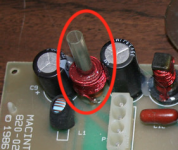 | |
| Posted by: CC_333 on 2019-04-17 12:53:01 The width adjustment is a coil with a pressed-metal slug inside, which is threaded. One turns that slug (which has a hex/Allen key shaped hole running through) to adjust the width. Judging by your description and the picture, I'd say that the slug is probably stripped out, probably because it crumbled when you or someone in the past tried to adjust it (in my experience, I've found that they tend to be rather brittle, and hence tend to crumble if one isn't too careful while adjusting them, especially with metal tools (used when the machine is off)). The best/easiest solution is probably to find a new, intact slug somehow. c | |
| Posted by: K Trueno on 2019-04-17 13:06:13 Right, so there should be something in that spring in that tube.. makes sense! I guess if I can get my hands on a parts machine I might be able to thread one out and thread one in? Or just replace the whole part altogether. Mystery solved, thanks for everyones help and insight! | |
| Posted by: SE30_Neal on 2019-04-17 13:54:39 So what’s that do? I thought the screen adjustments where on the cardboard side? Of the a/b analogue board | |
| Posted by: unity on 2019-04-17 15:20:03 Odd. On the bottom of that should be the hex part. Look through the other side, should be there. I guess they can strip out but I never have seen that before. | |
Posted by: K Trueno on 2019-04-17 21:12:18Odd. On the bottom of that should be the hex part. Look through the other side, should be there. I guess they can strip out but I never have seen that before. Yup, its gonzo! Here is a pic, I'm holding a blue piece of cardboard behind it. 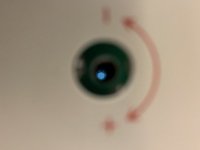 | |
| Posted by: K Trueno on 2019-04-17 21:41:51 Oh I am wrong! Its see through but the inside is the hex shape, so its not a screw but its a barrel that spins within the "straw". Ahhhh maybe that will help you SE30_Neal! | |
| Posted by: unity on 2019-04-17 21:54:40 Yeah... thats what I said. | |
Posted by: K Trueno on 2019-04-17 21:58:24(which has a hex/Allen key shaped hole running through) Yeah... thats what I said.Yup indeed. My confusion came from expecting a screw head of some sort. Thank you all! | |
| Posted by: unity on 2019-04-17 22:21:27 Easiest fix ever 🙂 | |
Posted by: SE30_Neal on 2019-04-17 22:44:48Oh I am wrong! Its see through but the inside is the hex shape, so its not a screw but its a barrel that spins within the "straw". Ahhhh maybe that will help you SE30_Neal!Thanks Trueno. I have just brought a replacement analogue board so it’s a good time to look at this and align the screen properly once ive re-capped it of course 🙂 | |
| < 2 |