68kMLA Classic Interface
This is a version of the 68kMLA forums for viewing on your favorite old mac. Visitors on modern platforms may prefer the main site.
| Click here to select a new forum. | |
| Building a Spotify player for my Mac SE/30 | |
| Posted by: dave@se30.com on 2018-12-20 08:53:38 Dope ! How have I not heard about 68kmla.com before now ?!!! | |
Posted by: gingerbeardman on 2018-12-21 02:23:47...Spotify is the only streaming provider I'm aware of that streams music from the target device - and not from the source device, if that makes sense?AirPlay hands off a URL to the target device, in most cases. So: Apple Music via speakers, YouTube via Apple TV, etc Anyway, awesome work! | |
| Posted by: gpz500 on 2018-12-21 07:50:49 Very, very impressive! | |
| Posted by: just.in.time on 2019-01-20 20:38:42 This is way cool! I have everything necessary, except that specific router. However, my router is OpenWRT compatible. Maybe this is the project that makes it worth trying out. Also, for anyone interested, Amazon Echos can be used as Spotify connect targets as well. I imagine other smart speakers also work if they have Spotify support... maybe Sonos? | |
| Posted by: just.in.time on 2019-01-20 22:40:01 Just kidding. My router was only "Supported*" where the asterisk was a whole lot of broken features. So I ordered a GL-AR300M. Amazon has a deal going on right now for the model without the external antennas for $40, plus 10% off at checkout. OpenWRT comes preinstalled. I'll update on my progress of following your setup in a week or so. | |
| Posted by: nonzero on 2019-04-24 14:18:55 What programming environment and/or compiler did you use? | |
Posted by: ants on 2019-04-25 13:28:51What programming environment and/or compiler did you use?I use the Retro68 compiler on my Windows 10 machine. I use the Visual Studio IDE. I also have Basilisk II installed on my PC to test builds. | |
| Posted by: olePigeon on 2019-04-25 13:33:31 Can I make a small recommendation? Since it's used for "Spotify," you should use Clarus the Dogcow somewhere. He has spots. 🙂 And he can fetch your music. 😀 | |
Posted by: ants on 2019-04-27 17:24:09Can I make a small recommendation? Since it's used for "Spotify," you should use Clarus the Dogcow somewhere. He has spots. 🙂 And he can fetch your music. 😀I'll keep that in mind for the next release! The current logo looks like this which is not nearly as interesting: 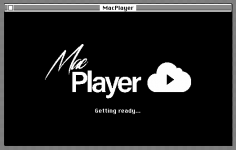 | |
| Posted by: 10001001sos on 2019-05-21 15:32:32 Awesome!!! 😎 This looks so cool! If only these sort of things existed back in the day... ;-) | |
| Posted by: just.in.time on 2019-08-12 19:41:31 @ants I'm trying to get this set up, however I seem to be hitting a roadblock. While trying to upgrade my GL-AR300m mini router to a current (18.x) version of OpenWRT (using image openwrt-18.06.4-ar71xx-generic-gl-ar300m-squashfs-sysupgrade.bin) from within the Luci interface, I get the message "The uploaded image file does not contain a supported format. Make sure that you choose the generic image format for your platform." I have re-downloaded a few times, using both safari and firefox but always get the same error. Also tried openwrt-18.06.0-ar71xx-generic-gl-ar300m-squashfs-sysupgrade.bin but still get the same message. Any ideas? | |
| Posted by: ants on 2019-08-12 20:26:07 @just.in.time That looks like the same package I used. Do you know if your GL-AR300M is the cheaper version with Nor Flash memory, or the better one with Nand memory? (models are here) Mine is the cheaper GL-AR300M16-Ext which uses Nor memory. The reason I mention it is because in the OpenWRT packages there is another folder called nand, which I wonder is for devices with Nand memory? https://downloads.openwrt.org/releases/18.06.4/targets/ar71xx/nand/ You could perhaps try this file? https://downloads.openwrt.org/releases/18.06.4/targets/ar71xx/nand/openwrt-18.06.4-ar71xx-nand-domywifi-dw33d-squashfs-sysupgrade.bin | |
| Posted by: just.in.time on 2019-08-12 21:15:03 @ants Gave that image a try, but still the same error. Basic Interface (non-advanced settings): Listed at bottom of screen: Model ar300m NAND (so I think you are right on the nand version, I'll give a few more nand options a try) Luci Interface: Here are some details from the system: Model: GL-AR300M Firmware: LEDE Reboot 17.01.4 r3560-79f57e422d / LuCI lede-17.01 branch (git-17.290.79498-d3f0685) System/Software/Configuration/Distribution Feeds: src/gz packages http://www.gl-inet.com/lede/2.27/ar71xx/nand (so again I think you are right about the nand memory) Details from System Log: Mon Apr 9 21:17:36 2018 kern.info kernel: [ 0.000000] CPU0 revision is: 00019374 (MIPS 24Kc) Mon Apr 9 21:17:36 2018 kern.info kernel: [ 0.000000] SoC: Qualcomm Atheros QCA9533 ver 2 rev 0 Mon Apr 9 21:17:36 2018 kern.info kernel: [ 0.117209] MIPS: machine is GL-AR300M Mon Apr 9 21:17:36 2018 kern.info kernel: [ 0.834536] nand: device found, Manufacturer ID: 0xc8, Chip ID: 0xb1 Mon Apr 9 21:17:36 2018 kern.info kernel: [ 0.841168] nand: Giga Device GD5F1GQ4U 1G 3.3V 8-bit Mon Apr 9 21:17:36 2018 kern.info kernel: [ 0.846381] nand: 128 MiB, SLC, erase size: 128 KiB, page size: 2048, OOB size: 128 I'll keep digging around in that NAND directory at openwrt's site, maybe one of them will do the trick. Thank you for the tip on memory type differences. | |
| Posted by: ants on 2019-08-12 21:39:43 @just.in.time sorry, if I had of known the packages were different I would have made this clear on my GitHub readme 🙁 I also found this on the OpenWRT site: https://openwrt.org/unsupported/nand_flash Note the table at the bottom: 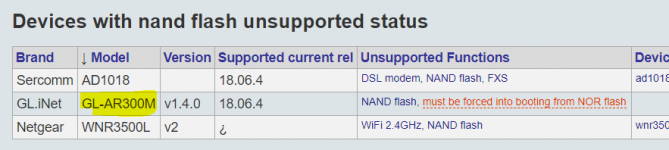 It says must be forced into booting from NOR flash - but the link goes to an empty page! Perhaps there info elsewhere on the web that explains how to boot your device from the NOR flash. Then, I assume the standard system upgrade would work. Sorry :-/ | |
| Posted by: just.in.time on 2019-08-12 21:54:18 @ants I was actually just typing up an update when I saw your reply. I found that same OpenWRT page too (https://openwrt.org/unsupported/nand_flash). No worries, now we know so we can document this so that anyone else that attempts this setup knows which version to purchase. 🙂 Did some quick research, and it looks like the GL-AR300M NAND memory portion isn't supported for the installation of OpenWRT. The NAND version does supposedly also have some NOR memory on board, but getting the ar300m/-ext to check there for booting purposes is an exercise (after enough failed boot attempts from nand memory it might attempt booting from nor memory for one boot cycle). And even then, it's unclear if the onboard software will allow the "nor" version of OpenWRT 18.06.x to be applied. So based on all this, the "safe" list of GL-AR300M versions are: GL-AR300M16 (internal antennas, 16m NOR memory only) GL-AR300M16-Ext (external antennas, 16m NOR memory only) --The version you (@ants) are using And the two that aren't supported at this point in time (at least, not without some sort of workaround): GL-AR300M (internal antennas, 128m NAND memory and maybe 16m NOR memory as fallback) GL-AR300M-Ext (external antennas, 128m NAND memory and maybe 16m NOR memory as fallback) The product info above I found at https://www.gl-inet.com/products/gl-ar300m/ | |
| Posted by: ants on 2019-08-13 03:26:02 @just.in.time thanks for the information. To make myself feel a little better, I've updated the Readme on the GitHub page with this information: https://github.com/antscode/MacWifi | |
| Posted by: just.in.time on 2019-08-13 12:32:45 @ants Thank you for all your help on this. Do you remember which retailer you got your 16M version at? Both Amazon and Newegg only carry the 16M version with internal antennas. | |
| Posted by: ants on 2019-08-13 16:31:47 eBay. This is the exact one I bought, but there might be cheaper sellers around: https://www.ebay.com.au/itm/GL-AR300M16-Ext-mini-router-300Mbps-WiFi-OpenWrt-Repeater-OpenVPN/223044703527 | |
| Posted by: Mu0n on 2019-08-14 15:43:12 Very cool although I'm not enough of an internet connectivity buff to try it out with all the requirements you listed. | |
| Posted by: corgski on 2019-10-21 18:38:41 Oooh this is neat! I'm going to have to look at this and see if I can't adapt it to work with something like the MITM-capable version of Squid I have on my home server instead of depending on that specific openWRT setup. (Or port the OpenWRT setup to work on mikrotik routers.) | |
| Posted by: Aeroform on 2021-10-23 09:07:45 This is insanely cool! Thank you @ants for doing this. 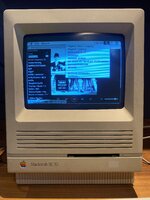 | |
| < 2 > |