68kMLA Classic Interface
This is a version of the 68kMLA forums for viewing on your favorite old mac. Visitors on modern platforms may prefer the main site.
| Click here to select a new forum. | |
| How to make disks for a IIGS? | |
| Posted by: LaPorta on 2018-10-05 10:06:33 If you have a 1.4 MB drive for the IIgs, you are golden. Otherwise, there is no USB drive in existence that will write 800ks. You will still need an old Mac. | |
| Posted by: EvieSigma on 2018-10-05 19:12:55 Well yes, but if you use something like an iBook G4 you can write the files to HFS formatted floppy disks to get them to the old Mac if you have no other way. | |
| Posted by: Retro Rider on 2018-10-05 21:33:23 I think I just figured it out! I just made a GS/OS boot disk!! So, I put the files onto a flash drive and then put the flash drive onto my Rev. B iMac G3 (which runs Mac OS 9.2) then put those files onto a floppy disk (via a USB floppy drive) then transfer it to a older machine, one with a floppy drive and that can format to Prodos disk (I used a Power Mac 4400/200). Then, on the older computer, you get another 1.44 floppy (preferably one you don't need) and put tape over the hole on the right side of the disk and insert it, it'll ask you if you'll wanna format it to ProDOS version. Then take the first floppy and copy the files from the first floppy and put it onto the second. That should be it! | |
| Posted by: EvieSigma on 2018-10-09 14:20:33 Been struggling a lot to make a boot disk because everything I find is in .2mg format, which Disk Copy 6.3 and DiskDup+ can't do anything with. I even tried Disk Copy 4.2 and that didn't work either. I know Apple had ProDOS disk images for GS/OS hosted on their site, is there a backup of those images? EDIT: I tried using a program called CiderPress to convert a .2mg to a .dsk but the .dsk file isn't being recognized by Disk Copy 4.2 either. | |
| Posted by: Gorgonops on 2018-10-09 15:06:00 If you have a Windows box lying around I believe CiderPress can convert .2mg to Diskcopy 4.2 format. Yes, it'd be pretty mickey-mouse to have to do that but it should work in principle. (IE, convert them on windows, copy them to the mac, go from there.) | |
| Posted by: EvieSigma on 2018-10-09 15:44:44 I did use CiderPress but then I had to use ResEdit on the Mac itself to make the DiskCopy files usable. It's finally working now though! | |
| Posted by: NJRoadfan on 2018-10-10 19:24:16 At that point, I would just get ADTPro setup and create disks that way. Yes, it requires a serial cable, but the program makes everything SOOOO much easier then the Disk Copy floppy shuffle on an old Mac. | |
| Posted by: EvieSigma on 2018-10-10 19:55:37 How new of a Windows machine do I need to run ADTPro? I'm thinking of trying to find an old laptop with a serial port to do it. | |
| Posted by: Gorgonops on 2018-10-10 21:08:02 It needs to be able to run a Java JRE, that's pretty much it. It'll run on Linux or OS X as well. | |
| Posted by: EvieSigma on 2018-10-10 21:48:47 I know I have a DE9 to mini-DIN8 serial cable around here somewhere so I'll have to find that and a suitable PC and give it a shot. | |
| Posted by: Zippy Zapp on 2018-10-16 11:15:03 I have a variety of Macs that can write images back to floppy. I mainly use a Beige G3 desktop for that because it has a decent sized HD and USB. I wrote my IIGS disks using that. Curious though, my Apple IIGS floppy drive says 1.4MB near the eject. It is an Apple drive but it only reads 800k. Didn't Apple sell an interface board that you had to plug the 1.4MB drives into because the built in one can never work with a full 1.4? IIRC that is the expensive part. I could be wrong because I was never really into Apple that much until later on. | |
Posted by: Gorgonops on 2018-10-16 12:05:50Curious though, my Apple IIGS floppy drive says 1.4MB near the eject. It is an Apple drive but it only reads 800k...What is the model number of the drive? Apple sold an external Superdrive in the same case as the 800k drive, the model numbers are G7287 (1.44mb) and A9M0106 (800k) respectively. The Superdrive version will work with a IIgs but, yes, to use it at its full capacity you need a rare interface board. Otherwise it's functionally identical to the 800k drive. Reactive Micro sold a clone of that interface board and, yes, it cost a fair chunk of cash. | |
| Posted by: Zippy Zapp on 2018-10-16 12:13:21 I have a picture of it on my MacBook here so I have attached it so you can see the front of the drive. I don't have a picture of the model number, though. I will check it when I get home. 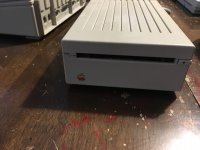 | |
| Posted by: olePigeon on 2018-10-17 13:53:50 You can also just swap a SuperDrive into the 800k case. | |
Posted by: Zippy Zapp on 2018-10-20 13:10:07What is the model number of the drive? Apple sold an external Superdrive in the same case as the 800k drive, the model numbers are G7287 (1.44mb) and A9M0106 (800k) respectively. The Superdrive version will work with a IIgs but, yes, to use it at its full capacity you need a rare interface board. Otherwise it's functionally identical to the 800k drive.Hmm. Mine is the A9M0106. Weird it is 800k model but the label on the drive says 1.4MB. I haven't opened it in a while. Do these drives also work with Macs that have an external floppy drive connector? | |
Posted by: Gorgonops on 2018-10-20 13:50:22Do these drives also work with Macs that have an external floppy drive connector?Yes. As olePigeon noted it's possible someone changed the internal mechanism and labeled it appropriately. Inside those drives is a normal MacII-era mechanism cabled to an adapter board that provides the daisy chain function, a SuperDrive cables right up. | |
| Posted by: Zippy Zapp on 2018-10-24 14:37:03 Cool. Thanks for the info. This is the first Apple II I have ever owned. I used them in high school but that was the extent. | |
| Posted by: LaPorta on 2018-11-01 04:59:23 I must say, im not familiar with .2mg. What format is that? | |
| Posted by: Retro Rider on 2018-11-01 08:15:42 It's for apple ii emulators. It's basically like a .img (or .vdi on how you look at it) for apple ii, kinda | |
Posted by: Dog Cow on 2018-11-01 13:17:31I must say,It's Universal Disk Image. | |
| < 2 > |