68kMLA Classic Interface
This is a version of the 68kMLA forums for viewing on your favorite old mac. Visitors on modern platforms may prefer the main site.
| Click here to select a new forum. | |
| Kendall's Collection and Finds! | |
Posted by: Byrd on 2015-12-01 13:48:53Isnt it just a badge put there?Badge ripped from an Apple II and stuck down I'd say. My 21'" iMac has a 512K badge 🙂 | |
| Posted by: khannonnd on 2015-12-01 14:01:44 Interesting. Now my internal debate is whether to remove it for "originality" sake or not! | |
| Posted by: Tiptoeturtle on 2015-12-01 14:31:29 I read last night that to format a 3.5" double density diskette to 400K single sided in an 800K double sided drive or to format a 3.5" double density disketter to 400K in a 1440K double sided drive, hold down the <Option> key (while inserting a blank, unformatted / uninitialised diskette in the drive). You will need to using a sufficiently old release of the operating system on a sufficiently old Macintosh at the time. | |
Posted by: khannonnd on 2015-12-01 14:33:56I read last night that to format a 3.5" double density diskette to 400K single sided in an 800K double sided drive or to format a 3.5" double density disketter to 400K in a 1440K double sided drive, hold down the <Option> key (while inserting a blank, unformatted / uninitialised diskette in the drive). You will need to using a sufficiently old release of the operating system on a sufficiently old Macintosh at the time.Hm. Yesterday I just used my Mac Plus to format some disks. They are double density disks. When I inserted the blank ones it gave me the option to format them either single sided or double sided. I chose single side and they formatted to just under 400k. Those will work in a 400k drive, right? | |
| Posted by: Tiptoeturtle on 2015-12-01 14:59:53 Correct. Also, in the old manual I was reading last night, it warned not to format / initialise High Density 1440KB diskettes to anything other than 1440KB. It is possible, but unwise, to initialise a 1440KB diskette as either a 400KB or an 800KB diskette when using a 400KB or an 800KB drive, because (from what I remember of what I read), if you ever put a 1440-formatted-as-400 or a 1440-formatted-as-800 into a 1440KB drive, the operating system will report the diskette is unreadable and ask you to initialise it, again. | |
Posted by: Gorgonops on 2015-12-01 15:00:38I chose single side and they formatted to just under 400k. Those will work in a 400k drive, right?Yes. The "400k" drive is 400K because it only used one side (vs. both in an 800k drive), and by default MacOS always formats 400k disks as MFS. (IE, the original 128k-compatible Mac filesystem.) | |
Posted by: Gorgonops on 2015-12-01 15:25:46if you ever put a 1440-formatted-as-400 or a 1440-formatted-as-800 into a 1440KB drive, the operating system will report the diskette is unreadable and ask you to initialise it, again.You can get around that by putting a piece of tape over the density detect hole. (That's the hole in an HD disk opposite of the write protect switch.) The real problem with using 1.44mb floppies as low density is they're just not particularly reliable when formatted like that. *How* reliable depends on the media, the drives, the phase of the moon... etc. In my experience my M0106 drive seems to "mostly work" with HD disks, but the internal 400k drive on my 400k is much more skeptical of them. Fair warning also: The original 400k drives, or at least the one in my machine, seems to have a "disk-present" sensor that shines right through the density select hole, so the internal drive doesn't see an HD disk *unless* there's tape over that hole. | |
| Posted by: Canby Fat Mac on 2015-12-03 13:22:36 That could also be a back badge of a 128/512k, the front badge apple is case color and the back badge is the color of the background of the back "Macintosh" / "Macintosh 512K" badge which it brown. | |
| Posted by: khannonnd on 2015-12-05 17:12:25 My setup, now newly revised in light of my recent acquisitions and repair (and with fake Christmas tree spirit). 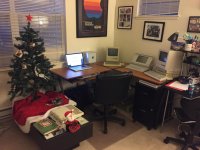 | |
| Posted by: Juror22 on 2015-12-05 18:57:12 That is an awesome setup - I need less clutter... or a display area. Yours looks so nice! | |
Posted by: khannonnd on 2015-12-05 19:16:51That is an awesome setup - I need less clutter... or a display area. Yours looks so nice!I am going to need to find a place for my Appel IIc. I don't want to replace the Mac Plus because its such a nice complete system with the HD20. I could put it where my Macbook Pro is right now, but then I would have nowhere to use my internet capable modern machine, lol | |
Posted by: khannonnd on 2015-12-05 19:57:50That is an awesome setup - I need less clutter... or a display area. Yours looks so nice!What machines do you have? I have found that my corner desk is very versatile for displaying the machines. | |
| Posted by: khannonnd on 2015-12-07 14:19:31 Just got my Apple IIc screen, so I was finally able to confirm that the machine (including the disk drive) works! Does anyone have any useful primers on how to use an Apple II? I haven't used one since I was in elementary school, and even then it was only to play Oregon trail. When I turn the machine on, it just says "Check Disk Drive," even if I put a disk in it. If I have a disk in it before I turn it on, it loads the disk. Is there a command/button combo to get it to read a disk I insert AFTER I turn it on? Any list of key combos/commands would be useful and appreciated 🙂 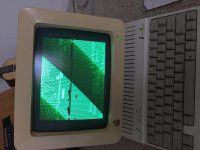 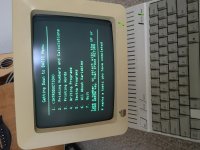 | |
| Posted by: XBHS1997 on 2015-12-07 16:25:55 Congratulations! Great finds so far! | |
| Posted by: falen5 on 2015-12-07 17:43:56 heres mine for ya - irish style - weh hey - - -- the more time that passes... the more i want to be back there....feck! im getting old!!!!!!!! 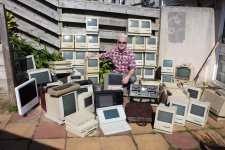 | |
| Posted by: khannonnd on 2015-12-07 17:58:03 Oh my goodness! Want! All of them. You are from Ireland or you live there now? | |
Posted by: Tiptoeturtle on 2015-12-08 14:18:27When I turn the machine on, it just says "Check Disk Drive," even if I put a disk in it. If I have a disk in it before I turn it on, it loads the disk. Is there a command/button combo to get it to read a disk I insert AFTER I turn it on?At the BASIC prompt (which from memory looked like either ] or >😉 type PR#6 Enter to boot from 5.25" internal drive, or PR#5 to boot from external 3.5" Unidisk (if it has the updated MON ROM, the original ROM in earlier //c shipped did not have the intelligence to recognise and use 3.5" diskette drives). All this is from memory, without checking, I could be wrong. If you do not see the BASIC prompt, press reset (if it has a reset key) as then I think the BASIC prompt should appear. Another possibility might be Control-C or Control-C Enter | |
| Posted by: tanaquil on 2015-12-08 17:59:29 Apple IIc: very nice! I wish I could advise you. I have my family's old Apple IIe in the basement (it was working last I tried some 15 years ago) but I have next to no memory of how to run it. One of these days, if I can get the mac collection corralled, I'll try to get the Apple IIe up and running again. | |
| Posted by: khannonnd on 2015-12-20 15:20:47 Picked up an Apple II plus, green screen monitor, and Disk II on Craigslist. I am new to the Apple II world -- can someone identify the two cards and third "add on" I found inside the machine? (See pictures attached). I also have a question -- when I tried to load a couple of games, it said that it could not run them because the diskette required 64k of RAM. I was confused by this because this Apple II plus has the language card in it and therefore HAS 64k of RAM. Also one of the games (Oregon Trail) is one that I see all sorts of Apple II plus-es running on Youtube.. Also, sometimes when I turn on the power to the machine, the disk II's red light turns on and it sounds like it is working (whether there is a disk in there or not) and it never does anything.... Thanks! | |
| Posted by: khannonnd on 2015-12-20 15:22:07 Picked up an Apple II plus, green screen monitor, and Disk II on Craigslist. I am new to the Apple II world -- can someone identify the two cards and third "add on" I found inside the machine? (See pictures attached). I also have a question -- when I tried to load a couple of games, it said that it could not run them because the diskette required 64k of RAM. I was confused by this because this Apple II plus has the language card in it and therefore HAS 64k of RAM. Also one of the games (Oregon Trail) is one that I see all sorts of Apple II plus-es running on Youtube.. Also, sometimes when I turn on the power to the machine, the disk II's red light turns on and it sounds like it is working (whether there is a disk in there or not) and it never does anything.... Thanks! 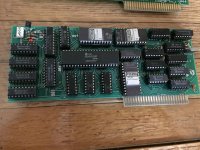 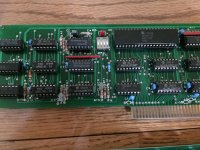 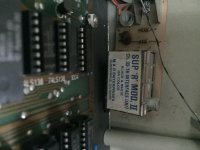 | |
| < 2 > |