68kMLA Classic Interface
This is a version of the 68kMLA forums for viewing on your favorite old mac. Visitors on modern platforms may prefer the main site.
| Click here to select a new forum. | |
| PowerBook 150 - screens all destroyed?! | |
| Posted by: Unknown_K on 2017-12-31 19:23:09 What did you clean the displays with before they were put on the shelf? | |
Posted by: digitalrampage on 2018-01-01 15:03:17What did you clean the displays with before they were put on the shelf?Nothing, they are in original condition from three sources. Have not serviced these yet. Completely untouched and the storage conditions are the same for all of my PB 100 series, only the 150's are affected. | |
| Posted by: PB145B on 2018-01-02 23:36:38 Man that sucks! My Compaq Contura 4/25 had this same problem when I got it but I managed to find an NOS LCD panel for it. | |
| Posted by: techknight on 2018-01-04 09:08:04 These things were stored in extremely high temperatures for an extended period of time. No doubt about it. This is what happens to the LCDs from that. This probably caused the adhesive to break down over time. The reason why I am saying heat is because if you take a heatgun to an LCD which I have before (out of nefariousness), you get the same results. I remember seeing this on some other powerbooks on ebay. Edit: Ah, here is one: https://www.ebay.com/itm/VINTAGE-MACKINTOSH-POWERBOOK-140-USED-UNTESTED/330785443351?hash=item4d04594e17:g:uK8AAOSw5dNWqjlA Similar deal. Good news is, you can get replacement polarizing film with adhesive. It isnt cheap but its doable and easily fixed if your careful. | |
| Posted by: techgeek on 2018-01-07 15:35:13 I feel for you! Had the same experience a few days ago. Happened to my PB 2300c, 520c, 230 duo and surprise, surprise my PB G3 Lombard. Will try to attach pictures later this week. They were all stored at a normal room temperature with the dehumidifier constantly running. Interestingly, I also have quite a few vintage PC laptops (mostly Toshibas from the same time period) some even stored in the same cabinets, but they seem to be perfectly fine! I searched various forums, but couldn't find much information about this phenomenon. | |
| Posted by: techknight on 2018-01-07 16:24:06 I think it all depends on their previous life and exposures. I know alot of the PB170/180 machines had tunneling, but mine does NOT so it may have been stored differently. But its hard to say. | |
Posted by: PB145B on 2018-01-07 21:27:28Good news is, you can get replacement polarizing film with adhesive. It isnt cheap but its doable and easily fixed if your careful.Cool! I still have the old display from my Compaq Contura so I may try this. | |
Posted by: Byrd on 2018-01-07 22:02:17I think it all depends on their previous life and exposures. I know alot of the PB170/180 machines had tunneling, but mine does NOT so it may have been stored differently. Reckon it's just down to hours of use; the CCFL gases wear out either end like any other household CCFL when used extensively. You're right on the polarising film; had a quick look and a small 5 - 10cm x 10cm sheet is $35 - 50. I wonder if a donor LCD could be used, for example from a cheap generic laptop, cut down? | |
| Posted by: techknight on 2018-01-09 15:27:34 "peeling" the film will ruin it. I have tried to re-use old polerizing film, and itll develop lines and marks from "peeling" and the inconsistent remaining adhesive will cause optical obstructions. | |
Posted by: digitalrampage on 2018-01-09 15:55:08"peeling" the film will ruin it. I have tried to re-use old polerizing film, and itll develop lines and marks from "peeling" and the inconsistent remaining adhesive will cause optical obstructions.Found a 145 at the office yesterday, exactly the same issue as my 150's. It could only be humidity related, three separate locations, all with the same. Surely there must be a way to remove, clear off the old adhesive and even just sit the polariser over the top? | |
| Posted by: Byrd on 2018-01-09 19:19:07 Poor man's fix: peel off polariser, then wear glasses with polarising film (DIY) :-/ | |
| Posted by: techgeek on 2018-01-13 15:18:32 Hi guys, I am sorry it took me so long to take the pictures I promised, but here they are. My collection of powerbooks was kept in two different rooms with our dehumidifier running all the time, because of a health condition. Since I am a chemist, it never even crossed my mind to clean the screens with solvents, so this can't be the reason for the excessive damage. Since last time I checked, the PB520 and Duo 2300c screens got even worse. The bright spot on the Duo 230 screen is not a flash light reflection, it is a polarizer damage. Any ideas of what might been causing the polarizer deterioration? 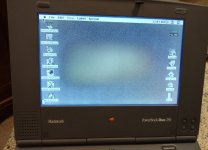 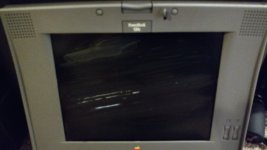 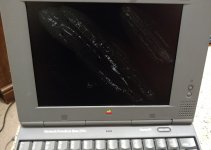  | |
| Posted by: Trash80toHP_Mini on 2018-01-13 16:11:57 YOWCH! Can you see the damage when the 'Books are powered down or do I need to go through my collection and test under power . . . those that'll power up. :/ | |
Posted by: digitalrampage on 2018-01-13 16:13:35YOWCH! Can you see the damage when the 'Books are powered down or do I need to go through my collection and test under power . . . those that'll power up. :/You can see it when off. | |
Posted by: digitalrampage on 2018-01-13 16:14:40Hi guys, I am sorry it took me so long to take the pictures I promised, but here they are. My collection of powerbooks was kept in two different rooms with our dehumidifier running all the time, because of a health condition. Since I am a chemist, it never even crossed my mind to clean the screens with solvents, so this can't be the reason for the excessive damage. Since last time I checked, the PB520 and Duo 2300c screens got even worse. The bright spot on the Duo 230 screen is not a flash light reflection, it is a polarizer damage. Any ideas of what might been causing the polarizer deterioration?Wow, just as bad.. Worse on some. Its like a bacterial growth. The last one certainly looks like mould, but I have a 180c with that "cracked" plastic too. Clearly something bad is going on =( | |
| Posted by: techknight on 2018-01-13 16:45:43 Crazy. I need to go through all of mine and double check everything. | |
Posted by: techgeek on 2018-01-13 17:18:04YOWCH! Can you see the damage when the 'Books are powered down or do I need to go through my collection and test under power . . . those that'll power up. :/Yes, you can see it on the Duo 230 - it looks as a slightly discolored area, but if I have not turned it on I may have not noticed it. On the PB G3 no way to tell - it is only visible when it is on. | |
| Posted by: techgeek on 2018-01-13 17:23:51 I have a few more which screens are still OK, but I am worried that these too will fail. I wonder if I should stop collecting powerbooks and collect only desktops from now on. | |
Posted by: PB145B on 2018-01-13 17:40:25I have a few more which screens are still OK, but I am worried that these too will fail. I wonder if I should stop collecting powerbooks and collect only desktops from now on.Why not buy some new film and see if you can fix them? That’s what I’d do. | |
| Posted by: techknight on 2018-01-13 17:46:43 Heres another one: https://www.ebay.com/itm/Apple-Macintosh-PowerBook-100-Laptop-Computer-Vintage-1991-UNTESTED/282652506188?hash=item41cf66f84c:g:dmAAAOSw1uRZuczT exhibiting the same sort of issues. | |
| < 2 > |