68kMLA Classic Interface
This is a version of the 68kMLA forums for viewing on your favorite old mac. Visitors on modern platforms may prefer the main site.
| Click here to select a new forum. | |
| EtherWave Mac/PB Adapter and Classic Mac | |
| Posted by: Paralel on 2013-09-25 13:16:23 According to the Farallon site in the Internet Archive, you do need a different driver than the driver for the Farallon Cards. This is the driver you need: http://web.archive.org/web/20000516202245/http://www.farallon.com/support/software/download/pbadapinstalld.html | |
| Posted by: mactjaap on 2013-09-25 13:52:59 OK! This gives hope! anyone who has this file? FENI222.sit.hqx PowerBook Adapter Installer 2.2.2 | |
| Posted by: Paralel on 2013-09-25 14:07:37 I have scoured the internets for you using Google and come up with nothing. Unless you can find someone here, LEM, or AppleFritter that has the driver, you are out to luck. If you do happen to find it, please share it here so it can be preserved for anyone else that needs it in the future. It's too bad they used FTP with Robots, if they had it inline with the webpage, being less than 1 MB, the Internet Archive would have just sucked it right up into the archive for indefinite preservation. | |
| Posted by: mactjaap on 2013-09-29 05:17:58 I did also some research and couldn't find the drivers too. Too bad! I did some research in things which are available and found out that my installer EN Card Installer 2.3 is probably the right driver. If you look at the proxim suppport (successors Farallon) site you can download a file called 59xv23.sit.hqx http://proximtechnicalservice.com/support/farallon/cards/download/59xv23.sit.hqx If you download it it is named FENI2.3.sit...so almost the same as FENI222.sit.hqx. I have the feeling that it should work...... Also the installation goes without problems. Normally the installation disk will complain it the hardware is not on board... So...please..please..please. If there are owners with a working EtherWave and with a driver disk....please help me to solve this mistery! I would also love to try the file FENI222.sit.hqx. Maybe someone has downloaded it in the past? 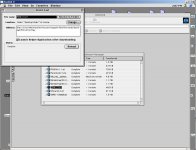 | |
| Posted by: max1zzz on 2013-09-29 13:11:53 had a look through my sources, would a file named "Farallon EtherWave 2.2.2.image.sit" be of use to anyone 😉 seems to fit what you guys are looking for http://files.max1zzz.co.uk/drivers/Farallon%20EtherWave%202.2.2.image.sit mounts fine on osx (after converting) | |
| Posted by: mactjaap on 2013-09-29 13:45:46 WOWWWWW GREAT! I start testing right away! Web server is ...going down....have to test! | |
| Posted by: mactjaap on 2013-09-29 14:20:30 I'm not lucky..... I put it on a 1.4 M disk ...called the disk Farallon EN Installer 2.2.2.. But it is complaining that: "This is not the correct "Farallon EN Installer 2.2.2" disk. What I'm I doing wrong? It also doesn't install from an external hard disk... | |
| Posted by: max1zzz on 2013-09-29 14:30:51 sorry to hear that, there must be some kind of disk check then i'll see if i can get any luck with the installer tommrow (however i don't actually have one of these etherwave adapters) Maybe someone here might be able to patch the check out? | |
| Posted by: Paralel on 2013-09-29 17:01:47 You shouldn't need the setup utility, you just need to drop the PB Adapter extension in the extensions folder. That should do it (this is assuming you want to run it in Ethernet mode" | |
| Posted by: mactjaap on 2013-09-29 22:35:28 No go! I added the PB Adapter extension in the Extension folder and rebooted. Still no extra choice in the Network control panel or MacTCP. I guess I really need to do the setup...... My latest guess is that I need to put the Installer maybe in the root of the floppy disk?? If someone else has a good idea..please let me know! | |
| Posted by: mactjaap on 2013-10-01 14:39:40 BIG SUCCESS!!!!! IT WORKS!!! On advice from one of our members I used Shrinkwrap to mount the disk. Then, with Extentions off, I installed the drivers with success. Now the PB Adapter can have a own IP adres from the normal Ethernet range I use in my house. So no macIPgw.... My PowerBook will be online tonight on: http://mac.vanegten.com Comming week I will make some screen shots to show how it works. | |
| Posted by: Trash80toHP_Mini on 2013-10-01 14:54:27 Dynamite, congrats! :approve: | |
| Posted by: Paralel on 2013-10-01 16:05:00 I'll have to go upload that file to Mac GUI so a copy will be around in the future. | |
| Posted by: markyb86 on 2013-10-01 16:17:42 Sorry that that image from my site never worked out, and now my site is also offline :/ I'm glad that you got this sorted out! | |
Posted by: CC_333 on 2013-10-01 16:23:21Sorry that that image from my site never worked out, and now my site is also offline :/Why is this? What happened?? I hope you get it back soon (assuming you didn't take it down intentionally, of course). c p.s. Did you ever sell your Plus? | |
| Posted by: markyb86 on 2013-10-01 17:43:44 Yes the plus was sold :'( also the site is down on purpose because I couldn't afford the renewals and the hosting :'( :'( It's all good. I have backups of everything and eventually it will go up on a free host. | |
| Posted by: mcdermd on 2013-10-01 19:00:52 Is it a personal, non-profit site? If so, send me a PM. | |
| Posted by: mactjaap on 2013-10-02 13:37:19 Tested it today on 7.1 and 7.5. Both install without any problems. I used Shrinkwrap on 7.5 and Diskcopy 6.3.3 on 7.1 Setup MacTCp as Ethernet Build-In and use an IP adress from the normal Ethernet range. I use as DNS my MacIPgw, which has a name server on board. So in my setup the PowerBook has 192.168.62.209, the router / gateway 192.168.62.1 and my MacIPgw (nameserver) 192.168.62.10 So...yes a EtherWave adapter can work with MacTCP without any gateway. It behaves as an Ethernet card. I'm glad that I could have tested this now! | |
| Posted by: mactjaap on 2013-10-03 11:51:36 To round it up. I bought the EtherWave adapter in June 2013. I didn’t work. A red light was burning. When I opened it up I found out that one of the capacitors was getting much to warm. I replaced it and I had green lights all over! When I connected it without any driver it worked like a normal hardware LocalBridge. You see the AppleTalk network, but cannot use it as an Alternative Ethernet card or switch to it in network or MacTCP control panel. Thanks to all our community I got the drivers. Many thanks for that again. I will attach the image I used for this on this post. The rest is simple. Just mount this disk and install the drivers on 7.1 or 7.5. Startup with Extentions Off (hold shift when booting). You see two images how the network control panel looks and the MacTCP control panel. 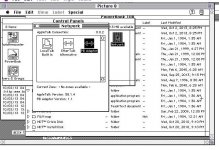 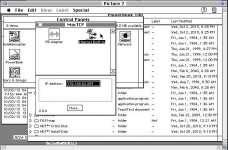 This is the image for the version 2.2.2. FarallonEtherWave.zip | |
| Posted by: techknight on 2013-10-03 19:12:24 too bad these things dont show up anymore. and when they do, they go for high $$$ on ebay. | |
| < 2 > |