68kMLA Classic Interface
This is a version of the 68kMLA forums for viewing on your favorite old mac. Visitors on modern platforms may prefer the main site.
| Click here to select a new forum. | |
| Video Capture on PCI Power Macs | |
| Posted by: trag on 2010-12-08 09:32:11 Thank you for the answers. We have some old videotape on the stuff before VHS (3/4"?, the huge decks that news rooms used with the giant tape cartridges). I've had a VVS system for about a decade but have just never made time to use it. I even had it installed in a PM8100/100, but getting the tape player set up near it was always too much trouble. Now I'm not even sure the old thing works any more. So if one captures old Videotape content with the Fuse or VideoVision, and wants to store it on a playable DVD, the path would be something like: 1) Capture MJPEG using OS 7.6.1 or some such. 2) Move MJPEG files to an OSX machine 3) Convert to MPEG2 or MPEG4 (h.264?) using...? How old of versions of Premier had problems? I think that the VVS came with v.4.2. | |
| Posted by: Unknown_K on 2010-12-08 14:22:00 Premiere 4.2.1 is the version you want, there is a patch to get to the .1 around if you need it. Not sure on the tools used in OSX, I never bothered to convert any capture to DVD. I do have an Apple videotape I captured using an RTMac I will convert to DVD one of these days. | |
| Posted by: ClassicHasClass on 2010-12-08 20:01:18 QuickTime 7.6 should be able to convert the MJPEG to MPEG-4 all by itself. MPEG-2 would require something like iDVD or the separately-purchased Apple MPEG-2 components. There's always the various Aquafied ffmpegs, of course, but I've never used them myself. EDIT: In fact, I just tested it on my Tiger system with some old video I captured from my Fuse card, and it plays and converts no problem (QT 7.6.4). | |
| Posted by: trag on 2010-12-08 20:50:52 Thanks, guys! Video has always been a bit of a mystery to me. | |
| Posted by: Bunsen on 2010-12-10 19:18:59 What ATI cards (PCI or AGP) are available that do capture (as well as output) under classic MacOS/OS X? Do they all require the external breakout box and special S-Video cable? | |
| Posted by: Unknown_K on 2010-12-10 22:12:06 Most of the old PCI capture cards for mac are OS9 only. ATI made a bunch of All In Wonder cards for the PC (AIW) but not for the mac I don't think. There is an ATI card with video capture sold on the budget B&W G3's for schools (Rage Pro based PCI). | |
| Posted by: lastmile77 on 2011-09-07 07:05:07 Finally found a really nice 8500 semi-local and cheap. After the usual UV treatment to bring the plastics back to beige it will be like new. 🙂 Does anyone know if the video capture circuitry on the 8500 shares bandwidth with the PCI slots? | |
Posted by: trag on 2011-09-07 09:34:15Finally found a really nice 8500 semi-local and cheap. After the usual UV treatment to bring the plastics back to beige it will be like new. 🙂In effect, the video capture is on it's own PCI bus. It's not actually a PCI bus, though. It's a bridge chip on the CPU/Memory bus. So, the Bandit PCI Bridge is a device on the CPU/Memory bus, and the video capture chip is also a device resident on the CPU/Memory bus. So video capture isn't going to interfere with PCI bandwidth, except to the extent that anything which takes CPU cycles/attention also takes PCI bandwidth. | |
| Posted by: lastmile77 on 2011-09-07 16:35:51 Thanks. Do you know if there's a diagram of how the different components on the logicboard communicate? I've seen them for other types of computers and even found one for G4 but no luck on other Macs yet. EDIT: Found it - see attachment. 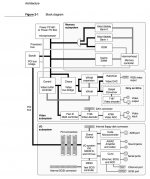 | |
| < 2 |