68kMLA Classic Interface
This is a version of the 68kMLA forums for viewing on your favorite old mac. Visitors on modern platforms may prefer the main site.
| Click here to select a new forum. | |
| The Great Gazelle PCI Hack Thread, Part 2 | |
Posted by: joevt on 2024-09-24 03:30:17If you're using the later and better approach (I can't remember who came up with that, sorry, and I don't have the time to look back through the thread right now - @joevt I think it was you?) then I would also be pretty surprised by a performance difference, but my surprise would be far less well-founded.My patch was originally posted here (at the bottom): https://68kmla.org/bb/index.php?threads/the-great-gazelle-pci-hack-thread-part-2.38360/post-467825 It's useful because it is not OrangeMicro or Sonnet specific. Only thing I can think of is whether the slowdown is to do with enabling USB or FW in the OS itself. In other words, "does having working USB hardware attached cause higher CPU usage somewhere", rather than "does the patch cause a performance issue". I've never done or seen any comparative benchmarks here, so that's a pure wild hypothesis.Both patches should allow USB to work. The question is, for each patch, was the system setup the same when doing the benchmarks? | |
Posted by: cheesestraws on 2024-09-24 04:41:48My patch was originally posted here (at the bottom): That was the one I was thinking of, thanks 🙂 | |
Posted by: Superdos on 2024-09-24 09:10:58In other words, "does having working USB hardware attached cause higher CPU usage somewhere", rather than "does the patch cause a performance issue". I've never done or seen any comparative benchmarks here, so that's a pure wild hypothesis. Given it's worth testing for science reasons, I don't see why I couldn't go and zap the PRAM once more and take another benchmark, just to be sure. I'll get to that a little later on this evening and post my findings. | |
Posted by: Superdos on 2024-09-24 17:42:46My patch was originally posted here (at the bottom):So for this, the system setup is exactly the same between all tests, with the exception of the NVRAM contents. 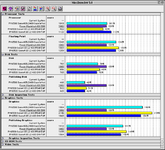 Where OM-FWP is the Orange Micro patch, and the others should be fairly easy to figure out. Interestingly enough here on the processor tests, you can see where it's now reading just a bit higher than baseline with the gazelle contents. FPU seems to take a slight hit for some reason over having nothing in the NVRAM, with nothing going on at that, and I even made sure to start the tests with the keyboard and not the USB connected mouse (MS Wheel Mouse Optical with the appropriate Intellipoint extension loaded). In all tests it seems there's definitely a performance increase having a freshly zapped PRAM, and even after shutdown/restart. for the zapped PRAM the mouse does not work, so I had to make use of an ADB-attached pointing device. Now that these scores are here, hopefully it gives a baseline to work against with this mod in place. once again there's:
| |
| Posted by: joevt on 2024-09-24 18:16:00 I wonder if there's an error margin? Does running the benchmark 5 times show any kind of variability? | |
Posted by: Superdos on 2024-09-24 19:55:59I wonder if there's an error margin? Does running the benchmark 5 times show any kind of variability?Let me go and try that. Is there any test specifically you want me to try multiples of, or do you want me to just run CPU/FPU? | |
| Posted by: joevt on 2024-09-24 22:06:38 Just CPU/FPU | |
Posted by: Superdos on 2024-09-24 22:36:08Just CPU/FPUso I did it with the gazelle mod enabled, the CPU scores this time around were a 983 solid after both a cold and warm reboot. FPU scores stayed around 1240 as well, compared to the graphs above. further testing also noted something else, I tried to do anything else to get the scores to drop intentionally whether it was using the ADB mouse or the USB mouse, and noticed when I moved the USB mouse around, FPU performance went down a lot, by 120-150 points or so. however, the CPU performance stayed the same. benchmarking this system really is puzzling. I don't know if the nvram code itself is the cause anymore or if something else is afoot. it's obvious the FPU bench would go down because there's polling going to the USB ports during the test, but not the CPU? very weird. I've run out of time that I can work on this tonight so I'll try some more testing tomorrow afternoon. | |
| Posted by: Tazintosh on 2024-12-04 11:54:36 Good evening dear cards masters 🙂 I've been sent here by Knezzen from MacOS9Lives while chatting on Hotline. Here's my situation:
| |
| Posted by: Powerbase on 2024-12-04 12:10:20 Barring any issues with the PCI bridges on PCI cards in those machines, are those chipset supported by any Mac drivers even? I did a quick search and couldn't find anything. | |
| Posted by: Tazintosh on 2024-12-04 12:23:14 About the NEC, I found it there: https://68kmla.org/bb/index.php?thr...sb-fw-combo-ethernet-other.45128/#post-496904 HiNT I don't remember, but read this combo (NEC + HiNT) was a good chance to get it working. | |
| Posted by: cheesestraws on 2024-12-04 14:42:29 I would try @joevt's patch, it's better than mine in nearly every way - I believe there's a patcher application to apply it upthread somewhere (sorry, I'm not in a position to look for the link at the moment). | |
Posted by: joevt on 2024-12-04 17:27:46I would try @joevt's patch, it's better than mine in nearly every way - I believe there's a patcher application to apply it upthread somewhere (sorry, I'm not in a position to look for the link at the moment).5500 ROM has the same version $077d.35f2 as the 6500/TAM so the patch should work. A patch app is at #235 The patch is described at #232 A better patch would fix the ATI fcode so that it doesn't matter what order it is loaded. | |
| Posted by: Tazintosh on 2024-12-05 00:59:11 Thanks you @cheesestraws and @joevt!! Can't wait to try it out! I missed the patch app post somehow, that's a great news for me because the patch description is actually this Klingon part of the topic I was referring to 😀 Out of curiosity, can the patch fail? What would happen then? If bad, can we revert? | |
Posted by: Daniël on 2024-12-05 01:05:25If bad, can we revert? Yes, boot the Mac and hold Command-Option-N-V until it chimes again, this clears NVRAM (where the patch is stored). | |
| Posted by: Tazintosh on 2024-12-05 01:56:39 Awesome. I'll try as soon as possible then. | |
| Posted by: cheesestraws on 2024-12-05 01:57:05 Let us know how it goes! | |
| Posted by: Tazintosh on 2024-12-05 11:46:34 "Good News Everyone!"© You guys are blowing my mind!
In case you're interested:
| |
| < 18 |