68kMLA Classic Interface
This is a version of the 68kMLA forums for viewing on your favorite old mac. Visitors on modern platforms may prefer the main site.
| Click here to select a new forum. | |
| RaSCSI Development Thread | |
| Posted by: quorten on 2020-09-05 10:45:35 Now, a big curve-ball question... is it possible for a single board to combine both the functions of RaSCSI and pi-parport? And, additionally, provide both host and device modes for parallel port communications? https://github.com/worlickwerx/pi-parport Yes, the DB25 connectors on both interfaces are that tempting, not to mention that some historic SCSI devices were implemented to also be able to communicate via a parallel port. | |
| Posted by: landoGriffin on 2020-09-05 10:59:48 As-is, No. I don't think it would be possible. The Parallel port pinout is quite different from the SCSI pinout. | |
| Posted by: quorten on 2020-09-05 13:25:26 One tip I was thinking about, seems it hasn't been mentioned in this thread, if you stick an ID_EEPROM on the board, that can make using your board easier, especially for folks who want to switch between HATs by plugging them in and unplugging them. Linux will automagically load the required kernel drivers by using Device Tree data. (I'm assuming the ID EEPROM pins are not used by RaSCSI as the Raspberry Pi schematics say they shouldn't be used for anything else.) That being said, if I understand correctly, RaSCSI is implemented entirely as a usermode service with no kernel driver components. But still, with the ID EEPROM, your service could check if the RaSCSI board is actually attached and abort loading if it isn't. Potential ideas for future developments. | |
Posted by: NF_ on 2020-09-05 14:41:31One tip I was thinking about, seems it hasn't been mentioned in this thread, if you stick an ID_EEPROM on the board, that can make using your board easier, especially for folks who want to switch between HATs by plugging them in and unplugging them. Linux will automagically load the required kernel drivers by using Device Tree data. (I'm assuming the ID EEPROM pins are not used by RaSCSI as the Raspberry Pi schematics say they shouldn't be used for anything else.) That being said, if I understand correctly, RaSCSI is implemented entirely as a usermode service with no kernel driver components. But still, with the ID EEPROM, your service could check if the RaSCSI board is actually attached and abort loading if it isn't. Potential ideas for future developments.Hey @quorten that's a really cool idea. If you want to help get that going, the github project accepts enhancement requests on the issues page. https://github.com/akuker/RASCSI/issues | |
Posted by: landoGriffin on 2020-09-05 23:04:14But still, with the ID EEPROM, your service could check if the RaSCSI board is actually attached and abort loading if it isn't.It could also be used to tell the difference between "FULLSPEC" and "STANDARD" version of the board. | |
| Posted by: adzq88 on 2020-09-05 23:45:58 Hi folks! I've been following the development of this RaSCSI since it was ever released in Japan about 3 years ago. It has been such an interesting project to follow! [🙂] I even ordered the Japanise Gimos version directly from Japan through an expensive shipping service couple of years ago. Luckily I was able to order the latest version of the RaSCSI board to Finland directly from Tindie. Thank you, guys! |) Btw, I've got some issues with RPi 4, the RaSCSI board (Gimons version and others) doesn't seem to work after I have updated the RPi's firmware and Linux kernel. But with RPi 3, and with an older firmware, the board works okay. Has anyone aware of some compatibility issues with the latest RPi so far? Let's see how it is going to work with the akuker's RaSCSI board... 😎 | |
| Posted by: landoGriffin on 2020-09-06 01:20:03 I've done most of my testing/development using a Raspberry Pi 4. But, I guess I haven't updated the firmware. What doesn't work? Just not detected by the Mac? Hopefully the new one works for you! 🙂 | |
| Posted by: landoGriffin on 2020-09-09 13:19:06 Holy cow!! The RaSCSIs sold out on Tindie!! Thank you to everyone who ordered! | |
Posted by: PotatoFi on 2020-09-09 13:45:15Holy cow!! The RaSCSIs sold out on Tindie!! Thank you to everyone who ordered!Thank you for ordering these boards and offering them! As soon as mine arrives, I plan to design a 3D-printable external case for it. I'm thinking that I'll try design it with the Snow White design language in mind. Of course, the final model will be posted for free, but for people without access to a 3D printer, I'll offer printed cases on Etsy. If anyone has any feature requests for such a case, let me know. No promises, but I'd love to hear your ideas! | |
| Posted by: landoGriffin on 2020-09-09 14:07:05 I think it would be really cool for it to look like a mini IIci (or similar) and have the RaSCSI logo on the front where the Apple logo would normally go. You should find a RaSCSI sticker in with your device 🙂 I also have quite a few extra! | |
Posted by: Endsjustify on 2020-09-13 05:51:48Thank you for ordering these boards and offering them!2 different lid options would be good, one with and one without allowance for the 2nd db25 board. That’s really just because I wrecked my extension board by accident during my build so won’t be using it (I do prefer the access to the internal SCSI connector anyway). 😉 Punch out, access for the lcd screen extension would also be handy. | |
| Posted by: Endsjustify on 2020-09-13 05:56:09 I’m getting a POST error (not written) when trying to upload ISOs from the web app. Is this not fully implemented yet or did I do something wrong during setup. Everything else works great! Getting around it by setting up an SMB share for in the fly uploads, but it would be awesome to do it all right from the web app. | |
Posted by: NF_ on 2020-09-13 06:12:32I’m getting a POST error (not written) when trying to upload ISOs from the web app. Is this not fully implemented yet or did I do something wrong during setup. Everything else works great!Just to confirm, has the upload_max_filesize setting in /etc/php/7.3/apache2/php.ini been changed? The default is 2M, but the wiki talks about bumping it to 1200M. If that setting has been changed, is the CF card out of space? You can check free space with ... df -h but I suspect free space is not an issue on a new installation. | |
Posted by: Endsjustify on 2020-09-13 06:35:59Just to confirm, has the upload_max_filesize setting in /etc/php/7.3/apache2/php.ini been changed? The default is 2M, but the wiki talks about bumping it to 1200M.Yes, upload bumped to 1200M. 30+ GB left on the cases, no issue uploading ISO’s via smb. | |
Posted by: NF_ on 2020-09-13 06:41:04Yes, upload bumped to 1200M. 30+ GB left on the cases, no issue uploading ISO’s via smb.Thanks for checking. I'll do some testing and try to recreate. How big was the ISO image in MB? | |
Posted by: Endsjustify on 2020-09-13 06:44:22Thanks for checking. I'll do some testing and try to recreate. How big was the ISO image in MB?650.6 mb actual error uploaded 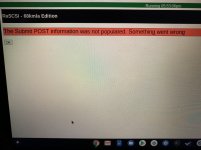 | |
Posted by: NF_ on 2020-09-13 06:47:54650.6 mbThanks again. Was this the error you saw?  | |
Posted by: Endsjustify on 2020-09-13 06:49:53Thanks again. Was this the error you saw?That’s it. | |
Posted by: Endsjustify on 2020-09-13 07:50:10That’s it.I sorted it, need to adjust “post_max_size” in php.ini. I set it to 1200M to match max upload. Works great now. | |
| Posted by: landoGriffin on 2020-09-13 07:59:52 Awesome!!! | |
| < 16 > |