68kMLA Classic Interface
This is a version of the 68kMLA forums for viewing on your favorite old mac. Visitors on modern platforms may prefer the main site.
| Click here to select a new forum. | |
| RaSCSI Development Thread | |
| Posted by: landoGriffin on 2020-08-24 09:30:04 Myself, I like the vintage apple colors mixed with the raspberry pi logo. 🙂 But, definitely need to figure out how to work the RasPi pixel art in somewhere!  | |
| Posted by: NF_ on 2020-08-24 15:46:22 Logo looks great. Added to wiki. | |
| Posted by: sonique6784 on 2020-08-25 11:02:05 Love it! maybe off-topic, but is anyone looking at using RaSCSI for networking? | |
| Posted by: landoGriffin on 2020-08-25 11:16:28 Not off topic at all! No one is actively working it right now (that I'm aware of). There is a Github issue here. Feel free to share your thoughts, propose solutions or start hacking away 🙂 https://github.com/akuker/RASCSI/issues/27 | |
| Posted by: landoGriffin on 2020-08-25 11:21:14 Also... FYI for everyone.... The boards are being made! Once I get them, I'll probably throw them on Tindie to help distribute them. 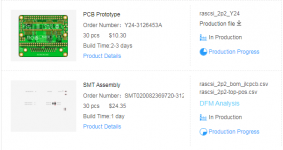 (Note: these are only PARTIALLY assembled. Only the teeny tiny surface mount parts are being installed by JLCPCB) | |
Posted by: Byte Knight on 2020-08-25 12:05:11Also... FYI for everyone.... The boards are being made! Once I get them, I'll probably throw them on Tindie to help distribute them.Sounds good! Will you include the other components in a kit form or do we need to order these separately? | |
| Posted by: landoGriffin on 2020-08-25 12:12:54 I’ll include the other components in kit form. These are also enroute from China right now. Also, I’m planning on having an option where I’ll assemble it for you. | |
Posted by: cheesestraws on 2020-08-25 18:04:19Love it!This is something I'm planning on playing with when I get a board and some time. 🙂 | |
| Posted by: landoGriffin on 2020-08-27 13:21:06 FYI: I've updated the github build to use the ARM cross compiler for building RaSCSI. The makefile also defaults to using the gnueabihf arm compiler. Before, it would use whatever the host environment is. This doesn't matter for most people - but I do some development on a x86 PC for stuff that doesn't require the real hardware. The socket/command interface still works on non-RaPi devices. It just doesn't do anything useful 😛 I hope everyone is having a good week! I've been checking jlcpcb every hour, waiting for my bulk order to ship! Once they get here, I'll have them up on Tindie if there are still folks who are interested in them: https://www.tindie.com/products/landogriffin/rascsi-macintosh-version/ (That link might not work immediate... the product listing is still under review) | |
| Posted by: sixty80hforty on 2020-08-28 04:48:33 I want to try this on a Roland vs audio workstation.(VS-1680) It has an external scsi bus. Does anybody know how much cpu is used on a pi3 or pi4 when running Rascsi? I'd like to be able to use the spare cycles to convert the files from propietary roland format to stand wav files if there is sufficent cpu time available. I've also got a Mac SE, I'd like to try it in.... | |
| Posted by: landoGriffin on 2020-08-28 05:08:40 The bulk of the work is done in a single thread, so the RaSCSI service will be limited to one core. On the Pi4, that would leave you with 3 cpu cores to do other things. You might get some contention for disk access though. Depending on how much data you’re talking about, you’ll probably be fine. | |
Posted by: paws on 2020-08-28 06:45:33I want to try this on a Roland vs audio workstation.(VS-1680) It has an external scsi bus. Does anybody know how much cpu is used on a pi3 or pi4 when running Rascsi?Does it use a normal FAT file system that can be read on a computer? I think a lot of old music gear like this had proprietary file systems. Probably a simple one, but I think there'd be some coding needed. | |
| Posted by: landoGriffin on 2020-08-28 22:40:50 I set up a discord channel for anyone interested in chatting. This forum thread is getting a little long! https://discord.gg/QChjK4 | |
| Posted by: cheesestraws on 2020-08-28 23:32:56 Discord makes my head hurt :-( | |
| Posted by: landoGriffin on 2020-08-29 03:01:26 LOL Any other suggestions? | |
Posted by: NF_ on 2020-09-03 14:24:28I think it would be possible for terminator power. However, as mentioned before, the Raspberry Pi needs to be up first before the Mac.I see the appeal to have it powered by the SCSI bus, but I don't see how it can be done practically. The Mac II, SE and Plus use an NCR 5380 SCSI controller. The controller outputs have a max voltage of 2.4v, and 48mA. In addition to the low numbers, the SE, Plus and II don't provide termination power. Even if there was a way to scavenge power from some of the other lines, The Pi Zero W needs at a minimum 80mA, and to get the power draw that low, you sacrifice a bunch of functionality. I think powering stuff via the SCSI ports would hinges on termination power being available. But since the computers this is initially targeted at target machines don't provide TERMPWR, building any circuitry to leverage it, and building a environment to boot up quickly would yield very little gain. What could be useful is a separate unit, something akin to a parallel port pass through dongle type thing. It could scavenge the TERMPWR and feed it into the RPi via an external cable, or whatever. With a separate unit, it's modular, and could be used for this or any number of other projects. | |
Posted by: sonique6784 on 2020-09-03 16:42:07This is something I'm planning on playing with when I get a board and some time. 🙂great, that would be an awesome addition to be able to connect to networks and the internet 🙂 | |
Posted by: NF_ on 2020-09-03 16:48:47I see the appeal to have it powered by the SCSI bus, but I don't see how it can be done practically.I'm still reading about this, and wondering if I'm mis-reading or misunderstanding something. I'll check the TERMPWR on my SE this weekend. If it's there, I should see 5v on pin 25. I've attached the NCR 5380 SCSI Interface Chip Design Manual for those interested, or you can find it online here. View attachment NCR_5380_SCSI_Interface_Chip_Design_Manual_May85.pdf | |
| Posted by: CC_333 on 2020-09-03 18:05:29 @NF_ My understanding is that the SE and II both provide SCSI term power, and the Plus is the only Mac that doesn't (fun fact: the circuits for providing it, to my knowledge, were partially implemented, but it was disabled from the factory. It can be enabled by adding a couple missing components I think, but the Plus' SCSI implementation isn't entirely standards compliant, so it may or may not work as expected.) c | |
Posted by: cheesestraws on 2020-09-03 18:13:41It can be enabled by adding a couple missing components I thinkI believe it's a single missing diode that there's even a place for on the board. | |
| < 14 > |