68kMLA Classic Interface
This is a version of the 68kMLA forums for viewing on your favorite old mac. Visitors on modern platforms may prefer the main site.
| Click here to select a new forum. | |
| Running the Thunder II 1360 at 1600x1200 | |
| Posted by: jmacz on 2024-08-08 18:32:41 This is really cool. Larger 4:3 ratio LCDs with native 1280x1024 LCDs are abundant and this resolution provides a lot of real estate. I no longer need to run two cards and two monitors at 1024x768. Really happy 🙂 1600x1200 would be even better of course. | |
| Posted by: MacOSMonkey on 2024-08-08 18:55:39 Great! 70Hz should look better! That is the highest refresh rate without using the externa auxl pad and a 135MHz oscillator. It may be possible to socket it on the back side and mirror the pins on a mini pcb so that you could use config $01...but gravy. Might be more useful for testing 1600x1200 if necessary to go to 165MHz with a DAC swap. You could also solder a 135 there for testing to max out at 75Hz. Quite an interesting and challenging process - and great that it's working!! Huge congrats again! 🙂 All of the debugging and historical reconstruction should make 1600x1200 easier, assuming it's possible! | |
Posted by: eharmon on 2024-08-09 20:26:56I tried the $0F for the clock configuration and that also worked. The card is now driving 1280x1024 @ 71Hz.Double checked everything and this looks good to me too! I'm not feeling the patience yet but it should be possible to copy the entire Board sRsrc table to the empty region at the bottom of the ROM, allowing for enough space to add the new resolutions without overwriting existing ones...assuming offsets are signed int24s for those. I'm pretty sure they are. Also replacing the "High Res 20" text should allow the hold-space-to-select-resolution on boot to properly report "1280x1024 Compatible Mode". Then it'll be simpler to add additional resolutions as needed as we'll have space without replacing existing, and the last UX element will be patched up. I'll give it a go this weekend maybe. | |
Posted by: jmacz on 2024-08-09 20:49:41Double checked everything and this looks good to me too! Nice! I'm not feeling the patience yet but it should be possible to copy the entire Board sRsrc table to the empty region at the bottom of the ROM, allowing for enough space to add the new resolutions without overwriting existing ones...assuming offsets are signed int24s for those. I'm pretty sure they are. Yeah, that would be cool! | |
| Posted by: MacOSMonkey on 2024-08-09 23:36:51 It sounds great, but I don't think it will be that simple. 😀 The potential problems could be: 1. There is more than 1 table to worry about. There is the monitor table (the one you're talking about), but also the resolution/depth table. And, if you are modifying the 1360 ROM, it probably doesn't have any 1600x1200 resources in it. So, you will have to add 1600x1200 in 24-/32-bit modes for all bit depths (although 24-bit may only support 1-bit mode. At some point, SuperMac stopped supporting 24-bit operation across all modes, since there was no point - only 1-bit for boot compatibility) -- and that is going to change the reference offsets. 2. The ROMs are 27C512s (64K) per the earlier discussion. So, might end up running into trouble with signed word offsets that are only +/- 32K if the tables end up out of reach. Historically, declaration ROM tables are at (or close to) the start of the ROM and all the other stuff is added in after that -- see the Apple sample. So, the tables at the end of ROM might end up requiring an offset > 32K (depending on ROM size). Check the current sRsrc table location and check the offset at the end of the code and see if it's within 32K (including the size of expanded tables for monitor and resolution). If not, then it's not going to work. 3. There might be other tables/table references in the code that would need to be updated. There has to be a full disassembly of Primary INIT, including any/all table accesses. The best way to solve this problem may be to start from a dump of the Thunder II GX 1600 ROM. Also, the ROMs will need to have new checksums. @jmacz You're doing that already for 1280x1024, right? | |
Posted by: jmacz on 2024-08-10 07:49:53Also, the ROMs will need to have new checksums. @jmacz You're doing that already for 1280x1024, right? Yup, all the ROMs I posted earlier had the checksums recalculated and updated after the modifications were made. | |
| Posted by: MacOSMonkey on 2024-08-10 17:05:42 I dumped memory on my Thunder/24 and it looks like the ROM is mapped to $e100000 at the top of the memory space above squid. So, if someone has a Thunder II 1600 GX (@olePigeon ?), you could try reading 64K from $Se1000000 with Macsbug and see what you get to see if the mapping is the same. Then, we could just dump the hex into a CODE resource and get an instant ResEdit disassembly - or whatever tool you want to use. No desoldering! | |
Posted by: eharmon on 2024-08-10 22:14:20I dumped memory on my Thunder/24 and it looks like the ROM is mapped to $e100000 at the top of the memory space above squid. So, if someone has a Thunder II 1600 GX (@olePigeon ?), you could try reading 64K from $Se1000000 with Macsbug and see what you get to see if the mapping is the same. Then, we could just dump the hex into a CODE resource and get an instant ResEdit disassembly - or whatever tool you want to use. No desoldering!Theoretically https://www.gryphel.com/c/minivmac/extras/slotrom/ can do it automatically. | |
| Posted by: MacOSMonkey on 2024-08-11 00:02:15 @eharmon - Interesting - perfect tool for this problem! @Arbee ...hmmm...or not: "The ROM image files that SlotRom saves are copyright Apple Computer, and may not be redistributed." So...maybe just skip it and see if there is anything around the address I mention above, then try to read 64K. | |
| Posted by: Arbee on 2024-08-12 13:26:48 That's only true if the card is made by Apple. | |
| Posted by: eharmon on 2024-08-12 23:24:01 Finally figured out how to get dynamic resolution changes working today: https://68kmla.org/bb/index.php?threads/dynamic-resolution-switching-for-supermac-cards.48112/ Handy for debugging. | |
| Posted by: jmacz on 2024-08-14 12:44:37 FWIW, 58/60Hz works better for me (1280x1024) than 70Hz. Might be monitor specific. I tested on two DELL LCDs.. one is a 1905FP and the other is a brand new P1917S IPS (can still get these new in box on Amazon). Both are native 1280x1024 panels and manuals say the optimal resolution for both are 1280x1024 @ 60Hz. When running at 70Hz, although the geometry and visible screen were dead on, some of the pixels were slightly fuzzy, mainly near the center of the screen, on both monitors. I mean, nothing crazy but just slightly. I tried making slight tweaks to the pixel clock and phase settings on the monitor but nothing really helped as if I dial in the center, the corners would get a slightly fuzzy. I mean, it wasn't to the point where it's a big deal but just annoying. At 58Hz, the entire screen is crisp even with the default auto adjust, no additional tweaking necessary. | |
| Posted by: jmacz on 2024-08-15 12:36:14 I've been eyeballing a few DELL 2007Fp monitors (native 1600x1200) but not sure if it's worth pulling the trigger as there are some clear unknowns whether the Thunder II 1360s without hardware modifications can drive 1600x1200? My Thunder II 1360 (non-GX) has the BT458LPJ135s like @MacOSMonkey showed in the pictures posted on page 9 of this thread. Which is clearly different from the BT467's on the Thunder II GX 1600. Although the 458's support 1600x1200, if it requires transplanting the 165MHz DACs, then I'm probably not going to go that route as I don't want to make hardware changes. Also curious if that 1600x1200 support is only at 8bits with the older DACs. I might just wait to look for a Thunder II GX 1600 instead of hacking this 1360 up hardware-wise. | |
| Posted by: eharmon on 2025-01-16 22:49:54 It’ll go for more than I want to pay, but a 1600 is up for sale if anyone wants one (bonus points for ripping the ROM). 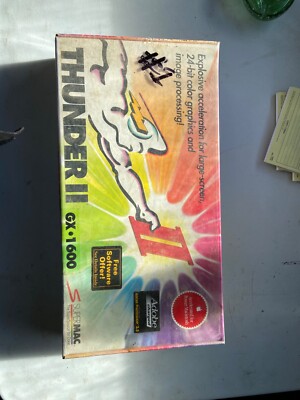
SuperMac GX Thunder II 1600 Video Card for NUBUS Apple Macintosh | eBayThis is protection for both of us. Item is shown as is.
www.ebay.com
| |
| Posted by: jmacz on 2025-01-18 17:00:32 Amazing how much that sold for. I won’t be getting one of those any time soon 🙂 | |
Posted by: eharmon on 2025-01-18 17:45:02Amazing how much that sold for. I won’t be getting one of those any time soon 🙂Sadly they just seem to be so much rarer. | |
Posted by: David Cook on 2025-01-18 19:59:28It’ll go for more than I want to pay, but a 1600 is up for sale if anyone wants one (bonus points for ripping the ROM). There were two of these from the seller. I bought the first one (labeled #2 ironically) for $350. The seller messaged me today and said "Bro! Don't open that box. Resell it immediately for $810!" (not his actual words). I thought that was pretty cool of the seller. Here is the unboxing. I could hear the depreciation as I broke the seal. SuperMac Thunder II 1600 UnboxingI just received a new-old-stock SuperMac Thunder II 1600 video card. It is still sealed in the original shrink wrap and the box's factory tape is intact. (Please note the "Free Software Offer!" sticker for later in this posting) I paid $350 for this. Ouch. The seller said they had another...
 68kmla.org
The ROM is not socketed. What would you like me to use to rip the ROM? It's version 3.0.3. | |
Posted by: jmacz on 2025-01-18 20:05:28There were two of these from the seller. I bought the first one (labeled #2 ironically) for $350. Wow that’s a great deal based on what the other one sold for! Congrats! | |
Posted by: zigzagjoe on 2025-01-18 20:50:14There were two of these from the seller. I bought the first one (labeled #2 ironically) for $350. The seller messaged me today and said "Bro! Don't open that box. Resell it immediately for $810!" (not his actual words). I thought that was pretty cool of the seller.Use the slot rom utility: https://www.gryphel.com/c/minivmac/extras/slotrom/ It'll save files next to where it runs. As the transformations needed (address/data bit swaps and inversions, if any) should hopefully be known from the lesser cards, there shouldn't be a need to desolder it from the card. | |
Posted by: obsolete on 2025-01-18 22:08:45Here is the unboxing. I could hear the depreciation as I broke the seal.You are a true man of the people. | |
| < 10 > |