68kMLA Classic Interface
This is a version of the 68kMLA forums for viewing on your favorite old mac. Visitors on modern platforms may prefer the main site.
| Click here to select a new forum. | |
| Using Magneto Optical drives on vintage 68k Macs | |
| Posted by: zefrenchtoon on 2023-12-31 08:01:12 Maybe give a try on MO Disk Master ? It would be interesting to try also with Drivor (I still did not find enough time to upload a proper archive of it on the garden) 😕 | |
| Posted by: Udo.Keller on 2023-12-31 09:24:28 The archived Sony Web Site gives us some hints about the drive's compatibility. The so-called Magneto Optical Drive Compatibility Lists does mention
So maybe you give HDT a try? | |
Posted by: jmacz on 2023-12-31 17:48:34@olePigeon tried the 2.3GB discs I'm having issues with on his drive (same one: Fujitsu MCR-3230SS) and the discs worked fine. So that seems to suggest my drive or how I'm using it. I was able to get a second MCR-3230SS and this one is able to read/write the 2.3GB disks perfectly. So something's wrong with the first drive. I will debug it at some point. Just wanted to circle back and mention it's confirmed to be the drive that was the problem. | |
| Posted by: zefrenchtoon on 2024-01-01 06:12:37 FYI, if you want to give Drivor a try, here it is: Happy new year everyone ! 🥳 | |
| Posted by: micheledipaola on 2024-01-04 10:09:37 thanks for all the support @Udo.Keller , @MrFahrenheit and @zefrenchtoon (btw your card is on the way! 😀 ) -I will spend some time on this tomorrow... meanwhile I got another scsi box and a SMO-F551, so now I will try all the possible combinations to see if it's the box, the drive or the software 😀 Hopefully something is going to work! | |
Posted by: sfp1954 on 2024-01-04 14:25:47I don't think I have seen this here, so I'll update this thread with this bit of info:Did you archive this somewhere? Macgarden? The link is dead. | |
Posted by: sfp1954 on 2024-01-04 14:30:25Decent price for 50x 640MB disks (just over $3.00 each)Have you ever used 640s with a PowerBook 1400? The SCSI on that machine doesn't seem quite up to regulation. I can get things to mount on a G3 Wallstreet, but the1400 won't cooperate at all. | |
Posted by: MrFahrenheit on 2024-01-04 18:49:54Did you archive this somewhere? Macgarden? The link is dead. It was uploaded here on page 8 of this very thread. Here's the link to that post: https://68kmla.org/bb/index.php?thr...-drives-on-vintage-68k-macs.38010/post-510230 | |
| Posted by: sfp1954 on 2024-01-04 19:10:31 Thanks. | |
Posted by: olePigeon on 2024-01-04 23:04:40Have you ever used 640s with a PowerBook 1400? The SCSI on that machine doesn't seem quite up to regulation. I can get things to mount on a G3 Wallstreet, but the1400 won't cooperate at all. Sounds like a problem I had with my FWB Jackhammer SCSI card. The FWB Jackhammer SCSI card would not work with disks larger than 540 MBs. The reason was that the firmware only supported disks that used 512 bytes per sector, so that limited it to 540 MB or smaller capacity disks. All the larger disks used 1024b/sec or 2048b/sec, and they would not work with the SCSI card. This was true on PCs as well, so you had to make sure you had the right kind of SCSI card to work with higher capacity disks. I was able to resolve this issue by patching my SCSI card with a highly elusive firmware update. Unfortunately, I don't know how you'd do it with the internal SCSI. So if you can mount 128 MB and 230 MB disks, but not 640 MB disks, then it's likely it has that same issue. I think the SCSI implementation is technically within spec, but it has some sort of sector size limitation that appeared to be fairly common on older machines. WHY it would be present in a newer machine I couldn't guess. As a side note: what I find interesting is that with 5.25" size disks, even the larger 9.1 GB disks are sold in two formats: 512b/sec and 4096b/sec. This is to maintain compatibility with older computers. The disks are much slower of course, they can't write to them as fast, but they'll work on anything. Unfortunately, 540 MB 3.5" disks tend to be very expensive, likewise with the larger 512b/sector 5.25" disks. Everyone wants the compatible disks. | |
| Posted by: sfp1954 on 2024-01-05 07:38:20 You don't think it's a SCSI-1 SCSI-2 issue on the 1400? All the optical drives are 50 pin mini SCSI 2. | |
Posted by: micheledipaola on 2024-01-05 09:40:19thanks for all the support @Udo.Keller , @MrFahrenheit and @zefrenchtoon (btw your card is on the way! 😀 ) -I will spend some time on this tomorrow... meanwhile I got another scsi box and a SMO-F551, so now I will try all the possible combinations to see if it's the box, the drive or the software 😀 Hopefully something is going to work!Here we go with some results: the Sony SMO-F551 worked with Disk Drive Tune-Up 3.41 out of the box, without even installing any extension, with both SCSI external enclosures - so it was definitely the first drive (Sony SMO-F541) which was somehow faulty. Anyone interested in getting it? 😉 I went on experimenting with the F551, and I can share that it is recognized and works with the MO Disk Master extension, and I am able to set up a cache for it from the control panel; when a disk is inserted, it get mounted and recognized. As I already wrote, Disk Drive Tune-Up recognizes the drive (but for some reason, it shows up as an HP and not Sony...) and it is able to format disks: I have two 1.3GB x2 sides disks which I tested and proved working. No other extension (Fujitsu, Pinnacle ) recognize the driver nor any inserted disk. Pinnacle Formatter still says it is not a MO removable disk; Fujitsu MO Formatter still says it cannot handle the disk. Now what I still need to figure out is how to properly connect the SCSI ID selector of the enclosure to the drive: I plugged the pins and I have it set as #6, but it always showed up as #6 even if I changed the ID manually... until the scsi box gave me some magic smoke so I decided it was time to stop testing for now 😀 | |
| Posted by: olePigeon on 2024-01-06 21:37:20 @micheledipaola That's excellent news. Jmacz had the same problem; first drive didn't work, but second drive was fine. I assume you already tried cleaning the lens of the other drive? | |
Posted by: micheledipaola on 2024-01-28 03:20:04@micheledipaola That's excellent news. Jmacz had the same problem; first drive didn't work, but second drive was fine.thanks for reminding me, the answer is not yet, as now I have ben dragged into having an internal 3.5" MO drive in my Mac II thanks to some of you guys 😀 | |
Posted by: MrFahrenheit on 2024-01-28 04:04:25thanks for reminding me, the answer is not yet, as now I have ben dragged into having an internal 3.5" MO drive in my Mac II thanks to some of you guys 😀Oooooo Let us know how it works out for you. I still need to do this on my IIfx. | |
| Posted by: JAG on 2024-01-29 07:48:40 As a side thread, I've marveled at how good your labels for MO drives looked MrFarenheit. Care to share what sort of printer, paper, etc you used to make them? I've tried printing a couple and the labels looks very amateurish and "paper-y". I'd like to figure out how to make labels that look a bit more genuine. | |
Posted by: MrFahrenheit on 2024-01-29 10:41:31As a side thread, I've marveled at how good your labels for MO drives looked MrFarenheit. Care to share what sort of printer, paper, etc you used to make them? I've tried printing a couple and the labels looks very amateurish and "paper-y". I'd like to figure out how to make labels that look a bit more genuine.Sure. I use a Xerox Phaser 8560 dye sublimation printer, and I design the labels within photoshop using high resolution images as much as possible. The paper is a glossy label made by SheetLabels. Because of the nature of dye sublimation, the printing has a 3D texture to it, which seems to allow some detail to “pop”. They don’t look flat like what is normally found on inkjet prints. | |
Posted by: MrFahrenheit on 2024-01-29 10:46:49Sure. 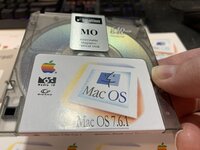 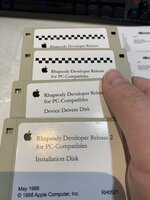 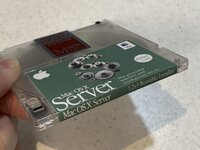 | |
| Posted by: JAG on 2024-01-29 11:09:34 Ah, I know very little about dye sublimation printers, but your labels look fantastic. Do you get premade floppy labels or cut them to size by hand or with a paper cutting machine? | |
| Posted by: jmacz on 2024-01-29 11:22:19 Those look really nice!! | |
| < 10 > |
