68kMLA Classic Interface
This is a version of the 68kMLA forums for viewing on your favorite old mac. Visitors on modern platforms may prefer the main site.
| Click here to select a new forum. | |
| Using Modern Hard Drives on Old Macs? | |
| Posted by: uniserver on 2013-08-16 09:11:05 yes the scsi internal zip drive 100 works great in the 512k /w plus rom's By the way when it boots up 7.1 ATM says that its a Macintosh Plus. Also i have tried with and w/o the TPR jumper when i was testing the 2.5" 10k hd. no dice, strange. | |
Posted by: mcdermd on 2013-08-16 09:32:43By the way when it boots up 7.1 ATM says that its a Macintosh Plus.Probably because of the Plus ROMs on board. | |
| Posted by: uniserver on 2013-08-16 10:21:30 Yup. Hey man this things is pretty sweet no doubt … its right up my ally, with these 2 add on boards, Ram/SCSI it's almost like there is 2 motherboards in there. I'm thinking about pulling the zip drive out and installing an 80mb IBM drive from the LC. | |
| Posted by: techknight on 2013-08-16 21:47:43 Well, put the zip drive in your plus, and hook the U320 drive up at the same time on the same cable, use the Zip drive for termination power and termination itself. | |
Posted by: CC_333 on 2013-08-18 00:32:38yes the scsi internal zip drive 100 works great in the 512k /w plus rom'sYour 512k has a SCSI upgrade? By the way when it boots up 7.1 ATM says that its a Macintosh Plus.If it does, it must have a RAM upgrade also, because the 512k generally can't run System 7.x (presumably because there's not enough RAM). c | |
| Posted by: uniserver on 2013-08-18 01:08:01 yes this is an INSANELY upgraded 512k. lol It Has: - Dove Mac Snap, SCSI, External and Custom Internal 50 pin connector. - MacSnap - 2mb Memory upgrade. 2.5meg ram total! Not gonna lie this thing excites me a little 🙂 I put 6.0.8 on it, had to remove the EYES extension. it was making my app's run jerky. I could put 7.1 back on it. I found out it was the EYES extension causing my odd slowness issues. | |
| Posted by: CC_333 on 2013-08-18 12:12:47 😎 I'll probably be keeping my 512k (when I get it) stock, except for a 512ke board upgrade (so it can be slightly more usable, while still being basically an original stock configuration.) c | |
| Posted by: NJRoadfan on 2013-09-17 05:13:02 Its too bad these 2.5" drives won't fit in a Powerbook due to complete lack of room. Not to mention the potential heat problems! | |
Posted by: James1095 on 2013-09-17 15:53:12Its too bad these 2.5" drives won't fit in a Powerbook due to complete lack of room. Not to mention the potential heat problems!They seem to run quite cool, although I don't know how they are in terms of power consumption. They certainly use more power than modern 2.5" laptop drives, but old drives tend to use more than newer drives so they might turn out to be similar. Has anyone measured the actual fit? Perhaps removing the SCA connector and soldering a cable directly to the board would work? | |
| Posted by: NJRoadfan on 2013-09-17 16:08:57 I had the Powerbook 165 apart, the SCA connector likely sticks out enough to hit the trackball assembly. Even if it was flush with the drive, any adapter would stick out in the same space. you'd have to somehow wire it directly into the ribbon cable that is there. | |
| Posted by: uniserver on 2013-09-17 20:02:12 that is an interesting idea 🙂 Do you have the ability to try this. Man it would be exciting as hell to see a PB170 fire up with one of these in it! 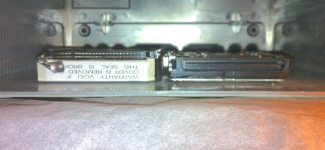 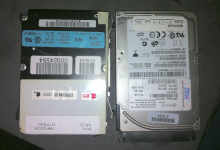 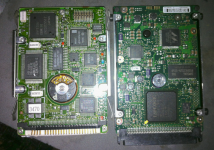 | |
| Posted by: NJRoadfan on 2013-09-17 20:24:42 I'd need an SCA drive, but looking at that, I'm pretty sure it intrudes into the space taken up by the trackball.... at least in the Powerbook 100 series. That and I'm pretty sure they don't make SCA to 2.5" 40pin SCSI adapters. 😎 Pinout of the stock 2.5" drive can be found here: http://www.umich.edu/~archive/apple2/misc/hardware/pinout.scsi.txt 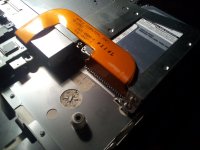 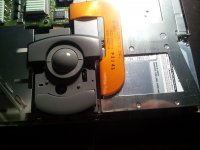 | |
| Posted by: NJRoadfan on 2013-09-17 20:53:32 Looking at a photo of the 500 series here: http://www.tiac.net/~sw/2006/03/scsi_to_ata/ They may have the space to shove in a SCA to kludge 2.5" adapter. | |
| Posted by: MacJunky on 2013-09-18 09:16:52 Trackpad upgrade? | |
Posted by: olePigeon on 2013-09-18 09:37:00Trackpad upgrade?Gods, I hope not. The trackball was a superior pointing device until... well, when did the magic trackpad come out? Wasn't until the glass trackpad from Apple did they finally become useable, in my opinion. | |
Posted by: olePigeon on 2013-09-18 09:39:27I'd need an SCA drive, but looking at that, I'm pretty sure it intrudes into the space taken up by the trackball.... at least in the Powerbook 100 series. That and I'm pretty sure they don't make SCA to 2.5" 40pin SCSI adapters. 😎Oof. That'd be a tight fit, even if you made your own adapter. Looking at the profile view of the HDD, you might be able to make one that sits on top of the HDD if you use the same type of ribbon cable and flat connector. | |
| Posted by: James1095 on 2013-09-18 11:45:10 Yeah that looks like it would be a heck of a tight fit. It could probably be done, but the thought of trying to solder all those connections makes me go cross-eyed and I'm fairly accustomed to hand soldering fine pitch SMT stuff. | |
| Posted by: uniserver on 2013-09-18 11:59:30 I guess the other concern is energy consumption. Might be over budget for the ribbon cable. or regulator. + i still think they get way to hot, with out some kind of ventilation. | |
| Posted by: James1095 on 2013-09-18 12:04:17 Well, measure the draw from one, and compare it to one of the original drives, that's the easiest way to find out. Solid state option is probably the best modern replacement though, just not cheap. | |
| Posted by: techknight on 2013-09-18 16:58:09 Well those SCA drives use both 5 and 12v. PB drives only use 5v. so you need to tap 12V from somewhere. Also with the SCA connector removed, you only have to hook up maybe half of those connections. as your not using the full U320 bus. | |
| < 10 > |