68kMLA Classic Interface
This is a version of the 68kMLA forums for viewing on your favorite old mac. Visitors on modern platforms may prefer the main site.
| Click here to select a new forum. | |
| Needed: Lapis ColorServer PDS/30 software | |
| Posted by: olePigeon on 2014-11-28 10:28:18 The copy on all the Mac Driver Museum mirrors is corrupted. Hoping someone here might have it. Also, is the only the only difference between the 17 and the 20 the amount of RAM? This one has 4 RAM chips installed (SIP kind), with 4 open slots. I'm wondering if I can buy 4 more chips and solder 'em. | |
| Posted by: ArmorAlley on 2014-11-28 14:30:39 I have those downloaded from the mac driver museum somewhere. I'll go and look for them for you tomorrow. | |
| Posted by: olePigeon on 2014-11-28 16:29:15 OK, thanks. The one I keep finding and trying to download is corrupted. | |
| Posted by: Danamania on 2014-11-29 11:11:24 Is this what you need? https://dl.dropboxusercontent.com/u/5334905/%7F%7FLapisVideoDrivers.sit | |
| Posted by: olePigeon on 2014-11-30 12:07:55 YES. Thank you. That's the archive I kept finding, but it was corrupt. 🙂 Has the ColorServer PDS 17 and 21 control panel. | |
| Posted by: olePigeon on 2014-11-30 12:24:17 Awesome. That did the trick! I now have an SE/30 with color video. 😀 Supports up to 832x624. It has 4 more RAM SIP sockets, so I bet if I can track down more memory for it, I could get 1024x768 @ 16-bit color. | |
| Posted by: Danamania on 2014-11-30 12:46:04 Ace! I downloaded that same file years ago and extracted it - that's the same contents. Although I just tried downloading it again - looks like the .sea doesn't run as-is (having lost its resource fork) but it does work by dropping it on top of a Stuffit Expander running in sheepshaver. Either way glad it works 😀 . | |
| Posted by: Trash80toHP_Mini on 2014-11-30 14:33:06 Dana, PowerBook 100 = new articulated feets obsession? ;D | |
| Posted by: ScutBoy on 2014-11-30 17:45:42 oldPidgeon, Would be interesting to see if those drivers wake up anything in our MicroMac SE cards. Those are based on Lapis hardware... Looong shot, but stranger things have happened. | |
Posted by: Danamania on 2014-11-30 23:36:03Dana, PowerBook 100 = new articulated feets obsession? ;DJust a nod to Steve for using my PB100's photo in the iPad keynote. I'm still kinda chuffed at that. A feetsless one, I might add - both were broken off quite a while before I got the machine.  | |
| Posted by: olePigeon on 2014-12-01 14:05:20 Yeah, I'm going to take another look at my SE. The video card didn't start outputting video until the drivers were installed. Hopefully that SE video card really is VGA or CGA (or anything standard) and I can get it to work. | |
| Posted by: ScutBoy on 2014-12-01 16:25:24 If you have any luck let me know - I would't be able to try until this weekend sometime. | |
| Posted by: olePigeon on 2014-12-01 19:42:02 Progress! I've established that it is an analog signal, and it is indeed 9-pin VGA of some type (or something very close.) The signal is just not quite right, but I don't know how. As you can see, it's a bunch of zigzags interleaved, but you can definitely see the cursor! I tried it on a couple of different LCDs, and I got the same screen on it. The software (Dual Screen Software 2.E, found in the Lapis bundle posted here) is expecting an Ehman Full Page Display. Don't know if the signal is compatible with the Radius and/or Apple Full Page displays. 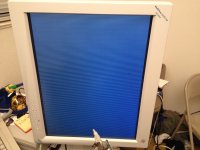 | |
| Posted by: olePigeon on 2014-12-01 19:44:47 Just FYI, I had to buy this cable: http://www.ebay.com/itm/DB-9-pin-RGB-To-HD15-Pin-VGA-Adapter-Cable-/251104441910 A regular 9-pin to 15-pin adapter doesn't work, I tried it. This cable did work, however. It's short, so you'll wanna get a little female-female VGA passthrough adapter. | |
| Posted by: ScutBoy on 2014-12-02 07:00:22 I've done some googling to try and come up with specs on the Ehman Full page display, but so far have not found any info. It appears (along with the Ehman Portrait Display) on a list of "Fixed Frequency Monitors" but the links on that list to specs is 404. | |
| Posted by: trag on 2014-12-02 23:04:03 Is this the VRAM you need: http://www.ebay.com/itm/121291981557?_trksid=p2060778.m1438.l2649&ssPageName=STRK%3AMEBIDX%3AIT I think there are lots of the same stuff with fewer chips. IIRC, the Lapis cards I looked at contained an FPGA with no associated memory chip (EEPROM/Flash) to store the FPGA code. Apparently the card driver loads the FPGA code into the FPGA at boot time. So the cards won't do a darned thing without a proper driver to configure the FPGA. | |
| Posted by: olePigeon on 2014-12-03 09:32:48 That could be the RAM, I'll have to wait until I get home to double check. Too bad he/she doesn't sell singles. Not sure I wanna drop $30 to upgrade 6 RAM chips. | |
Posted by: trag on 2014-12-03 11:18:45That could be the RAM, I'll have to wait until I get home to double check. Too bad he/she doesn't sell singles. Not sure I wanna drop $30 to upgrade 6 RAM chips.If they are the right ones, search Ebay on the part number. I think there were multiple sellers of those chips, offering different quantities. I just posted a link to the one I happened to keep in my watched items list. | |
| Posted by: olePigeon on 2014-12-03 13:57:38 Awesome, thanks. I'll check when I get home. If I can find them cheaper, I'll order a few and then populate the SE/30 Lapis video card. See if I can't get thousands (or millions) colors and a higher resolution. | |
| 1 > |