68kMLA Classic Interface
This is a version of the 68kMLA forums for viewing on your favorite old mac. Visitors on modern platforms may prefer the main site.
| Click here to select a new forum. | |
| Evie's Conquests | |
| Posted by: EvieSigma on 2016-10-28 20:08:52 I seem to be acquiring more Macs and Mac-related stuff at a fairly steady clip so I decided to make my own conquests thread...I won't re-post the 630CD or the PowerBook 180, so my first conquest to show off is the Mac SE/30 I got off eBay. It's a bit grungy and yellow (and a thorough Magic Eraser/Goo Gone treatment didn't do much) and it needs a recap but it's in good physical condition and has a network card, so it's not all bad. 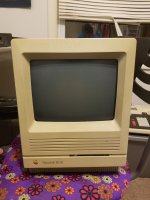 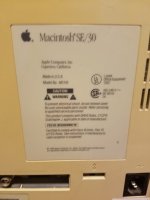 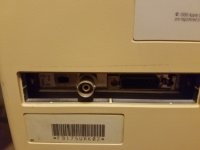 | |
| Posted by: Carboy7 on 2016-10-28 20:14:19 Nice! I believe that using Hydrogen Peroxide/retr0brite will fix the yellowed plastic, but I don't know. Some people hate retr0brite, some people adore it. Just keep it away from UV radiation. EDIT: Also, check the caps, rom, or card if it's simasimacing. | |
| Posted by: EvieSigma on 2016-10-28 20:21:38 Yeah...first boot gave me fan, no chime, and jumpy horizontal black and white stripes (which tells me the screen probably needs the horizontal and vertical hold adjusted). Unfortunately I lost my damned 1/4" bit extender so I don't have anything long enough with a T15 Torx to open this baby up! Guess it's gonna sit until I can get the case open... | |
| Posted by: Juror22 on 2016-10-28 20:45:13 There is a thread from a few days ago that lists torx options towards the tail of the thread https://68kmla.org/forums/index.php?/topic/28728-vintage-mac-torx/?hl=torx I'm still using a regular torx screwdriver (after removing the handle), which gave it just enough extra length to work. Congrats on the SE/30, they are nice machines once you get them recapped. 🙂 | |
| Posted by: EvieSigma on 2016-10-28 20:47:03 I'll have to try and find one of those Torx drill bits, the local hardware store only had a T20. | |
| Posted by: Macdrone on 2016-10-29 15:22:41 a long regular hex will work also. I got one with an old accelerator for an SE and it works like a charm. | |
| Posted by: EvieSigma on 2016-10-29 16:27:10 I ordered one of these off eBay, as the price was right and they explicitly market it as working on compact Macs: http://www.ebay.com/itm/331657821608?_trksid=p2057872.m2749.l2649&ssPageName=STRK%3AMEBIDX%3AIT Meanwhile, today brought Macintosh project #2! A 2.3DP PowerMac G5 with no RAM and no hard drive. Yeah, I kinda overpaid for it ($100), but I was planning on maxing out the RAM and changing the hard drive to a SSD anyway. Anyone know where I can get the guides that you need to keep hard drives inside the G5 drive bays? 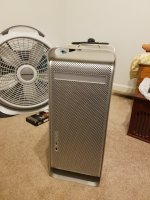 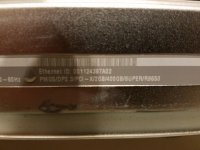 | |
| Posted by: Carboy7 on 2016-10-29 20:48:36 At first, I thought you had somehow stumbled upon a DTS... 😛 | |
| Posted by: EvieSigma on 2016-10-29 20:54:54 What's a DTS? I know there's a Cadillac DTS but I've never heard of a Mac DTS. 😛 | |
| Posted by: Carboy7 on 2016-10-29 21:05:24 Developer's Transition System. It was a platform from back in 2006 when Apple was switching its stuff to Intel processors from PPC. It is extremely rare, as the computers had to be given back to Apple after one year. The case is basically the same as the Power Mac G5, but there is a tiny Intel board on the inside, called "Barracuda". 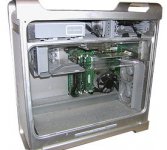 | |
| Posted by: EvieSigma on 2016-10-29 21:19:17 Nope, I definitely don't have one of those! This guy had three 2.3DP G5s (and two MDD G4s that I didn't pursue...this time) that he got from some kind of auction. Probably a business that closed down or something. Seriously though, what do I need to keep hard drives locked into the weird tracks in the drive bay? I need a hard drive for this thing ASAP so I can actually put an OS on it but it won't do me any good if it's bouncing around, that's what messed up the original dual drives in my G3. | |
| Posted by: TheWhiteFalcon on 2016-10-30 06:09:43 You use screws in the hard drives, and those slide into the tracks. https://www.ebay.com/itm/122203473839 Might be some inside near the hard drive bay already. | |
| Posted by: EvieSigma on 2016-11-01 08:13:10 Nope, nothing in there... I can't find 2GB non-ECC DDR RAM so the G5 is getting 8 1GB sticks and a 160GB Intel 320 SSD with a fresh install of 10.4.11 and 9.2.2 for Classic Mode. | |
| Posted by: EvieSigma on 2016-11-03 14:29:02 So I got my Torx 15 "Mac Bit" today to open the SE/30...only to find there wasn't any screws holding it together anyway! Now I'm gonna have to find screws. Here's the logic board, it came out fairly easy aside from disconnecting the analog board connector. I had a hell of a time until I found the locking clip on the back! The one little can near the CPU (C13) clearly leaked and damaged a trace near the CPU, but I didn't see any other obvious signs of damage...and that trusty Tadiran battery hadn't leaked a drop. Now it's bagged and ready to be sent to Unknown_K for recapping tomorrow. Also, I bent up the thin metal pan that fits in the bottom of the rear casing... 🙁 Do I really need that? 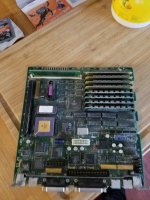 | |
Posted by: mrpippy on 2016-11-03 22:34:55You use screws in the hard drives, and those slide into the tracks.Yep the G5 includes a spare set of screws, I found a picture.  | |
| Posted by: EvieSigma on 2016-11-04 05:08:52 Damn, I bought a set of screws for no reason! Oh well... I decided to forgo the SSD this time to save money, so 8GB of RAM and a 320GB HDD are on the way. | |
| Posted by: EvieSigma on 2016-11-15 20:17:44 Got a pair of iMac G3s today from a Craigslist ad, one's a Bondi Blue Rev B tray-loader (dated October 28th 1998) and the other is an Indigo 400MHz DV. The Bondi is getting upgraded to 9.2.2 (probably tomorrow) and I might as well update the DV to 10.4.11. The Bondi had a Maxell PRAM battery but by some miracle, it hadn't leaked! What luck! 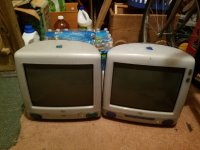 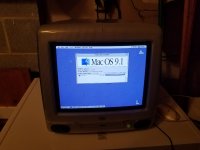 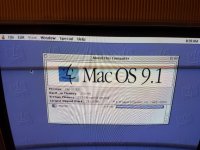 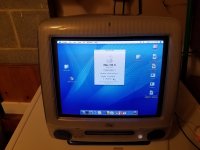 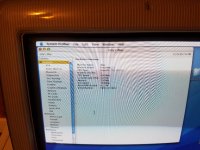 | |
| Posted by: just.in.time on 2016-11-15 20:35:06 Nice iMacs! | |
| Posted by: EvieSigma on 2016-11-15 21:01:56 Thanks! They aren't the ones I really wanted (I want a Lime or Grape tray loader and a tangerine slot loader) but for now I'm gonna hold on to them. | |
| 1 > |