68kMLA Classic Interface
This is a version of the 68kMLA forums for viewing on your favorite old mac. Visitors on modern platforms may prefer the main site.
| Click here to select a new forum. | |
| iMmaculate iMac Late 2011 21.5"... With a HUGE problem! | |
| Posted by: macinbot on 2026-05-07 21:41:47 Spoilers: Firmware Lock issue incoming! Been on the hunt for a good machine to run Photoshop CS4 under Mavericks 10.9, and also one that will do a decent job at Windows XP gaming. A single owner, incredibly well cared for Late 2011 iMac 21.5" popped up on Marketplace for $40 and decided it was the perfect machine for my needs. Met up at a grocery store parking lot with this very nice, elderly (in his 70s) German immigrant original owner. Everything checked out, and included the original box, manual, keyboard, boxed Mighty Mouse, and boxed copies of 10.5 Leopard, 10.6 Snow Leopard, and iWork 09. 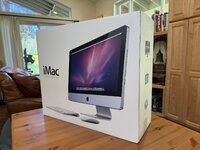 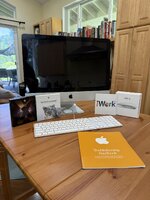 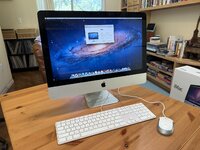 We talked for a bit about this iMac, his new (2020) Macbook M1, and graphic design and web design work. Said our goodbyes and I headed home to test it out. Initial boot up was great. Everything checked out. 12Gb ram was a nice surprise for a machine of this vintage. 10.7 Lion was installed. With everything looking good to go, I plugged in my Mavericks USB flash drive install and rebooted with option key down so I could select the Mavericks installer volume. Then I ran into this: 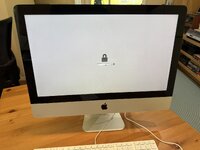 The dreaded firmware lock! I emailed my elderly German Macintosh friend and explained the problem. But unfortunately, he doesn't understand the issue. Despite careful explanation (including photos and videos), he seems to believe that the user password and the firmware password are the same. And because he gave me login user / password combo, he doesn't understand (or doesn't want to understand) that the firmware lock requires a different password. So now I'm stuck. I tried the remove ram stick and pram reset (command-option-P-R) trick, but it appears this model is too new for that workaround, as it ignores the attempt and just boots up to the firmware lock screen. I don't know any other way around the firmware lock. Ideas appreciated! | |
| Posted by: volvo242gt on 2026-05-08 00:48:35 @xenocide21, any ideas? | |
| Posted by: max1zzz on 2026-05-08 07:19:04 If you have access to s programmer and the appropriate soldering tools it is fairly trivial to dump the flash, patch out the password and flash it back. I’m not aware of any way to do it without soldering though | |
| Posted by: luRaichu on 2026-05-08 07:27:42 Will the Apple store still help you? | |
| Posted by: ArbysTPossum on 2026-05-08 07:42:45 You could pull the hard drive out, put an OS on it and put it back in, the machine should automatically attempt to boot from the internal drive. It doesn't remove the lock, but it sneaks passed it. | |
| Posted by: olePigeon on 2026-05-08 10:32:10 If this is the kind of iMac with a magnetic screen that's easily removable with a suction cup, then you can try the RAM trick. On some models of Intel Macs, removing a stick of RAM to change the total amount of RAM and booting it will also remove the firmware lock. Incidentally, I also kept all the packaging for one Yellow and one Blue M1 iMac. When they get ewasted, I'm gonna squirrel them away in my office storage with all their accessories to keep them as minty as possible. Hopefully someone some day will also get a vintage minty iMac. | |
Posted by: macinbot on 2026-05-08 15:46:48If you have access to s programmer and the appropriate soldering tools it is fairly trivial to dump the flash, patch out the password and flash it back. I’m not aware of any way to do it without soldering thoughI’m all for this in concept, but it is currently above my skill grade. Will the Apple store still help you?The jury is split on this. From anecdotal info, older Macs like this may get less scrutiny. Nearest Apple store is four hours out, so next time I go to the big city, I’ll see if they’ll let me slide on the info. You could pull the hard drive out, put an OS on it and put it back in, the machine should automatically attempt to boot from the internal drive. It doesn't remove the lock, but it sneaks passed it.See my update below. If this is the kind of iMac with a magnetic screen that's easily removable with a suction cup, then you can try the RAM trick. On some models of Intel Macs, removing a stick of RAM to change the total amount of RAM and booting it will also remove the firmware lock.I gave this a go already, and fortunately the ram on this model is still behind a little door on the underside of the iMac. Unfortunately it didn’t work. I think this one does have the screen magnets, which will be nice for future SSD upgrade. One day those boxes will be worth the effort. 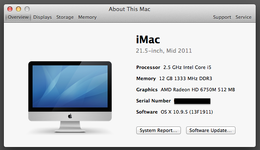 So, some progress has been made. While this iMac did not want to let me boot from Snow Leopard DVD, the Startup Disk preferences panel oddly would let me select and boot into my Mavericks USB installer. So I’m now sitting on a fresh install of Mavericks 10.9.5 fully updated. Next step is trying a Bootcamp install of Windows 7 to see if I can boot back and forth between them without the firmware lock getting cranky. If so, I might be able to install Windows XP over the Windows 7 partition. Which will effectively give me what I want out of this machine. I’d prefer no firmware lock for peace of mind, but funtionally this iMac *may* be good to go. | |
| Posted by: macinbot on 2026-05-08 21:53:10 In other news, the seller got back to me, but went on the defensive saying that he never claimed the machine could upgrade beyond the installed OS X version and that when he sold it to me it was in working condition. So there’s that. | |
Posted by: joevt on 2026-05-09 02:04:13So, some progress has been made. While this iMac did not want to let me boot from Snow Leopard DVD, the Startup Disk preferences panel oddly would let me select and boot into my Mavericks USB installer. So I’m now sitting on a fresh install of Mavericks 10.9.5 fully updated.I don't get it. If there's a firmware lock, why is it letting you boot different OS's? You have access to everything except the Startup Manager? https://support.apple.com/en-ca/102603 How does firmware lock work on an iMac from 2011? Maybe you can get a ROM dump and examine it with UEFITools. It should include every nvram variable (including those that aren't output by the nvram command):https://github.com/Macschrauber/Macschrauber-s-Rom-Dump https://github.com/LongSoft/UEFITool https://forums.macrumors.com/thread...escription-and-a-boot-picker-renamer.2415320/ | |
Posted by: luRaichu on 2026-05-09 05:45:19You have access to everything except the Startup Manager?Yes, they do... | |
Posted by: macinbot on 2026-05-09 13:19:08I don't get it. If there's a firmware lock, why is it letting you boot different OS's?I don't get it either. Initially, when Lion was installed (which is how I received it), it wouldn't let me select the Snow Leopard DVD from Startup Disk preference. But it did let me select Mavericks from USB as startup disk and proceeded to install Mavericks after rebooting. Just moments ago I wanted to see if this iMac would let me select Snow Leopard DVD as startup disk with Mavericks installed. And it did. BUT... on reboot I got a kernel panic. Had to hard power it off and eject the CD on startup. And now when it restarts, I am greeted with the infamous flashing ? folder. My previously working Mavericks install has apparently moved on to better things. You have access to everything except the Startup Manager? Using startup key combos such as command-option-p-r, command-r for restore, or just option to attempt to select from the start manager all give me the lock screen as shown in the OP. How does firmware lock work on an iMac from 2011? Apparently subjectively? Maybe you can get a ROM dump and examine it with UEFITools. It should include every nvram variable (including those that aren't output by theGoing to attempt an install to an external USB drive and see if it will pick it up as a boot drive. If not, looks like I will need to install to another hard drive and then tear open this iMac and replace the corrupt hard drive. After which (assuming it boots), I'll try using one of those linked utilities and see what the NVRAM has to offer. | |
| Posted by: macinbot on 2026-05-09 13:25:49 And in seller news, the guy I bought it from is now saying he'll "happily" take the machine back, and will refund half of what I paid, and keep the other half of the money for the privilege of allowing the return. lol. | |
| Posted by: Byrd on 2026-05-09 16:47:07 If it was a $400 item I'd be bothered, but a $40 boxed complete Mac from FBMP that's not bad, the old bloke doesn't have to offer a refund at all. You can probably get another junk iMac with smashed LCD, or bare motherboard for very little and transplant over, enjoy. | |
Posted by: macinbot on 2026-05-18 16:43:27If it was a $400 item I'd be bothered, but a $40 boxed complete Mac from FBMP that's not bad, the old bloke doesn't have to offer a refund at all. You can probably get another junk iMac with smashed LCD, or bare motherboard for very little and transplant over, enjoy.Heard. I get what you’re saying about the box and ephemera. It was more that I would be effectively paying him $20 to take back the (now non functioning) computer. And while the all the extras were nice, I bought this specific iMac so I could get back to working on art projects in Photoshop CS4. Since the last post, I ran a SMART test on the hard drive and it failed miserably. Shortly after I got the dreaded “?” folder. Because of the firmware lock, I can’t just replace the HDD in the iMac and reinstall an OS. I’ve got to do an install to the replacement drive on a separate machine and then transplant the drive into the iMac, and hope the swap doesn’t somehow set off the firmware lock. And on reflection, between the surprise firmware lock, being dishonest about password locks (I specifically asked), the HDD dying days after purchase, and the seller not wanting to let me demo it before purchase, I’m of the opinion that this iMac was already down for the count and I just got bamboozled on the purchase. Lesson learned. None of this is the worst things that’s ever happened. It’s only $40. It’s just annoying that people put so much work in to be dishonest over so little money. | |
Posted by: RepairManiac on 2026-05-20 09:33:30Will the Apple store still help you?Nope! You must be the original owner with original proof of purchase + your credentials to even request a EFI Password reset. The firmware lock is written on the logic board, so you can swap the drive into another machine without issue (just saw your hard drive failed, so correct you will not be able to replace the drive & then re-install an OS on this iMac ). Yes there are people on YT showing how to desolder the IC, reading the info, clearing the section, and soldering it back on, but...The cheapest solution for this iMac is to buy a replacement motherboard and swap it out. They are relatively cheap as they rarely ever fail therefore relatively plentiful OR buy another cheap iMac - just check the boot manager first. I don't think he was being dishonest since almost everyone I encountered with the EFI Firmware activated, genuinely did not know what it was nor claimed turning it on. You never encounter this as long as the internal drive boots. Schools almost always have it on. Regular Joes did not. This security feature doesn't randomly turn itself on.. it MUST be configured. LOL | |
| Posted by: RedJacketPress on 2026-05-20 17:38:51 I’m coming to this topic late, but for what it is worth: the process to request a firmware password unlock from an Apple Store requires documentation that the store must to provide to Apple to request the tool that is used to do the work. (It’s configured to the specific serial number.) I manage an AASP, I’ve gone through that process. I’m not sure that you are required to be the original owner, but you certainly are required to prove ownership (you’d need a copy of a bill of sale), and it is possible they might be willing to make accommodations a 15-year-old computer. You could start a support case, and see what they are willing to do. The remove-the-RAM method only works through the 2010 models. | |
Posted by: RepairManiac on 2026-05-21 07:15:08I’m not sure that you are required to be the original owner, but you certainly are required to prove ownership (you’d need a copy of a bill of sale)...Technically you are correct that you don't have to be the original owner, but I've never seen a secondary owner ever have a valid Proof of Purchase that would qualify. Possible though. Buying from eBay and "marketplace" do not qualify. Most return the item back to the source for a refund. Totally forgot about the remove the RAM on the earlier models. 🙂 | |
Posted by: RedJacketPress on 2026-05-21 08:11:30Technically you are correct that you don't have to be the original owner, but I've never seen a secondary owner ever have a valid Proof of Purchase that would qualify. Possible though. Buying from eBay and "marketplace" do not qualify.Yeah, I'm looking at Apple's requirements, and I had forgotten that they have that restriction. I think the best hope is that someone is willing to make an exception for a fifteen-year-old computer, though that's not likely to be a call that can be made at the Retail Store level -- it'd be something you'd want to generate a support case for. (That, or a replacement Logic Board.) | |
| Posted by: nathall on 2026-05-24 17:05:55 Apple really, really, REALLY sucks in this regard. I was bequeathed an iPad when my grandfather passed away. At some point it went into some kind of activation lock mode out of the blue and wanted a verification through his Apple ID to reactivate it. Needless to say, I don’t have access to his Apple ID, nor do I know the password associated with it. I looked online as to what might cause this, and the answer I got was someone used “Find my iPad” to try to locate it. This is a load of bullshit as he’s, well, dead, and has been for years. Also, he was the original owner so no one else used it, either. I called Apple to see if they could help unlock it. They wanted proof of ownership. I told them the situation and the agent told me in that case I could go get a court order from a judge after providing the court with a death certificate and proof it was bequeathed to me and that’s the only way they’d help me. I told them to eff off. I could just buy a new one for less time, money and hassle than that. It is just aggravating because I have several years of photos and information on it that I will never be able to retrieve. | |
Posted by: luRaichu on 2026-05-24 17:26:26It is just aggravating because I have several years of photos and information on it that I will never be able to retrieveWell, I guess you didn't want them that bad after all. I called Apple to see if they could help unlock it. They wanted proof of ownership. I told them the situation and the agent told me in that case I could go get a court order from a judge after providing the court with a death certificate and proof it was bequeathed to me and that’s the only way they’d help me. I told them to eff offI also shouldn't be able to rob somebody blind and have Apple give me access to the data on my victim's device | |
| 1 > |