68kMLA Classic Interface
This is a version of the 68kMLA forums for viewing on your favorite old mac. Visitors on modern platforms may prefer the main site.
| Click here to select a new forum. | |
| Portable & SCSI2SD Questions | |
| Posted by: khannonnd on 2016-10-25 09:16:30 I know some (several?) people on this forum have SCSI2SDs in their Macintosh Portables. I have a SCSI2SD, but have never gone ahead and tried to throw it in the Portable. Bear with my lack of technical skill, but I was hoping someone could help me figure out how to get this done. Specifically, I had 3 questions about this process: (1) I believe I saw a thread awhile back about needing a 34 pin to 50 pin SCSI cable in order to plug the SCSI2SD to the Portable -- Does anyone have any of these made that they would be willing to sell? (2) Is the SCSI2SD just plug and play? Do you have to do anything special to format the SD card before putting the OS/Files on it? (3) Related to 2 -- What is the best way to get Mac OS 6 or 7 onto an SD? I don't have hard copies of either and the only computers I have that can access the internet are relatively recent OS X machines (though I do have a Wallstreet Powerbook) with both a floppy and CD drive that can be a sort of bridge, if need be. Thanks for the hand holding/input! | |
| Posted by: novusgordo on 2016-10-25 09:20:53 Could you hook it up to the PowerBook's SCSI interface and use that to ghost it with an old Mac OS image? | |
| Posted by: khannonnd on 2016-10-25 09:27:48 It just struck me: The Portable has SCSI -- Could I simply hook the SCSI2SD to the SCSI port and then copy over the contents of the hard drive (which still functions)? If so, that would solve question #3, leaving only 1 + 2! | |
| Posted by: BadGoldEagle on 2016-10-25 09:42:53 Yes, you can use an external drive case: I have a HD40SC, I just swap the ribbon between the actual hard disk and the scsi2SD all the time. Works great. Be careful though: you'll still have to configure the SD card first. With the SD card inserted, connect the Floppy EMU to your computer. Run the SCSI2SD-util (available from the SCSI2SD website). From there you'll have to 'partition' the SD card. Remember that Mac OS can only handle 2GB volumes. If you have a 4GB SD card, you can either create 2 2GB volumes, or leave 2GB free and create only one volume. From there you'll also have to select the SCSI ID. Just don't use 7 or 0 and you're good to go. About the 34 pin adapter, I know good old Uniserver sells them. Check him out. | |
| Posted by: BadGoldEagle on 2016-10-25 23:47:05 Edit: Don't use 7 or 0 when connected to the powerbook using an external drive case. There will be ID conflicts with the powerbook's own HD. You can set it back to 0 once you're done transferring data from the PB: 0 is for internal drives only. | |
| Posted by: godfatherq8 on 2019-05-19 15:35:45 but if you have the SDSCSI adapter V5.1 it is 50 pin do i need the 34 pin to 50 adapter ? or it can install directly to the macintosh portable? 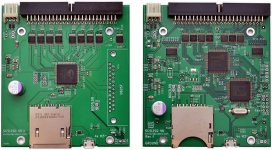 | |
| Posted by: LaPorta on 2019-05-20 02:47:32 You need the adapter as well. | |
| Posted by: godfatherq8 on 2019-05-20 11:50:33 thanks a lot is this SCSI2SC V5.1 compatible with the macintosh portable ? 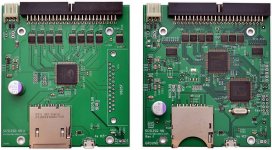 Edit: Don't use 7 or 0 when connected to the powerbook using an external drive case. There will be ID conflicts with the powerbook's own HD. | |
| Posted by: BadGoldEagle on 2019-05-20 12:47:07 @godfatherq8 you’ll need a 50 pin to 34 pin SCSI adapter/cable but apart from that SCSI is SCSI so yes it’ll be compatible. edit: Apparently Alaska sells them... https://www.ebay.com/itm/Macintosh-Portable-34-to-50-pin-SCSI-Hard-drive-Adapter-/312047710466 | |
| Posted by: LaPorta on 2019-05-20 19:50:05 5.1 is compatible. That is what I have in my Portable. Turns the thing into a System 6 rocket. | |
| Posted by: ScutBoy on 2019-05-21 05:46:33 Yes - I have the 5.1 SCSI2SD in my Portable, and it works great. There's a bracket that works for the SCSI2SD for the Portable on Thingiverse if you have 3D printer access. I started with the McMaster adapter, but there was too much cable floating around in the drive compartment (and I didn't have the stuff to make shorter, custom cables, nor the desire). I bought the adapter from Alaska360 and like that much more. If you are interested in the McMaster adapter with cables, let me know | |
| Posted by: godfatherq8 on 2019-05-21 16:01:46 thanks a lot for the replay and your help | |
Posted by: godfatherq8 on 2019-05-21 16:04:29@godfatherq8 you’ll need a 50 pin to 34 pin SCSI adapter/cable but apart from that SCSI is SCSI so yes it’ll be compatible.thanks | |
| Posted by: stickyc on 2019-12-11 17:09:25 Sorry for resurrecting the old thread, but I'm in the same boat of trying to install a SCSI2SD adapter in my old Macintosh Portable and had some Q's maybe you guys could help out with. I got the SCSI2SD version 5.1 board and Alaska360's adapter board. Managed to get access to plug things in, BUT.... I can't tell which orientation the 50 pin cable needs to be. There's no Pin 1 indicator on either the SCSI2SD or 34<->50 adapter board. I'm sure plugging things in backwards will let out the magic smoke, that's not a bet I want to take. Also, the boards both have power connectors on them, but there's no obvious way to get power off the Macintosh Portable's motherboard. Since it's an SD card, does it even need system power, or are the ribbon cables enough? Thanks in advance! | |
| Posted by: LaPorta on 2019-12-13 03:01:04 The board should have a notch on the connector housing, does it not? Also, yes, the SCSI bus provides power: no external needed. | |
| Posted by: ScutBoy on 2019-12-13 08:23:18 I have the exact same setup - SCSI2SD with the Alaska360 board. I'd have to open it up to be sure, but the pin 1 indicator should be there on the circuit board. It's likely obscured somewhat by the connector on top of it, but it should be a square on the silkscreen in the corner for pin 1. | |
| Posted by: stickyc on 2019-12-13 08:33:03 Actually, I mis-spoke: The SCSI2SD board does have a notch, but the 50 pin plug on the 34<->50 adapter board does not have any tab on it, so I was not sure which way to orient it. The cable is the 34pin cable that goes between the motherboard and the adapter board and that connection is fine (has registration tabs so you can only plug things in one way). I've reached out to the guy who made it (Alaska360) and he sent a picture that cleared it up, so I think I'm good. Now the Portable doesn't power up though (where it did before I ordered all this stuff last month). Not sure if my battery hack failed or what - but that's for another thread 🙂 My board (note the lack of tab): 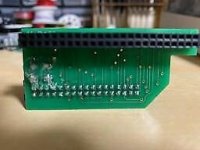 Alaska360's reference photo: 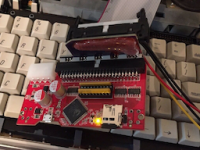 Thanks for the help! I'm assuming that once I get this working, since the SD card is pre-formatted from the vendor, it should show up as an empty hard drive and I can install System 7 on it from floppies (if the set I have is still readable)? I've not worked with System 7 since it was 'live' (and I've lost most of those brain cells to alcohol and solder fumes) so I'm sure there'll be a learning curve on getting it set up. | |
| Posted by: ScutBoy on 2019-12-13 10:59:24 Make sure the battery is fully charged. If I let mine site for a while, I have to charge it for an hour or more before it will start on its own again. | |
| Posted by: LaPorta on 2019-12-13 12:00:57 Tell us the specifics of what you did for the battery, I worked through this myself. | |
| 1 > |