68kMLA Classic Interface
This is a version of the 68kMLA forums for viewing on your favorite old mac. Visitors on modern platforms may prefer the main site.
| Click here to select a new forum. | |
| Installing RAM in a IIcx... | |
| Posted by: keithiepoo on 2026-03-31 10:01:09 Hello folks... I bought SIMMs for my IIcx. The RAM in there now I cannot remove. They feel locked in. And, the sockets do not have openable clips. How do I remove the SIMMs in there? And, are there any tips you can think of for installing the new RAM? Thank you! | |
| Posted by: CuriosTiger on 2026-03-31 16:03:54 The SIMMs are held in by retainer clips on either side. You would GENTLY, GENTLY, GENTLY push those aside with your nail, a small spudger or screwdriver, or ideally, a 30-pin SIMM removal tool. But it CAN be done with a nail or spudger. You just want to be VERY gentle, because these retaining clips are made of plastic on the IIcx, and 40-year-old plastic is very brittle. Without the retaining clips, they'll tilt slightly forward in the slot; they come out at about a 55-degree angle, as opposed to the 90-degree angle they're installed at. You can see the process on a IIcx in this old MacConnection video teaching customers how to install RAM upgrades. The link below is bookmarked at the beginning of the IIcx demonstration in the video. | |
| Posted by: keithiepoo on 2026-03-31 16:24:32 Thank you VERY much. This is great. | |
Posted by: keithiepoo on 2026-04-01 11:26:38The SIMMs are held in by retainer clips on either side. You would GENTLY, GENTLY, GENTLY push those aside with your nail, a small spudger or screwdriver, or ideally, a 30-pin SIMM removal tool. But it CAN be done with a nail or spudger. You just want to be VERY gentle, because these retaining clips are made of plastic on the IIcx, and 40-year-old plastic is very brittle.Hey there... as far as I can tell, I removed the original SIMMs damage-free, and installed the new ones -- just four in the RAM bank that is closer to the hard drive. I believe this is the "A" bank? And, with all four slots occupied by a 16MB SIMM, I am getting the unhappy chime. I haven't tried the replacing these with the remaining four SIMMs I have that are still in their silvery bags. Any thoughts? The second bank, the one closer to the video board, is unoccupied. | |
| Posted by: finkmac on 2026-04-01 13:01:59 did you try reinstalling the old simms? does it power up fine with them installed? | |
| Posted by: croissantking on 2026-04-01 13:35:46 It’s probably either bad ram or badly seated ram. | |
Posted by: keithiepoo on 2026-04-01 13:48:53did you try reinstalling the old simms? does it power up fine with them installed?This is something I absolutely will do barring a suggestion that doesn't require me to move those retaining pins more than is necessary. Did that make sense? LOL It’s probably either bad ram or badly seated ram.I don't believe they're badly-seated. They did seem to lock / snap into place, and they're pretty solid now. | |
Posted by: croissantking on 2026-04-01 13:50:53I don't believe they're badly-seated. They did seem to lock / snap into place, and they're pretty solid now.Could be dirty contacts though. In reality you’ll need to try another set of SIMMs to rule out the issue. | |
Posted by: keithiepoo on 2026-04-01 14:25:16Could be dirty contacts though.The original SIMMs were performing well. Why do you say to put them back in order to test this? Thanks. | |
Posted by: croissantking on 2026-04-01 14:33:29The original SIMMs were performing well. Why do you say to put them back in order to test this? I didn't mean to put back the SIMMs you started with, I meant to try another set of RAM entirely. Can you share pics of the RAM you bought, so we can see compatibility? | |
Posted by: keithiepoo on 2026-04-01 14:35:44I didn't mean to put back the SIMMs you started with, I meant to try another set of RAM entirely.Ahh... alright. Yes, I can do that. Give me a bit to get that out. | |
Posted by: obsolete on 2026-04-01 14:54:00It’s probably either bad ram or badly seated ram.Or modern 1.2mm thick SIMMs, which seat badly. | |
| Posted by: keithiepoo on 2026-04-01 15:20:37 Here ya go! Thanks 🙂 | |
| Posted by: croissantking on 2026-04-01 17:54:05 They look fine. I would try installing them in Bank B and putting some of your stock SIMMs in Bank A. I know you're wary of clipping and unclipping these things.. | |
Posted by: CuriosTiger on 2026-04-01 18:18:46Or modern 1.2mm thick SIMMs, which seat badly. This is my suspicion. They do look like modern SIMMs. They look fine. I do believe there's a restriction where the larger capacity SIMMs have to be in Bank A. But I'm not certain. | |
| Posted by: keithiepoo on 2026-04-01 19:23:10 I believe the stock / old SIMMs are ... 4MB? The new ones are 16. Are not the larger-capacity SIMMS supposed to be in bank A? This is my suspicion. They do look like modern SIMMs.They are modern SIMMs, and to your second point, this is what I also believe to be true. | |
Posted by: croissantking on 2026-04-01 21:40:38I believe the stock / old SIMMs are ... 4MB? The new ones are 16. Are not the larger-capacity SIMMS supposed to be in bank A? I don’t think it matters on the IIci. | |
Posted by: Juror22 on 2026-04-01 22:17:02I don’t think it matters on the IIci....from the Apple Memory Guide...I also recall there is a post (not sure where) about the optimum bank A amount. Too much DRAM decreases the onboard video performance. 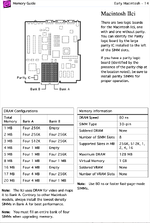 | |
Posted by: keithiepoo on 2026-04-01 22:50:42I don’t think it matters on the IIci.Hmm... Might be worth looking into to confirm. ...from the Apple Memory Guide...I also recall there is a post (not sure where) about the optimum bank A amount. Too much DRAM decreases the onboard video performance.Thank you for this 🙂 But, does this equally apply to the IIcx? | |
| Posted by: keithiepoo on 2026-04-01 23:17:13 Guys, one thing: This is a IIcx, not a IIci. | |
| 1 > |