68kMLA Classic Interface
This is a version of the 68kMLA forums for viewing on your favorite old mac. Visitors on modern platforms may prefer the main site.
| Click here to select a new forum. | |
| LC III, happy boing, no video output | |
| Posted by: emuboy on 2026-03-18 15:03:22 Hello! For Marchintosh I managed to score an LCII and LCIII, while the II was a quick fix with new caps, this one it is definitely not, provided same cable,same PSU and same setup of the LCII i get an happy boing but no video, I get nothing at all, no h/v sync or colours, the scope show some faint noise, that's it, I checked the BOMAC schematics and I'm a bit confused by it, there doesn't seem to be anything that would keep the CLUT/DAC from operating and the system would do a sad mac noise if anything like that would happend, right? Also, I have a db15 to VGA, it's a 2 row of dips, bought on ebay, i think is based on an opensource project, but if that works on the LCII shouldn't be a problem with a III, right? If you have any idea, please let me know, I never owned an LC and I ususally repair compacts. View attachment PXL_20260318_215230541.jpg | |
| Posted by: dougg3 on 2026-03-18 15:19:36 I have an LC III that had this exact same symptom (chime and then nothing) and it ended up being a broken trace (well, a bad via) between the CPU and the RAM on the data bus. It was like the RAM test was failing so badly that the Chimes of Death couldn't play. If the adapter you're testing works with the LC II, I'd expect it to work with the LC III too. The cap depicted here (shown with my tantalum replacement) tends to ruin the nearby vias with leakage. I've seen damage in this area on two LC IIIs. 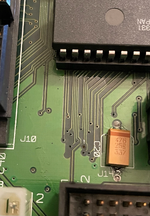 What I would do is use the Bomarc schematics to trace out continuity between the RAM and CPU. I bet you'll find something broken. I'd put my money on one of the data lines or the address lines. My broken via was D13. | |
| Posted by: emuboy on 2026-03-18 15:47:43 Ok, I will search that area, but I thought that a good boing was a symptom of good ram? I which it would crash, so I could drop into the debug serial test | |
| Posted by: dougg3 on 2026-03-18 15:55:06 I’d normally agree with you, but I saw it with my own eyes on my LC III. Usually bad RAM results in a chime followed by the chimes of death. | |
| Posted by: mikes-macs on 2026-03-18 16:30:31 Probably a dumb question but did you remember to install a vram SIMM? Maybe swap out the one from the LC II. I started my performa once without any vram and it chimed and booted but I couldn’t see anything. | |
Posted by: Juror22 on 2026-03-18 16:34:14Probably a dumb question but did you remember to install a vram SIMM? Maybe swap out the one from the LC II. I started my performa once without any vram and it chimed and booted but I couldn’t see anything.You beat me to that suggestion by 2 mins! | |
| Posted by: dougg3 on 2026-03-18 16:43:06 The LC III doesn't require a VRAM SIMM. | |
| Posted by: mikes-macs on 2026-03-18 16:49:09 Oh, I see. I guess it was a dumb question after all then. | |
| Posted by: dougg3 on 2026-03-18 17:05:50 Not dumb at all! I’ve just spent more time than I care to admit troubleshooting multiple LC IIIs. You make a good point, a trace to the onboard VRAM could also be bad | |
| Posted by: emuboy on 2026-03-19 02:24:21 I did try the LC II vram, I added another stick of ram but no changes, there was cap juice on the board, but no corrosion, I will test the RAM lines, see what we get. | |
| Posted by: dougg3 on 2026-03-19 07:13:02 I guess one other thing to add is, if you have a known good boot disk like a hard drive or SCSI hard drive emulator of your choice, see if the machine actually boots from it or if it's just hung up forever with the black screen. In the case of mine that was stuck with a black screen after a chime, it did not try to boot and that led me to stop focusing on the video circuit. | |
| Posted by: emuboy on 2026-03-20 02:24:35 right, good point, my bluescsi blinks only once, so that's probably the system crashing after boot, I'm wondering, would a bad ROM cause this? I don't see any particular damage on the PCB, I scoped the ram and everything looks in place? | |
| Posted by: Mikerophone on 2026-03-20 09:55:35 Does the LCIII require a PRAM battery to show video like the 475/Q605s do? No PRAM battery, no video, but the chime still happens... | |
| Posted by: emuboy on 2026-03-20 11:28:01 no, I do have a pram battery which is new, but no dice. | |
| Posted by: dougg3 on 2026-03-20 15:44:17 Yeah, both my LC IIIs work fine without a battery installed. The thing that makes me think the ROM is okay: the startup chime is playing. The chime should only play if the ROM checksum test passes. It's not 100% proof that the ROM is totally fine, but it's a pretty good sign. I tried messing with the ROM in an emulated LC III in MAME and confirmed that if the ROM is corrupt (the checksum no longer matches) it will play the chimes of death instead of the normal startup sound. And that's assuming the ROM corruption isn't drastically bad -- otherwise the code that plays the death chime might not even be reachable. | |
| Posted by: emuboy on 2026-03-21 04:07:10 New clue. the external ram will always give a sad mac, still no video, I tried 6 different ram sticks, all tested fine, plus the one the machine came in, at this point i'm almost tempted to swap the ram on the logic board as there might be a dodgy chip. | |
| Posted by: dougg3 on 2026-03-21 05:33:49 If it’s doing the chimes of death, you should be able to use the serial diagnostics mode to read out the error info and run tests. The RAM tests should be able to tell you what data line(s) are acting up (if it’s a data line anyway) and then you could focus on the related traces/chips. | |
| Posted by: emuboy on 2026-03-21 05:45:36 good plan, I will try that | |
| Posted by: emuboy on 2026-03-21 06:59:55 TX: *T000100010001RX: *ERROR**T TX: *R RX: 000020000000*R TX: *T000200010001 RX: *ERROR**T 000020000015*R TX: *T000500010001 RX: *ERROR**T 000020000015*R TX: *T000600010001RX: *ERROR**T TX: *RRX: 000020000000*R if I'm not mistaken I have a data line 13 problem. | |
| Posted by: dougg3 on 2026-03-21 10:45:35 Those tests do use A0 and A1 with the *0 and *1 commands to decide the range of addresses to mess with. It might also be smart to use the *4 command to clear the result register each time before performing the test, to make sure you're getting an actual result from the test you're trying. But, regardless of all that...I agree. The 00002000 in the result points toward bit 13. For what it's worth, that's the *exact* same data line that failed on mine and led to the same symptom of the chime + black screen hang with no RAM SIMM installed. Looking at my notes, the RAM chip responsible for D13 is U29 (pin 2). The pin in the 72-pin RAM SIMM slot responsible for bit 13 is pin 61. You should probably already see continuity between those two because they are right next to each other. What I saw is those two didn't have any continuity with ROM chip U19, pin 25 or 26 depending on whether you count the unused pins in the ROM socket. Pin 25 of the actual chip. When I added a bodge wire, it came back to life. Here's a picture of the bodge I added. U35 pin 7 is also connected to U29 pin 2 and RAM socket pin 61. It was just a convenient location for soldering. I'd definitely recommend checking to see if those pins depicted already have continuity. If not, there's the problem! 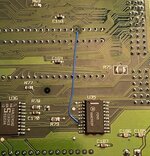 | |
| 1 > |