68kMLA Classic Interface
This is a version of the 68kMLA forums for viewing on your favorite old mac. Visitors on modern platforms may prefer the main site.
| Click here to select a new forum. | |
| Portable blank display row after recap | |
| Posted by: Aeroform on 2026-02-07 10:27:23 Hello! I just recapped a Macintosh Portable. It boots and seems to work fine, however, it has a row about 20-30 pixels high at the top of the screen that doesn’t work (see images). I’ve tried several displays, so it must be something on the mainboard that causes it. Any tips for likely culprits / troubleshooting? I don’t have much except a multi meter to beep out traces etc. Can a wrongly installed capacitor cause this issue? Is there a simple guide to points where I can check continuity for the caps I installed? I checked for shorts and that they were all connected to ground OK, but the positive sides were harder to check on most of the caps. Thank you! | |
| Posted by: Aeroform on 2026-02-07 13:37:58 Started poking around the contrast curcuit and seem to have found a broken trace going to Q12. It’s on the other side of the board so will hunt around some more to hopefully not have to run a super long bodge wire 😅 | |
| Posted by: Aeroform on 2026-02-08 00:53:45 Spoke too soon. Everything in the contrast curcuit checks out OK. The hunt continues. 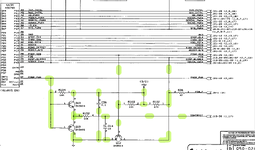 | |
| Posted by: Aeroform on 2026-02-08 08:46:18 I've traced out and double checked all caps, so am fairly confident they are all in order. Also traced out a ton of other things as suggested by gemini, but still no progression in tracking down the issue. Will trace out all vram / video driver chips etc if no one has a better idea on where to look? | |
| Posted by: techknight on 2026-02-12 13:52:38 Make sure you didnt blob a capacitor solder joint over to an adjacent trace. its super easy to do. It's either missing the M clock, or the panel itself is shot which sadly, is increasingly common now. It is possible the contrast drive signal is an issue, the only way to verify that is a scope. But ive not had that issue. | |
Posted by: Aeroform on 2026-02-13 02:09:58Make sure you didnt blob a capacitor solder joint over to an adjacent trace. its super easy to do. Thank you, I’ve checked all caps and they should be ok / not shorted to other traces. I haven’t updated this thread, but I did ultimately find a broken trace and several with high resistance on the FPData lines as the vias around J20 were eaten up. I’m still waiting for some supplies but will get those repaired and update if that did the trick. I’m still surprised 90% of the display looks good despite these poor traces. Panel is good, I tested several displays and they all had the same horizontal line. | |
| Posted by: techknight on 2026-02-13 07:58:20 It is entirely possible that is the issue if the resistance is high. | |
| Posted by: Aeroform on 2026-02-16 11:00:02 Well I'm an idiot, I read the R163-R167 cluster the wrong way around, so all FPData lines turned out to be OK too. I've now checked every single line going to the video chip and the vram, incl. resistance, pins for shorts etc. and found ... nothing.. so uhm not sure where to go next. @techknight where can I trace the M clock? I've checked all clock lines I could find 😅 Would exchanging the vram make sense at this stage? 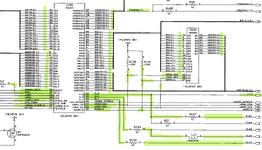 | |
| Posted by: David Cook on 2026-02-16 12:32:36 Have you run MacTest Pro to verify the VRAM is good? Buy a VGA adapter. It will help you rule out much of the circuitry. | |
Posted by: Aeroform on 2026-02-16 13:10:22Have you run MacTest Pro to verify the VRAM is good?Will have to try MacTest Pro, thanks for the tip! The VGA adapter is really cool, been eyeing it as a route for a modern lcd replacement. But as the external video connector is basically just a mirror of the internal one, I’d be 99.9% sure it would show the same line error 😬. | |
Posted by: David Cook on 2026-02-16 15:11:31But as the external video connector is basically just a mirror of the internal one, I’d be 99.9% sure it would show the same line error I agree. I actually think it's your video RAM (or a trace going to it). | |
| Posted by: Aeroform on 2026-02-17 13:53:49 Hmm some development. A) I ran MacTest Portable 1.0.2. All tests pass but it fails on the power manager. I started tracing all lines from the pmgr relating to the display or video systems but so far every trace I’ve checked have been OK. B) The line is now about twice is high, even though I didn’t change anything, so something is either progressively failing or there’s a loose connection or something. Also, the line isn’t completely blank, but rather some graphic come through but about every other pixel row. But it’s not consistent (see images). It also feels more ”analog” rather than digital. C) I can here static build up and come through the speaker. Playing a sound clears it up again. This is also not consistent. It comes somewhat randomly both in timing and loudness. Soooo, maybe a floating ground? Something failing on the hybrid? Kind of out of my depth now.. | |
| Posted by: David Cook on 2026-02-17 14:40:48 This is a 5120? Not backlit. I'll get mine from downstairs and see if it passes all the tests. Something failing on the hybrid? Oh. Have you not replaced the hybrid? | |
Posted by: Aeroform on 2026-02-17 14:44:18This is a 5120? Not backlit. I'll get mine from downstairs and see if it passes all the tests.Yup, non backlit, original hybrid. | |
| Posted by: David Cook on 2026-02-18 00:30:08 I just ran Macintosh Personal Diagnostics v1.1.3 and the board I have in front of me passed all tests. I then tried MacTest Portable 1.0.2 and it also said the Power Manager failed. So, perhaps a bug? I'll try it on another Portable tomorrow. If you haven't replaced the hybrid module, then it is probably your next step (along with getting a VGA adapter). | |
Posted by: Aeroform on 2026-02-18 07:54:18I just ran Macintosh Personal Diagnostics v1.1.3 and the board I have in front of me passed all tests.Hmm that's odd with 1.0.2 reporting power manager failure on your unit too. Thanks for checking. Will have to try 2.0 but that required 6.0.4 specifically and not even sure it supports the non backlit. | |
| Posted by: Aeroform on 2026-02-18 08:12:07 Another day another fault hunt. 1. Placing my finger on top of Q21 or C22 alleviates the issue!! Just having my finger on top moves the line upwards and restore4s the display to perfect condition over about 20 seconds or so. This is even without applying any pressure. Pressing with a non conductive item does not help. I reflowed the entire area, as well as checked all traces I could without finding any issues. I also checked ground connections were OK, and even replaced C22 again. Sadly to no avail. I checked the 12v line and it reads 11.9v. 2. I checked my hybrid as outlined by Androda here https://androda.work/mac-portable-hybrid-pre-check/ , all resistance checks turned out OK, however, some of the voltage readings differed a lot, see table attached. @techknight any ideas on what to do next? Would greatly appreciate any input. Thank you! | |
Posted by: David Cook on 2026-02-18 08:25:46Placing my finger on top of Q21 or C22 alleviates the issue!! That's the SCSI power enable. So, perhaps you've got a floating gate.  | |
Posted by: Aeroform on 2026-02-18 10:27:18That's the SCSI power enable. So, perhaps you've got a floating gate.Hmm pin 1 of Q21 reads 12v for a split second on cold boot, before hitting and staying on 0v, so I guess that isn't floating (that should be a voltage somewhere in between right?) Pin 2 & 3 reads 12v. Q23 reads 0.6v on Pin 1 which might be odd (?) as that is the 5v disk line? Pin 2&3 of Q23 reads 0v. I traced Q23 Pin 1 to R175, R176, R174 and J18-23 all with 0 resistance.. All these three resistors read 25k, but guessing that might be because they are all connected so in circuit i get 1/3 of the value? | |
| Posted by: Aeroform on 2026-02-19 08:40:14 Tried MacTest 2.0, which I now can confirm works also on non backlit portables, but as mentioned, only under System 6.0.4. Anyhow it gave the same result, might error out if the charger isn’t connected. Anyhow, prodded some more, for the millionth time, AND, I feel it might be closing in this time. Something is funky with my -5v rail. Here’s the kicker, neither heat nor pressure on the board helps the issue, but slight moisture (say from breathing) on the area close to the lcd connector does. As soon as it dries up again, the issue returns. Sooo, I’m now 99% sure I have a poor via around that area that I missed, that traps the moisture for a while giving enough capacitance to sort it out, while taking longer to dry up than what I’d expect the surface to do. So back to more beeping and prodding I guess! Wish me luck haha. | |
| 1 > |
