68kMLA Classic Interface
This is a version of the 68kMLA forums for viewing on your favorite old mac. Visitors on modern platforms may prefer the main site.
| Click here to select a new forum. | |
| Unable to find HD SE/30 | |
| Posted by: jacopodn on 2025-10-31 04:00:57 Hi, I'm rebuilding an SE/30 and I can't get it to recognize the internal hard drive to install the OS. 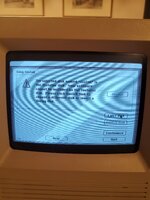 I have the following two HDs available. When connected only to the power supply, the Apple one starts spinning, but the Maxton one does not (I imagine it is faulty at this point). I have not found any pins where I can configure the termination of the SCSI chain. 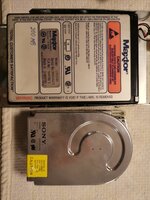 The capacitors appear to be in good condition. I checked the continuity of the tracks running from the SCSI connector to the UI12 chip and from the UI12 chip to the UJ11 chip with a tester, and there are no breaks. The capacitors appear to be in good condition. I checked the continuity of the tracks running from the SCSI connector to the UI12 chip and from the UI12 chip to the UJ11 chip with a tester, and there are no breaks.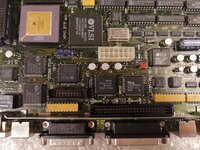 I don't have any other Macs to test the HDs on, and I have the OS 7.1 installation disks. I've ordered an external blueSCSI, which will arrive in a few weeks. | |
| Posted by: finkmac on 2025-10-31 05:18:23 probably dead disks | |
Posted by: croissantking on 2025-10-31 05:47:09The capacitors appear to be in good condition.They will 100% need changing, although they aren’t likely to be the direct cause of your hard drive issue. | |
| Posted by: mikes-macs on 2025-10-31 06:18:07 It may need reformatting with a different formatting utility. Also check the quality of the SCSI cable from disk to Board. | |
Posted by: croissantking on 2025-10-31 06:28:36It may need reformatting with a different formatting utility.Apple used those Sony units as stock drives in the SE/30 so it should just work with the Apple HD SC setup utility. If it has a sticker saying HD40 (or just ‘40’ inside an Apple logo) on the edge of the casing, that would confirm it. 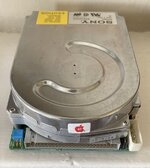 One thing to check is that is has the termination resistor networks installed underneath. Here’s mine: 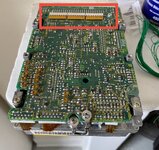 | |
| Posted by: jacopodn on 2025-10-31 07:57:19 Yes, I confirm that the disc has the apple with the number 40 written inside and also has the terminals mounted. 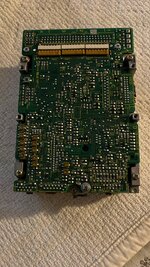 | |
| Posted by: shirsch on 2025-11-01 13:01:54 What happens when you connect a drive to the rear panel DB-25 connector? | |
| Posted by: jacopodn on 2025-11-02 00:51:58 At the moment I don't have an external HD, I have to wait a few week to receive the blueSCSI db25 | |
Posted by: croissantking on 2025-11-02 02:22:52Hi, Reading into this a bit more, you've shown us that you're trying to install System 7.1 and are not seeing any mounted partitions, but this in itself doesn't mean the drive isn't being detected. Scanning for disks in a formatting utility such as Apple HD SC Setup is the crucial first step here. So, have you tried HD SC Setup (or similar)? Your Disk Tools floppy should have the appropriate formatting utility for the version of system software you're trying to install. So, to begin with, boot from that rather than Install Disk 1. If it's detected, you will be able to format the drive. Then you can try installing System 7.1 again. SCSI Probe is another useful utility which will report which devices it sees on the bus. | |
| Posted by: jacopodn on 2025-11-04 00:38:04 I tried to start the “disk utility” floppy, everything starts up correctly, but it tells me that I have no device connected. If necessary, I can attach a photo this evening. I don't have a floppy drive handy at the moment to create the utility diskette you mentioned. | |
Posted by: croissantking on 2025-11-04 03:39:14I tried to start the “disk utility” floppy, everything starts up correctly, but it tells me that I have no device connected. If necessary, I can attach a photo this evening. Yeah a photo would be a good idea. I’m interested to know which utility is giving you this error. ‘No device connected’ does indicate that it can’t see the drive on the SCSI bus, but without seeing a photo or knowing the exact wording I’d rather not make an assumption. Probably either the drive is dead, or there’s an issue with the logic board. When your BlueSCSI arrives, things should become more clear. | |
| Posted by: killvore on 2025-11-04 03:55:50 Watching this thread since it sounds similar to an issue I am having with an SE/30 - it boots fine from floppy, but is unable to detect SCSI stuff. I've recapped it so maybe I messed something up, it had worked before. | |
Posted by: croissantking on 2025-11-04 03:56:52Watching this thread since it sounds similar to an issue I am having with an SE/30 - it boots fine from floppy, but is unable to detect SCSI stuff. I've recapped it so maybe I messed something up, it had worked before. Could it be the fuse? I can’t remember if that affects internal drives as well. | |
Posted by: killvore on 2025-11-04 12:27:03Could it be the fuse? I can’t remember if that affects internal drives as well.Ooh interesting, I haven't done so much diagnosing - I only really know how to replace caps, no idea how to troubleshoot issues 😅 I can test continuity around the fuses next time I have it open! | |
Posted by: jacopodn on 2025-11-04 12:33:28Could it be the fuse? I can’t remember if that affects internal drives as well. Here are the photos of the utility disk. 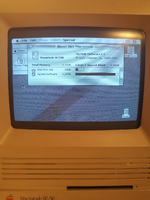 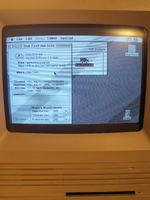 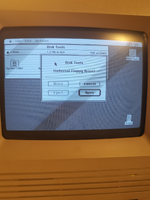 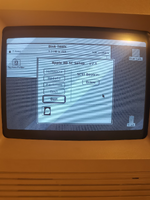 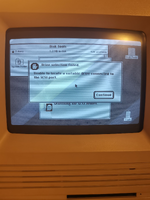 | |
| Posted by: A24A on 2025-11-04 14:38:10 It is not unusual to find that Apple HD SC Setup cannot properly locate/recognise/initialise a SCSI drive that previously had been (re)formatted with a non-Apple utility. If so, you could try something like Lido 7.56. One problem (if you do not have access to a fully working Mac with a hard disk, and a decoding and decompression program such as StuffIt Expander 4.0.1 or 5.5) could be to get Lido 7.56 onto a bootable disk, though. | |
| Posted by: mikes-macs on 2025-11-04 16:05:16 Lido wouldn’t have to be on the boot floppy. It could be on its own floppy and do the floppy swap. So any one of us could mail you one. I would also include the hacked version of HD SCSI Setup and SCSI Probe as well. Did you check the scsi cable for rips and bent pins in the slots? It’s really beginning to appear that there is something wrong with the drive or the board though. Needs more diagnostics. | |
| Posted by: jacopodn on 2025-11-05 01:34:10 I only have an Air with M3, which I don't think will be much use to me, and no other vintage Macs. If you have a link where I can download these utilities, I can try to find someone to create a floppy disk for me. | |
| Posted by: A24A on 2025-11-05 07:48:59 The German site http://www.knubbelmac.de/ is using plain http and thus even accessible from a System 7.x Mac running the WannaBe web browser (or something similar). Under Software -> Werkzeuge you will find several utilities. If necessary, use a web page translation service. Remember, do not immediately decode or decompress anything downloaded on a PC or modern Mac. The encoding is for protection. Keep all MacBinary (.bin) and BinHex (.hqx) files unaltered until on an appropriate older Mac, where the decoding/decompression can take place. If you know someone with a pre-1998 Macintosh computer with a built-in floppy drive, it is easy to decode and decompress (.bin, .hqx, .sit) via StuffIt Expander 4.0.1 or 5.5, and then copy any resulting application files to a Mac-formatted 800K or 1.44 MB floppy disk for use in your SE/30. | |
| Posted by: jacopodn on 2025-11-05 11:31:29 I also have an external floppy drive. Is there a live os version that I can run from a floppy and load the second one with the necessary software (burned from Windows or recent Mac)? | |
| 1 > |